Windows 下 gtsam python 编译及报错解决
gtsam-py
依赖环境
版本仅供参考,VS版本2015-2026应该都可以,boost尽量选尽可能高的,不要低于1.70
- Visual Studio2022
- cmake
- conda
- boost(1.70-1.90)
步骤
-
解压源码,在 conda 终端选择虚拟环境,然后执行命令切换到源码路径,
cd 源码路径 -
执行命令,
cmake -B build -DGTSAM_BUILD_PYTHON=ON -DCMAKE_C_FLAGS="-D_CRT_NONSTDC_NO_DEPRECATE /GS-" -DCMAKE_INSTALL_PREFIX=gtsam_install- GTSAM_BUILD_PYTH 是为了开启 python 支持,默认关闭
- CMAKE_C_FLAGS 设置c编译选项(避免后面的一些报错)
- CMAKE_INSTALL_PREFIX 设置安装路径到源码路径/gtsam_install
-
在源码的 build 目录中双击打开 GTSAM.sln 文件,最好选择 Release 编译
-
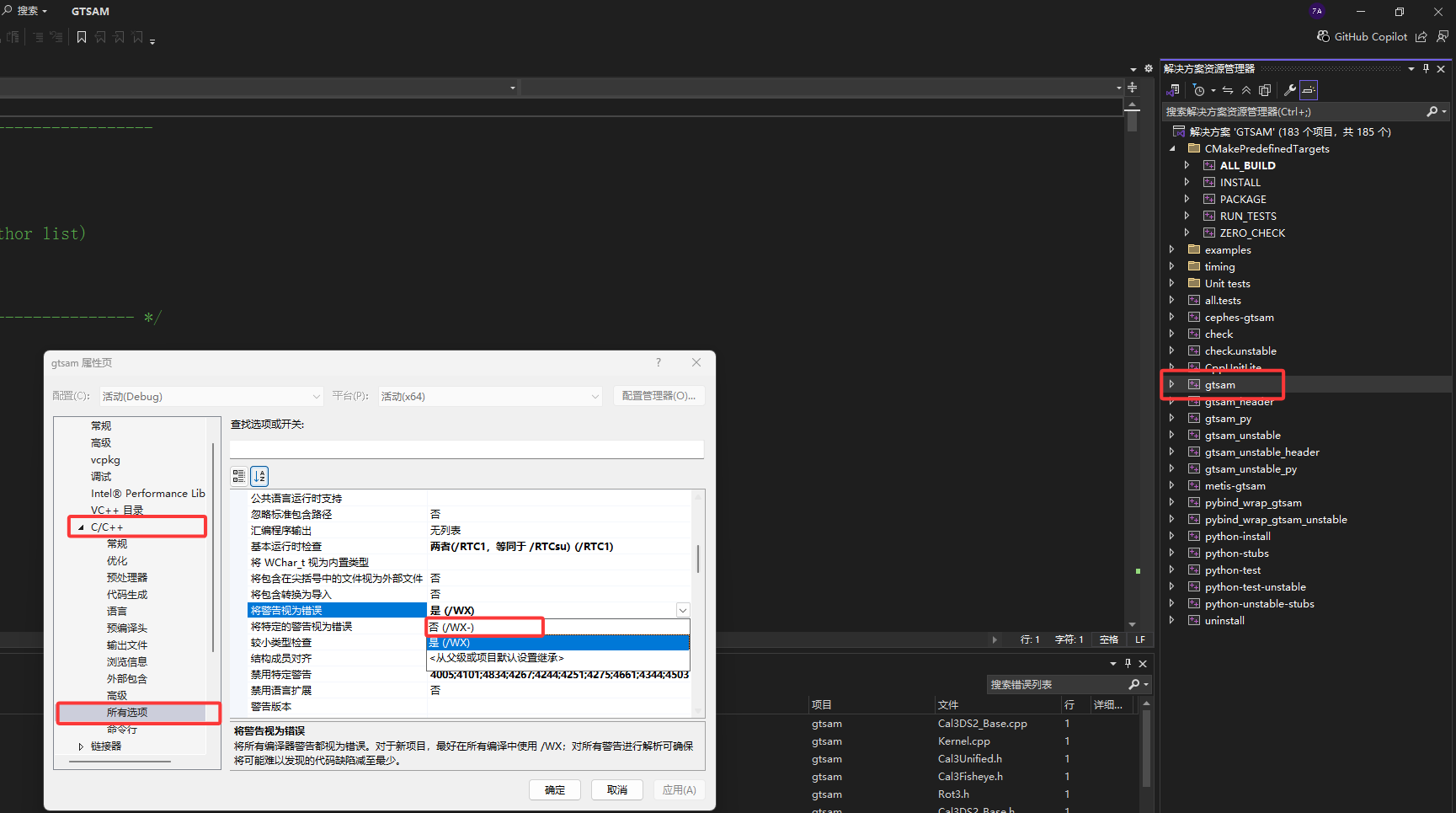
右键 gtsam 项目,点击属性,在
C/C++ -> 所有选项里找到将警告视为错误,设置为否,gtsam_unstable 项目同理
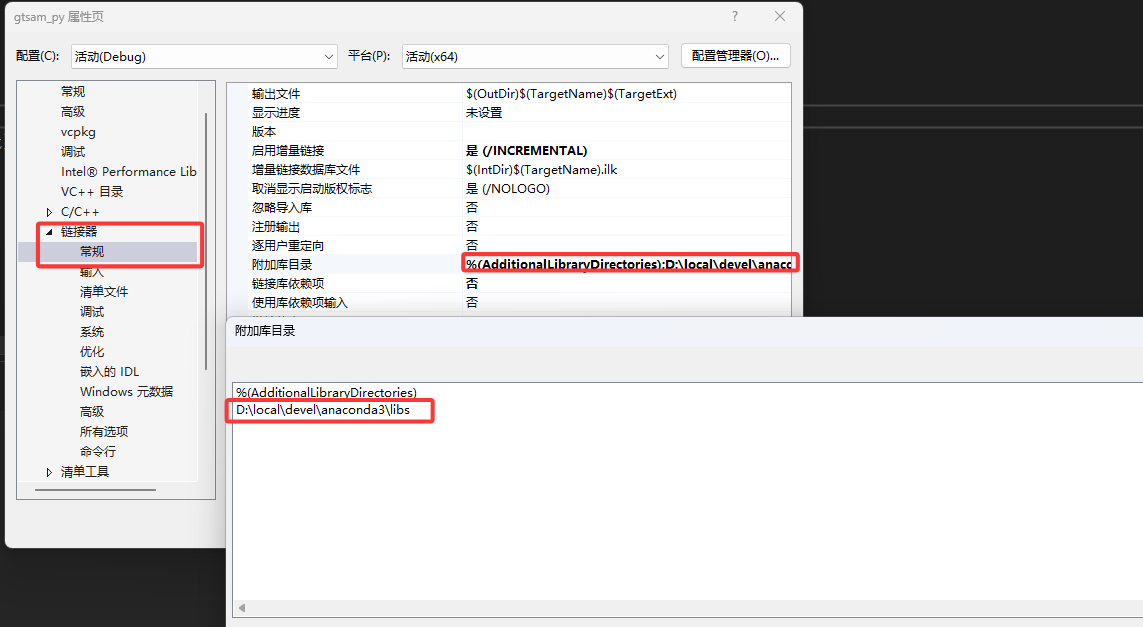
- 右键 gtsam_py 项目,点击属性,在
链接器 -> 常规 -> 附加库目录中添加 python 路径的libs 文件夹,比如我的为D:\local\devel\anaconda3\libs,gtsam_unstable_py 项目同理
-
右键并生成项目 gtsam_py,可能会报错,若有
源码路径/build/python/gtsam/Release/gtsam_py.pyd,拷贝到源码路径/build/python/gtsam/gtsam_py.pyd -
右键并生成项目 gtsam_unstable_py,可能会报错,若有
源码路径/build/python/gtsam/Release/gtsam_unstable_py.pyd,拷贝到源码路径/build/python/gtsam/gtsam_unstable_py.pyd -
右键并生成项目 python-install 项目,会在
C:\Users\用户名\AppData\Roaming\Python\Python312文件夹下安装 -
正常会自动识别该路径下的 gtsam(一般会自动找到,基本不用担心,如果用了venv环境,请把
C:\Users\用户名\AppData\Roaming\Python\Python312\site-packages文件夹里的所有文件拷到虚拟环境的site-packages中),如果出现找不到的情况,将site-packages文件夹拷到同样版本的 python 路径下的Lib 文件夹中,或者在 python 脚本中添加以下代码
import sys
sys.path.append('C:\Users\用户名\AppData\Roaming\Python\Python312')
其他错误
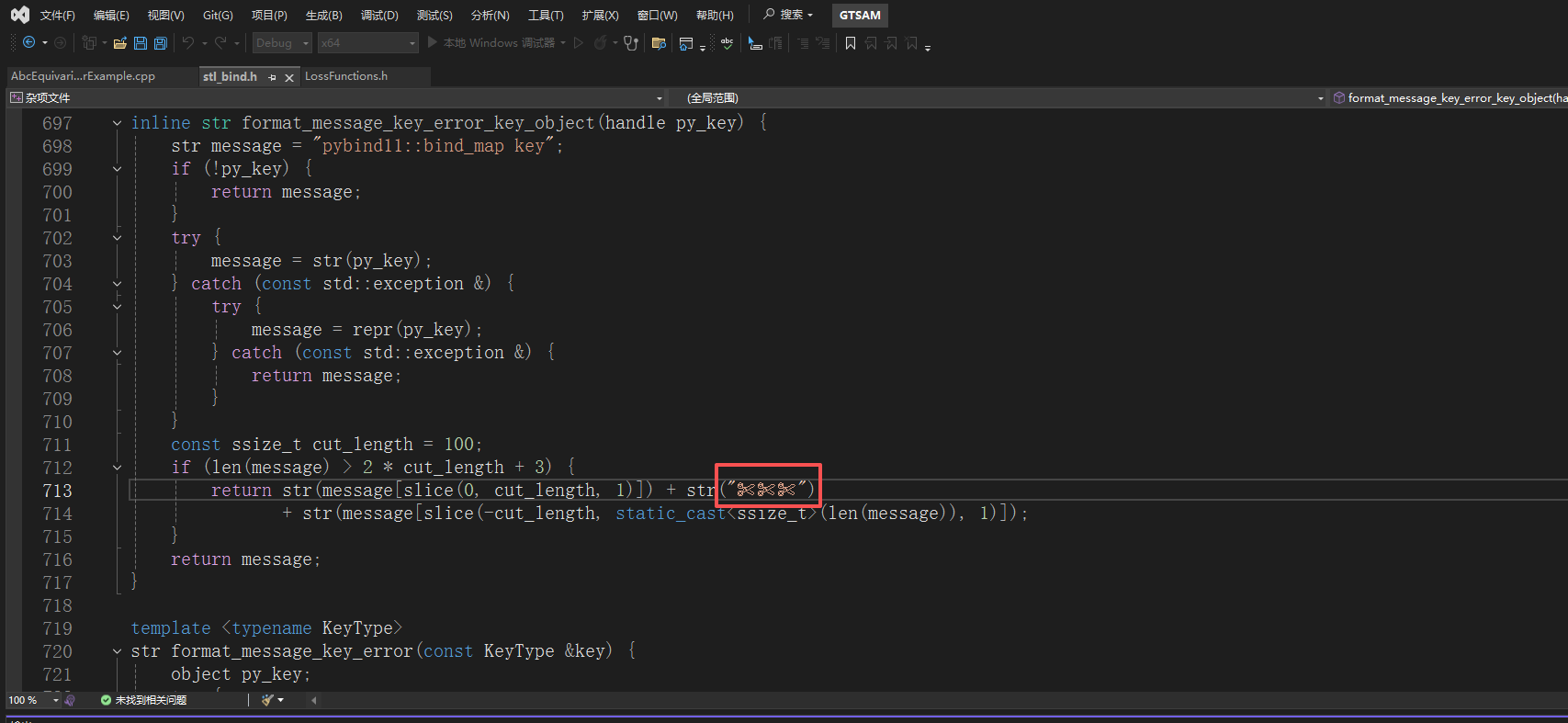
- 如果编译报错,常量中有换行符,那么说明有特殊字符,把文件
源码路径\wrap\pybind11\include\pybind11\stl_bind.h中第 713 行的代码改成return str(message[slice(0, cut_length, 1)]) + str("xxx"),特殊字符替换为 xxx
- 如果报错
无法解析的外部符号 “void __cdecl boost::throw_exception(class std::exception const &)”,在对应项目的C/C++ -> 命令行中添加/EHsc,gtsam_py 与 gtsam_unstable_py 项目
python-install 完整输出
从以下输出里可以看出,已经 gtsam python 安装到了 C:\Users\azh03\AppData\Roaming\Python\Python312
5>------ 已启动生成: 项目: python-install, 配置: Debug x64 ------
5>1>
5>DEPRECATION: Loading egg at d:\local\devel\anaconda3\lib\site-packages\scons-4.8.1-py3.12.egg is deprecated. pip 24.3 will enforce this behaviour change. A possible replacement is to use pip for package installation.. Discussion can be found at https://github.com/pypa/pip/issues/12330
5>Processing d:\users\azh\desktop\gtsam-develop\build\python
5>  Preparing metadata (setup.py): started
5>  Preparing metadata (setup.py): finished with status 'done'
5>Requirement already satisfied: numpy>=1.11.0 in d:\local\devel\anaconda3\lib\site-packages (from gtsam==4.3a1) (1.26.4)
5>Collecting pytest>=9.0.1 (from gtsam==4.3a1)
5>  Downloading pytest-9.0.2-py3-none-any.whl.metadata (7.6 kB)
5>Requirement already satisfied: colorama>=0.4 in d:\local\devel\anaconda3\lib\site-packages (from pytest>=9.0.1->gtsam==4.3a1) (0.4.6)
5>Requirement already satisfied: iniconfig>=1.0.1 in d:\local\devel\anaconda3\lib\site-packages (from pytest>=9.0.1->gtsam==4.3a1) (1.1.1)
5>Requirement already satisfied: packaging>=22 in d:\local\devel\anaconda3\lib\site-packages (from pytest>=9.0.1->gtsam==4.3a1) (23.2)
5>Collecting pluggy<2,>=1.5 (from pytest>=9.0.1->gtsam==4.3a1)
5>  Downloading pluggy-1.6.0-py3-none-any.whl.metadata (4.8 kB)
5>Requirement already satisfied: pygments>=2.7.2 in d:\local\devel\anaconda3\lib\site-packages (from pytest>=9.0.1->gtsam==4.3a1) (2.15.1)
5>Downloading pytest-9.0.2-py3-none-any.whl (374 kB)
5>   --------------------------------------- 374.8/374.8 kB 27.8 kB/s eta 0:00:00
5>Downloading pluggy-1.6.0-py3-none-any.whl (20 kB)
5>Building wheels for collected packages: gtsam
5>  Building wheel for gtsam (setup.py): started
5>  Building wheel for gtsam (setup.py): finished with status 'done'
5>  Created wheel for gtsam: filename=gtsam-4.3a1-cp312-cp312-win_amd64.whl size=80499728 sha256=f9e6b5c604e28e14e8d0bfe8c0b8563fc0502dccb217c17f07d6ec107f2977f4
5>  Stored in directory: C:\Users\azh03\AppData\Local\Temp\pip-ephem-wheel-cache-qdfawjqj\wheels\2b\37\ed\1a27eed30b413a1c4adf86db3577b4ae90725533fa7771ccdc
5>Successfully built gtsam
5>Installing collected packages: pluggy, pytest, gtsam
5>CUSTOMBUILD : warning : The scripts py.test.exe and pytest.exe are installed in 'C:\Users\azh03\AppData\Roaming\Python\Python312\Scripts' which is not on PATH.
5>  Consider adding this directory to PATH or, if you prefer to suppress this warning, use --no-warn-script-location.
5>Successfully installed gtsam-4.3a1 pluggy-1.6.0 pytest-9.0.2
5>Building Custom Rule D:/Users/azh/Desktop/gtsam-develop/python/CMakeLists.txt

这里是“一人公司”的成长家园。我们提供从产品曝光、技术变现到法律财税的全栈内容,并连接云服务、办公空间等稀缺资源,助你专注创造,无忧运营。
更多推荐



 7
7 0
0- 0


 已为社区贡献1条内容

所有评论(0)