

作者:鸥弋、筱姜
2023 年下半年,ComfyUI 以其快速、流畅的图像生成能力,结合多样的自定义节点,迅速在创作者中流行起来。ComfyUI 的亮点就是能够批量化生成图像,一键加载大量工作流,让用户可以轻松实现人像生成、背景替换、风格迁移和图像动画化等功能。越来越多的企业及个人开发者希望借助 ComfyUI 能力进行 AI 绘画领域创业或者业务上新,获得高流量及商业价值,但使用原生的 ComfyUI 仍然存在一些问题:
- 显卡资源昂贵且难以购买: GPU 卡池管理技术门槛高:高性能的 GPU 资源不仅价格昂贵,而且往往难以大规模采购。此外,GPU 卡池的有效管理和维护需要复杂的技术支持,也带来了额外的挑战。
- 难以应对高并发: 原生的 ComfyUI 出图需要排队,并发处理能力有限。在面对高并发场景时,尤其是并发请求具有大的波动性时,资源配置难以精确预测,从而可能导致系统错误和业务中断。
- 门槛高,难以对外透出: ComfyUI 拥有一定的门槛,对于普通的创作者而言几乎无法使用,需要对其进行二次包装才能让更多用户享受到 AI 的便捷。
为了帮助用户高效率、低成本应对企业级复杂场景,以下介绍 ComfyUI API Serverless 版解决方案,通过使用该方案,用户可以充分利用 ComfyUI +Serverless 技术优势快速开发上线 AI 绘画应用,期待为广大开发者 AI 绘画创业及变现提供思路。相关文章: AI 绘画平台难开发,难变现?试试 Stable Diffusion API Serverless 版解决方案
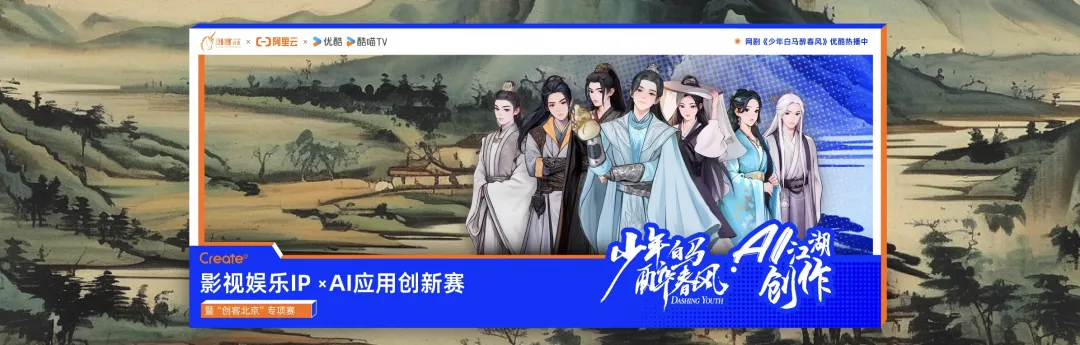
阿里云X优酷联名发起的「Creat@AI 江湖创作大赛」使用本文章中的解决方案,基于函数计算 FC 一键部署 AI 绘图平台,1 分钟实现 “破次元壁合照”、5 分钟实现 Stable Diffusion、ComfyUI 部署, 生成以“少年江湖“为主题的画作赢万元奖金。
活动链接: https://developer.aliyun.com/plan/create/snbm
方案优势
在以往的活动中,我们也面临了很多非技术相关的用户期望享受 AI 的魅力。结合实际需要我们给出了 Serverless 化的 ComfyUI 实践案例,解决了上述问题。
- 部署简单: 提供基础 ComfyUI 镜像,不需要修改时一键即可拉起出图,需要修改时也只需要修改 ComfyUI 镜像地址即可。
- 弹性 GPU: 函数计算提供了 GPU 弹性的能力,根据实际请求控制实例个数,有突发流量时自动弹新实例承接请求,完全不需要增加额外的关注。
- 按量付费: 函数计算的按量实例为毫秒级粒度的计费策略,用多久就收多少钱,确保每分钱都花在刀刃上。
- ComfyUI Serverless 化改造: 对原本不适应 Serverless 弹性能力的 ComfyUI 改造,使其可以支持异步、并发、弹性等各种 Serverless 能力。
- 前后端联动: 活动开源了一个支持自定义参数,并且并发出图的前端页面,可直接提供给客户使用。
应用场景
ComfyUI 提供了非常高的自由度和灵活性,支持定制化工作流,并且可以重复使用,批量出图,特别适用于需要创意图像生成场景:
- 艺术创作与设计: 艺术家和设计师可以利用 ComfyUI 生成独特的艺术作品,包括概念艺术、插画、海报设计等。通过 ComfyUI,他们可以根据自己的创意想法生成初步的图像草稿,然后再进一步细化和完善。
- 内容制作与营销: 在社交媒体、广告和营销领域,ComfyUI 可用于快速生成符合品牌风格的视觉素材,用于社交媒体内容、广告横幅、海报等
- 游戏开发: 游戏开发者可能利用 ComfyUI 自动生成游戏内的景观或建筑物的纹理,减少手工制作这些元素所需的时间和成本。
- 视觉特效与影视后期: 电影和电视行业的视觉特效团队可以使用 ComfyUI 来辅助创建逼真的背景、特殊效果或修复旧影片中的画面缺陷。
通过 API 接口调用 ComfyUI 解决方案
常规的 ComfyUI 出图的流程大致如下:
- 调用 /prompt 接口,发起出图任务
- 通过 WebSocket 获取出图进度
由于在 Serverless 场景下,无请求的时候实例会被冻结,因此 WebSocket 请求是必须要存在的,且需要保持连接到出图完成。
在并发请求数比较大的情况下,我们往往期望可以利用 Serverless 的弹性,动态创建多个函数实例处理出图任务。但由于 ComfyUI 本身是“有状态”的,难以确保出图的请求和获取状态的请求固定打到同一个实例上,这可能会导致接口的调用不符合预期。
为了让 ComfyUI 更加适配 Serverless 模式,需要针对 ComfyUI 进行一定的改造。
参考 fc-comfyui/src/images/agent 的代码,在 ComfyUI 镜像里内置 agent 程序,负责转换 ComfyUI 请求并且拉起 ComfyUI。
fc-comfyui/src/images/agent:
https://github.com/OhYee/fc-comfyui/tree/master/src/images/agent

🔔 注意: 我们提供的代码仅用于运营活动使用,作为 Serverless 方式调用的实践参考。功能未经过严格测试,请根据实际的业务需要开发或调整相关的代码,并构建 ComfyUI 镜像。
目前提供的 Agent 能力介绍
开启 Agent 能力,需要增加环境变量
- USE_AGENT:1
当通过 Agent 的 API 调用时,建议您调整单实例并发度为 1 ~ 5,确保并发请求尽量使用单独的实例,提高出图效率。
数据类型
出图 Prompt
与 ComfyUI 在 Dev Mode 导出的文件一致。
LoadImage 节点的参数做了特殊处理,如果内容为 base64 或 http 地址,会自动将对应的文件上传,并转换为 ComfyUI 可识别的形式。
进度
// key 为 node id 的 map 对象
type TProgress map[string]TProgressNode

type TProgressNode struct {
  Max         int                  `json:"max"` // 进度的最大值
  Value       int                  `json:"value"` // 当前进度
  Start       int64                `json:"start"` // 开始时间
  LastUpdated int64                `json:"last_updated"` // 最后一次更新时间
  Images      []TProgressNodeImage `json:"images"` // 当前节点输出的图片信息(路径)
  Results     []string             `json:"results,omitempty"` // 当前节点输出的图片 base64
}- 1.
- 2.
- 3.
- 4.
- 5.
- 6.
- 7.
- 8.
- 9.
- 10.
- 11.
接口
出图请求(HTTP 同步)
路径:/api/run
Body:json 格式的 prompt 数据
返回值:最后一次的进度(包含图片信息)
当需要异步请求时,需要增加 X-Fc-Invocation-Type 和 task-id,前者告知 FC 异步形式调用,后者用于记录当前任务的唯一 id,方便后续获取状态。
curl http://xxxxx/api/run -v \
  -H 'X-Fc-Invocation-Type: Async' \
  -H "task-id: abcdefg" \
   -XPOST \
  -d '{
    "3": {
        "inputs": {
            "seed": 1586995582004891,
            "steps": 17,
            "cfg": 6,
            "sampler_name": "dpm_2",
            "scheduler": "karras",
            "denoise": 1,
            "model": [
                "33",
                0
            ],
            "positive": [
                "31",
                0
            ],
            "negative": [
                "32",
                0
            ],
            "latent_image": [
                "5",
                0
            ]
        },
        "class_type": "KSampler",
        "_meta": {
            "title": "KSampler"
        }
    },
    "4": {
        "inputs": {
            "ckpt_name": "majicMIX realistic_v7.safetensors"
        },
        "class_type": "CheckpointLoaderSimple",
        "_meta": {
            "title": "Load Checkpoint"
        }
    },
    "5": {
        "inputs": {
            "width": 1024,
            "height": 784,
            "batch_size": 1
        },
        "class_type": "EmptyLatentImage",
        "_meta": {
            "title": "Empty Latent Image"
        }
    },
    "6": {
        "inputs": {
            "text": "2 human\nhi quality,detailed",
            "clip": [
                "4",
                1
            ]
        },
        "class_type": "CLIPTextEncode",
        "_meta": {
            "title": "CLIP Text Encode (Prompt)"
        }
    },
    "8": {
        "inputs": {
            "samples": [
                "3",
                0
            ],
            "vae": [
                "4",
                2
            ]
        },
        "class_type": "VAEDecode",
        "_meta": {
            "title": "VAE Decode"
        }
    },
    "9": {
        "inputs": {
            "filename_prefix": "ComfyUI",
            "images": [
                "8",
                0
            ]
        },
        "class_type": "SaveImage",
        "_meta": {
            "title": "Save Image"
        }
    },
    "10": {
        "inputs": {
            "image": "https://serverless-tool-images.oss-cn-hangzhou.aliyuncs.com/aigc/json/couple/default.png",
            "upload": "image"
        },
        "class_type": "LoadImage",
        "_meta": {
            "title": "Load Image"
        }
    },
    "11": {
        "inputs": {
            "image": "https://serverless-tool-images.oss-cn-hangzhou.aliyuncs.com/aigc/json/couple/百里东君.png",
            "upload": "image"
        },
        "class_type": "LoadImage",
        "_meta": {
            "title": "Load Image",
            "edit": []
        }
    },
    "12": {
        "inputs": {
            "image": "https://serverless-tool-images.oss-cn-hangzhou.aliyuncs.com/aigc/json/couple/background.png",
            "upload": "image"
        },
        "class_type": "LoadImage",
        "_meta": {
            "title": "Load Image"
        }
    },
    "13": {
        "inputs": {
            "image": "https://serverless-tool-images.oss-cn-hangzhou.aliyuncs.com/aigc/json/couple/mask.png",
            "upload": "image"
        },
        "class_type": "LoadImage",
        "_meta": {
            "title": "Load Image"
        }
    },
    "15": {
        "inputs": {
            "threshold_r": 0.15,
            "threshold_g": 0.15,
            "threshold_b": 0.15,
            "remove_isolated_pixels": 0,
            "fill_holes": false,
            "image": [
                "13",
                0
            ]
        },
        "class_type": "MaskFromRGBCMYBW+",
        "_meta": {
            "title": "🔧 Mask From RGB/CMY/BW"
        }
    },
    "21": {
        "inputs": {
            "image_weight": 0.8,
            "prompt_weight": 1,
            "weight_type": "linear",
            "start_at": 0,
            "end_at": 1,
            "image": [
                "10",
                0
            ],
            "mask": [
                "15",
                0
            ],
            "positive": [
                "24",
                0
            ],
            "negative": [
                "25",
                0
            ]
        },
        "class_type": "IPAdapterRegionalConditioning",
        "_meta": {
            "title": "IPAdapter Regional Conditioning"
        }
    },
    "22": {
        "inputs": {
            "image_weight": 1,
            "prompt_weight": 1,
            "weight_type": "linear",
            "start_at": 0,
            "end_at": 1,
            "image": [
                "11",
                0
            ],
            "mask": [
                "15",
                1
            ],
            "positive": [
                "26",
                0
            ],
            "negative": [
                "25",
                0
            ]
        },
        "class_type": "IPAdapterRegionalConditioning",
        "_meta": {
            "title": "IPAdapter Regional Conditioning"
        }
    },
    "23": {
        "inputs": {
            "image_weight": 0.7000000000000001,
            "prompt_weight": 1,
            "weight_type": "linear",
            "start_at": 0,
            "end_at": 1,
            "image": [
                "12",
                0
            ],
            "mask": [
                "15",
                6
            ]
        },
        "class_type": "IPAdapterRegionalConditioning",
        "_meta": {
            "title": "IPAdapter Regional Conditioning"
        }
    },
    "24": {
        "inputs": {
            "text": "illustration of a body with black hair, presented in high definition with intricate details",
            "clip": [
                "4",
                1
            ]
        },
        "class_type": "CLIPTextEncode",
        "_meta": {
            "title": "CLIP Text Encode (Prompt)"
        }
    },
    "25": {
        "inputs": {
            "text": "(worst quality:1.6),(low quality:1.6),(lowres:1.6),(NSFW:1.5),watermark,monochrome,disconnected limbs,malformed limbs,extra limb,mutated hands,fused fingers,too many fingers,extra arms,missing fingers,bad hands,bad feet,mutated hands and fingers,malformed hands,extra legs,floating limbs,missing limb,mutation,mutated,deformed,bad body,poorly drawn hands,(badhandv4),(naked),(nude),",
            "clip": [
                "4",
                1
            ]
        },
        "class_type": "CLIPTextEncode",
        "_meta": {
            "title": "CLIP Text Encode (Prompt)"
        }
    },
    "26": {
        "inputs": {
            "text": "anime Aillustration of 1 boy with black hair, depicted in high definition showcasing rich details, in 8k resolution.",
            "clip": [
                "4",
                1
            ]
        },
        "class_type": "CLIPTextEncode",
        "_meta": {
            "title": "CLIP Text Encode (Prompt)"
        }
    },
    "28": {
        "inputs": {
            "params_1": [
                "21",
                0
            ],
            "params_2": [
                "22",
                0
            ],
            "params_3": [
                "23",
                0
            ]
        },
        "class_type": "IPAdapterCombineParams",
        "_meta": {
            "title": "IPAdapter Combine Params"
        }
    },
    "31": {
        "inputs": {
            "conditioning_1": [
                "21",
                1
            ],
            "conditioning_2": [
                "22",
                1
            ],
            "conditioning_3": [
                "6",
                0
            ],
            "conditioning_4": [
                "47",
                0
            ]
        },
        "class_type": "ConditioningCombineMultiple+",
        "_meta": {
            "title": "🔧 Conditionings Combine Multiple "
        }
    },
    "32": {
        "inputs": {
            "conditioning_1": [
                "47",
                1
            ],
            "conditioning_2": [
                "22",
                2
            ],
            "conditioning_3": [
                "25",
                0
            ]
        },
        "class_type": "ConditioningCombineMultiple+",
        "_meta": {
            "title": "🔧 Conditionings Combine Multiple "
        }
    },
    "33": {
        "inputs": {
            "combine_embeds": "concat",
            "embeds_scaling": "V only",
            "model": [
                "4",
                0
            ],
            "ipadapter": [
                "34",
                1
            ],
            "ipadapter_params": [
                "28",
                0
            ]
        },
        "class_type": "IPAdapterFromParams",
        "_meta": {
            "title": "IPAdapter from Params"
        }
    },
    "34": {
        "inputs": {
            "preset": "PLUS (high strength)",
            "model": [
                "4",
                0
            ]
        },
        "class_type": "IPAdapterUnifiedLoader",
        "_meta": {
            "title": "IPAdapter Unified Loader"
        }
    },
    "43": {
        "inputs": {
            "clip_name": "CLIP-ViT-H-14-laion2B-s32B-b79K.safetensors"
        },
        "class_type": "CLIPVisionLoader",
        "_meta": {
            "title": "Load CLIP Vision"
        }
    },
    "45": {
        "inputs": {
            "ipadapter_file": "ip-adapter-plus_sd15.safetensors"
        },
        "class_type": "IPAdapterModelLoader",
        "_meta": {
            "title": "IPAdapter Model Loader"
        }
    },
    "46": {
        "inputs": {
            "provider": "CPU"
        },
        "class_type": "IPAdapterInsightFaceLoader",
        "_meta": {
            "title": "IPAdapter InsightFace Loader"
        }
    },
    "47": {
        "inputs": {
            "strength": 0.8,
            "start_percent": 0,
            "end_percent": 1,
            "positive": [
                "21",
                1
            ],
            "negative": [
                "21",
                2
            ],
            "control_net": [
                "48",
                0
            ],
            "image": [
                "49",
                0
            ]
        },
        "class_type": "ControlNetApplyAdvanced",
        "_meta": {
            "title": "Apply ControlNet (Advanced)"
        }
    },
    "48": {
        "inputs": {
            "control_net_name": "control_v11p_sd15_openpose_fp16.safetensors"
        },
        "class_type": "ControlNetLoader",
        "_meta": {
            "title": "Load ControlNet Model"
        }
    },
    "49": {
        "inputs": {
            "detect_hand": "enable",
            "detect_body": "enable",
            "detect_face": "enable",
            "resolution": 512,
            "image": [
                "10",
                0
            ]
        },
        "class_type": "OpenposePreprocessor",
        "_meta": {
            "title": "OpenPose Pose"
        }
    }
}'


{"":{"max":0,"value":0,"start":0,"last_updated":1722234889,"images":null},"10":{"max":1,"value":0,"start":1722234844,"last_updated":1722234844,"images":null},"11":{"max":1,"value":0,"start":1722234844,"last_updated":1722234844,"images":null},"12":{"max":1,"value":0,"start":1722234844,"last_updated":1722234844,"images":null},"13":{"max":1,"value":0,"start":1722234844,"last_updated":1722234844,"images":null},"15":{"max":1,"value":0,"start":1722234844,"last_updated":1722234844,"images":null},"21":{"max":1,"value":0,"start":1722234844,"last_updated":1722234844,"images":null},"22":{"max":1,"value":0,"start":1722234844,"last_updated":1722234844,"images":null},"23":{"max":1,"value":0,"start":1722234844,"last_updated":1722234844,"images":null},"24":{"max":0,"value":0,"start":0,"last_updated":0,"images":null},"25":{"max":0,"value":0,"start":0,"last_updated":0,"images":null},"26":{"max":0,"value":0,"start":0,"last_updated":0,"images":null},"28":{"max":1,"value":0,"start":1722234844,"last_updated":1722234844,"images":null},"3":{"max":17,"value":17,"start":1722234848,"last_updated":1722234889,"images":null},"31":{"max":1,"value":0,"start":1722234848,"last_updated":1722234848,"images":null},"32":{"max":1,"value":0,"start":1722234848,"last_updated":1722234848,"images":null},"33":{"max":1,"value":0,"start":1722234844,"last_updated":1722234844,"images":null},"34":{"max":0,"value":0,"start":0,"last_updated":0,"images":null},"4":{"max":0,"value":0,"start":0,"last_updated":0,"images":null},"43":{"max":0,"value":0,"start":0,"last_updated":0,"images":null},"45":{"max":0,"value":0,"start":0,"last_updated":0,"images":null},"46":{"max":0,"value":0,"start":0,"last_updated":0,"images":null},"47":{"max":1,"value":0,"start":1722234848,"last_updated":1722234848,"images":null},"48":{"max":0,"value":0,"start":0,"last_updated":0,"images":null},"49":{"max":1,"value":1,"start":1722234846,"last_updated":1722234848,"images":null},"5":{"max":0,"value":0,"start":0,"last_updated":0,"images":null},"6":{"max":0,"value":0,"start":0,"last_updated":0,"images":null},"8":{"max":1,"value":0,"start":1722234889,"last_updated":1722234889,"images":null},"9":{"max":1,"value":0,"start":1722234889,"last_updated":1722234889,"images":[{"filename":"ComfyUI_00004_.png","subfolder":"","type":"output"}]}}- 1.
- 2.
- 3.
- 4.
- 5.
- 6.
- 7.
- 8.
- 9.
- 10.
- 11.
- 12.
- 13.
- 14.
- 15.
- 16.
- 17.
- 18.
- 19.
- 20.
- 21.
- 22.
- 23.
- 24.
- 25.
- 26.
- 27.
- 28.
- 29.
- 30.
- 31.
- 32.
- 33.
- 34.
- 35.
- 36.
- 37.
- 38.
- 39.
- 40.
- 41.
- 42.
- 43.
- 44.
- 45.
- 46.
- 47.
- 48.
- 49.
- 50.
- 51.
- 52.
- 53.
- 54.
- 55.
- 56.
- 57.
- 58.
- 59.
- 60.
- 61.
- 62.
- 63.
- 64.
- 65.
- 66.
- 67.
- 68.
- 69.
- 70.
- 71.
- 72.
- 73.
- 74.
- 75.
- 76.
- 77.
- 78.
- 79.
- 80.
- 81.
- 82.
- 83.
- 84.
- 85.
- 86.
- 87.
- 88.
- 89.
- 90.
- 91.
- 92.
- 93.
- 94.
- 95.
- 96.
- 97.
- 98.
- 99.
- 100.
- 101.
- 102.
- 103.
- 104.
- 105.
- 106.
- 107.
- 108.
- 109.
- 110.
- 111.
- 112.
- 113.
- 114.
- 115.
- 116.
- 117.
- 118.
- 119.
- 120.
- 121.
- 122.
- 123.
- 124.
- 125.
- 126.
- 127.
- 128.
- 129.
- 130.
- 131.
- 132.
- 133.
- 134.
- 135.
- 136.
- 137.
- 138.
- 139.
- 140.
- 141.
- 142.
- 143.
- 144.
- 145.
- 146.
- 147.
- 148.
- 149.
- 150.
- 151.
- 152.
- 153.
- 154.
- 155.
- 156.
- 157.
- 158.
- 159.
- 160.
- 161.
- 162.
- 163.
- 164.
- 165.
- 166.
- 167.
- 168.
- 169.
- 170.
- 171.
- 172.
- 173.
- 174.
- 175.
- 176.
- 177.
- 178.
- 179.
- 180.
- 181.
- 182.
- 183.
- 184.
- 185.
- 186.
- 187.
- 188.
- 189.
- 190.
- 191.
- 192.
- 193.
- 194.
- 195.
- 196.
- 197.
- 198.
- 199.
- 200.
- 201.
- 202.
- 203.
- 204.
- 205.
- 206.
- 207.
- 208.
- 209.
- 210.
- 211.
- 212.
- 213.
- 214.
- 215.
- 216.
- 217.
- 218.
- 219.
- 220.
- 221.
- 222.
- 223.
- 224.
- 225.
- 226.
- 227.
- 228.
- 229.
- 230.
- 231.
- 232.
- 233.
- 234.
- 235.
- 236.
- 237.
- 238.
- 239.
- 240.
- 241.
- 242.
- 243.
- 244.
- 245.
- 246.
- 247.
- 248.
- 249.
- 250.
- 251.
- 252.
- 253.
- 254.
- 255.
- 256.
- 257.
- 258.
- 259.
- 260.
- 261.
- 262.
- 263.
- 264.
- 265.
- 266.
- 267.
- 268.
- 269.
- 270.
- 271.
- 272.
- 273.
- 274.
- 275.
- 276.
- 277.
- 278.
- 279.
- 280.
- 281.
- 282.
- 283.
- 284.
- 285.
- 286.
- 287.
- 288.
- 289.
- 290.
- 291.
- 292.
- 293.
- 294.
- 295.
- 296.
- 297.
- 298.
- 299.
- 300.
- 301.
- 302.
- 303.
- 304.
- 305.
- 306.
- 307.
- 308.
- 309.
- 310.
- 311.
- 312.
- 313.
- 314.
- 315.
- 316.
- 317.
- 318.
- 319.
- 320.
- 321.
- 322.
- 323.
- 324.
- 325.
- 326.
- 327.
- 328.
- 329.
- 330.
- 331.
- 332.
- 333.
- 334.
- 335.
- 336.
- 337.
- 338.
- 339.
- 340.
- 341.
- 342.
- 343.
- 344.
- 345.
- 346.
- 347.
- 348.
- 349.
- 350.
- 351.
- 352.
- 353.
- 354.
- 355.
- 356.
- 357.
- 358.
- 359.
- 360.
- 361.
- 362.
- 363.
- 364.
- 365.
- 366.
- 367.
- 368.
- 369.
- 370.
- 371.
- 372.
- 373.
- 374.
- 375.
- 376.
- 377.
- 378.
- 379.
- 380.
- 381.
- 382.
- 383.
- 384.
- 385.
- 386.
- 387.
- 388.
- 389.
- 390.
- 391.
- 392.
- 393.
- 394.
- 395.
- 396.
- 397.
- 398.
- 399.
- 400.
- 401.
- 402.
- 403.
- 404.
- 405.
- 406.
- 407.
- 408.
- 409.
- 410.
- 411.
- 412.
- 413.
- 414.
- 415.
- 416.
- 417.
- 418.
- 419.
- 420.
- 421.
- 422.
- 423.
- 424.
- 425.
- 426.
- 427.
- 428.
- 429.
- 430.
- 431.
- 432.
- 433.
- 434.
- 435.
- 436.
- 437.
- 438.
- 439.
- 440.
- 441.
- 442.
- 443.
- 444.
- 445.
- 446.
- 447.
- 448.
- 449.
- 450.
- 451.
- 452.
- 453.
- 454.
- 455.
出图请求(WebSocket)
路径:/api/run/ws
Message:
- 客户端 -> 服务端:仅发送一次,json 格式的 prompt 信息
- 服务端 -> 客户端:中间状态
获取状态
路径:/api/run/ws?id=
Query 参数:
- id:task id
curl http://xxxxx/api/status?id=abcdefg -v


{"":{"max":0,"value":0,"start":0,"last_updated":1722234889,"images":null},"10":{"max":1,"value":0,"start":1722234844,"last_updated":1722234844,"images":null},"11":{"max":1,"value":0,"start":1722234844,"last_updated":1722234844,"images":null},"12":{"max":1,"value":0,"start":1722234844,"last_updated":1722234844,"images":null},"13":{"max":1,"value":0,"start":1722234844,"last_updated":1722234844,"images":null},"15":{"max":1,"value":0,"start":1722234844,"last_updated":1722234844,"images":null},"21":{"max":1,"value":0,"start":1722234844,"last_updated":1722234844,"images":null},"22":{"max":1,"value":0,"start":1722234844,"last_updated":1722234844,"images":null},"23":{"max":1,"value":0,"start":1722234844,"last_updated":1722234844,"images":null},"24":{"max":0,"value":0,"start":0,"last_updated":0,"images":null},"25":{"max":0,"value":0,"start":0,"last_updated":0,"images":null},"26":{"max":0,"value":0,"start":0,"last_updated":0,"images":null},"28":{"max":1,"value":0,"start":1722234844,"last_updated":1722234844,"images":null},"3":{"max":17,"value":17,"start":1722234848,"last_updated":1722234889,"images":null},"31":{"max":1,"value":0,"start":1722234848,"last_updated":1722234848,"images":null},"32":{"max":1,"value":0,"start":1722234848,"last_updated":1722234848,"images":null},"33":{"max":1,"value":0,"start":1722234844,"last_updated":1722234844,"images":null},"34":{"max":0,"value":0,"start":0,"last_updated":0,"images":null},"4":{"max":0,"value":0,"start":0,"last_updated":0,"images":null},"43":{"max":0,"value":0,"start":0,"last_updated":0,"images":null},"45":{"max":0,"value":0,"start":0,"last_updated":0,"images":null},"46":{"max":0,"value":0,"start":0,"last_updated":0,"images":null},"47":{"max":1,"value":0,"start":1722234848,"last_updated":1722234848,"images":null},"48":{"max":0,"value":0,"start":0,"last_updated":0,"images":null},"49":{"max":1,"value":1,"start":1722234846,"last_updated":1722234848,"images":null},"5":{"max":0,"value":0,"start":0,"last_updated":0,"images":null},"6":{"max":0,"value":0,"start":0,"last_updated":0,"imag* Connection #0 to host photo-b-comfyui-ibiwqxodsh.cn-hangzhou.fcapp.run left intact
es":null},"8":{"max":1,"value":0,"start":1722234889,"last_updated":1722234889,"images":null},"9":{"max":1,"value":0,"start":1722234889,"last_updated":1722234889,"images":[{"filename":"ComfyUI_00004_.png","subfolder":"","type":"output"}]}}- 1.
- 2.
- 3.
- 4.
- 5.
其他
原样转发至 ComfyUI。
调用方式
同步调用
/api/run 和 /api/run/ws 都是同步接口,直接调用即可,区别在于是否需要出图进度。
- 在 WebSocket 内部获取:只调用 /api/run/ws
- 不关心出图进度 / 起另一个线程获取进度:使用 /api/run + /api/status
🔔 注: 当选择 /api/run + /api/status 方式时,您需要挂载一个 NAS 实例或改造代码,将状态存放至 OTS 等数据库,否则在多实例时无法获取进度。
异步调用
调用 /api/run 接口,并且添加 HTTP Header,借助函数计算自带的能力,将请求转换为异步形式。
- Key:X-Fc-Invocation-Type
- Value:Async
🔔 注: 当选择异步调用时,您需要挂载一个 NAS 实例或改造代码,将状态存放至 OTS 等数据库,否则在多实例时无法获取进度。
二次开发
我们提供的 agent 仅用作参考,正式使用时,请根据业务需要进行二次开发。
状态存储
在 src/images/agent/pkg/store/fs.go 中,我们实现了基于文件系统的状态存储,您只需要挂载 NAS 系统,确保文件可被正常持久化,既可以在多个实例之间共享状态文件,确保可以正确拿到状态信息。
更好的做法是,将状态信息写入到 OTS、MySQL 等数据库中,您只需要仿照 fs.go 实现 Stroe 接口针对其他数据库的实现即可。
Output 节点
目前,agent 仅针对 SaveImage 节点做了特殊处理,提取其中的图片信息。对于特殊的业务需要,您可能需要更加定制化的工作流处理,如:
- 增加更多对于 Output 的解析
- 不解析图片节点,而是借助于其他接口获取图片文件
case "execution_error", "executed":
      // 节点执行结束
      log.Debugf("%s node %s finished", logPrefix, nodeid)

      // 节点已完成时,修改下 Max 和 Value 至少为 1
      if currentNodeProgress.Max == 0 && currentNodeProgress.Value == 0 {
        currentNodeProgress.Max = 1
        currentNodeProgress.Value = 1
      }

      if promptNode.ClassType == "SaveImage" && msg.Data.Output.Images != nil && len(msg.Data.Output.Images) > 0 {
        // 如果是图片节点,则记录一下图片数据
        if currentNodeProgress.Images == nil {
          currentNodeProgress.Images = make([]store.TProgressNodeImage, 0, len(msg.Data.Output.Images))
        }

        for _, img := range msg.Data.Output.Images {
          currentNodeProgress.Images = append(currentNodeProgress.Images, store.TProgressNodeImage{
            Filename:  img.Filename,
            SubFolder: img.SubFolder,
            Type:      img.Type,
          })
        }
}- 1.
- 2.
- 3.
- 4.
- 5.
- 6.
- 7.
- 8.
- 9.
- 10.
- 11.
- 12.
- 13.
- 14.
- 15.
- 16.
- 17.
- 18.
- 19.
- 20.
- 21.
- 22.
- 23.
- 24.
前端功能集成
与 Agent 对应,我们也给出了一份前端页面:
devsapp/fc-comfyui-couple-photo在这里,我们针对 ComfyUI 的 prompt 做了一些特殊的约定,以适应自定义需要。
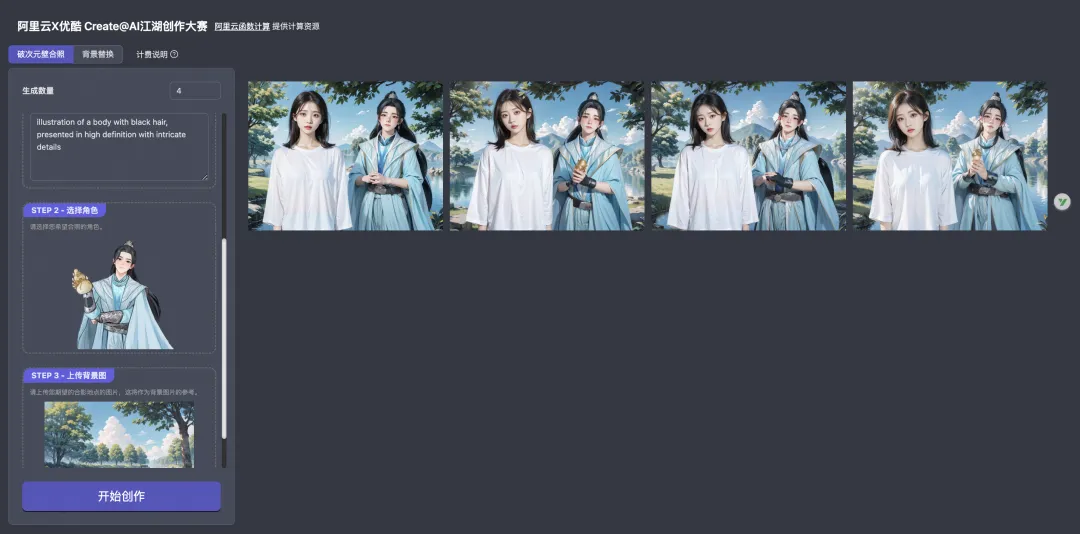
以函数计算支持活动 “阿里云X优酷江湖创作大赛” 为例,我们提供了预定义的 prompt 文件。
[
  {
    "title": "破次元壁合照",
    "prompt": {},
    "params": [
      {
        "type": "group",
        "title": "STEP 1 - 上传您的照片",
        "children": [
          {
            "type": "image",
            "id": "10",
            "key": "image",
            "title": "参考图",
            "description": "请上传您的照片,帮助模型理解您的样貌。请尽量选择背景简单、主体突出的半身照,不要佩戴墨镜、帽子等可能影响您特征的衣物。"
          },
          {
            "type": "string",
            "id": "24",
            "key": "text",
            "title": "参考形象描述",
            "description": "为了确保模型更好地理解您的特点,您可以使用提示词来加强模型对您的印象(请使用因为描述)。"
          }
        ]
      },
      {
        "type": "image",
        "id": "11",
        "key": "image",
        "title": "STEP 2 - 选择角色",
        "description": "请选择您希望合照的角色。",
        "options": [
          "https://serverless-tool-images.oss-cn-hangzhou.aliyuncs.com/aigc/json/couple/百里东君.png",
          "https://serverless-tool-images.oss-cn-hangzhou.aliyuncs.com/aigc/json/couple/司空长风.png",
          "https://serverless-tool-images.oss-cn-hangzhou.aliyuncs.com/aigc/json/couple/玥瑶.png",
          "https://serverless-tool-images.oss-cn-hangzhou.aliyuncs.com/aigc/json/couple/叶鼎之.png",
          "https://serverless-tool-images.oss-cn-hangzhou.aliyuncs.com/aigc/json/couple/易文君.png",
          "https://serverless-tool-images.oss-cn-hangzhou.aliyuncs.com/aigc/json/couple/南宫春水.png",
          "https://serverless-tool-images.oss-cn-hangzhou.aliyuncs.com/aigc/json/couple/萧若风.png"
        ]
      },
      {
        "type": "image",
        "id": "12",
        "key": "image",
        "title": "STEP 3 - 上传背景图",
        "description": "请上传您期望的合影地点的图片,这将作为背景图片的参考。"
      }
    ]
  },
  {
    "title": "背景替换",
    "prompt": {},
    "params": [
      {
        "type": "image",
        "id": "10",
        "key": "image",
        "title": "STEP 1 - 选择角色",
        "description": "请选择您希望合照的角色。",
        "options": [
          "https://serverless-tool-images.oss-cn-hangzhou.aliyuncs.com/aigc/json/couple/百里东君.png",
          "https://serverless-tool-images.oss-cn-hangzhou.aliyuncs.com/aigc/json/couple/司空长风.png",
          "https://serverless-tool-images.oss-cn-hangzhou.aliyuncs.com/aigc/json/couple/玥瑶.png",
          "https://serverless-tool-images.oss-cn-hangzhou.aliyuncs.com/aigc/json/couple/叶鼎之.png",
          "https://serverless-tool-images.oss-cn-hangzhou.aliyuncs.com/aigc/json/couple/易文君.png",
          "https://serverless-tool-images.oss-cn-hangzhou.aliyuncs.com/aigc/json/couple/南宫春水.png",
          "https://serverless-tool-images.oss-cn-hangzhou.aliyuncs.com/aigc/json/couple/萧若风.png"
        ]
      },
      {
        "type": "image",
        "id": "12",
        "key": "image",
        "title": "STEP 2 - 上传背景图",
        "description": "请上传您期望的合影地点的图片,这将作为背景图片的参考。"
      }
    ]
  }
]- 1.
- 2.
- 3.
- 4.
- 5.
- 6.
- 7.
- 8.
- 9.
- 10.
- 11.
- 12.
- 13.
- 14.
- 15.
- 16.
- 17.
- 18.
- 19.
- 20.
- 21.
- 22.
- 23.
- 24.
- 25.
- 26.
- 27.
- 28.
- 29.
- 30.
- 31.
- 32.
- 33.
- 34.
- 35.
- 36.
- 37.
- 38.
- 39.
- 40.
- 41.
- 42.
- 43.
- 44.
- 45.
- 46.
- 47.
- 48.
- 49.
- 50.
- 51.
- 52.
- 53.
- 54.
- 55.
- 56.
- 57.
- 58.
- 59.
- 60.
- 61.
- 62.
- 63.
- 64.
- 65.
- 66.
- 67.
- 68.
- 69.
- 70.
- 71.
- 72.
- 73.
- 74.
- 75.
- 76.
- 77.
- 78.
- 79.
- 80.
通过 params 字段,约定了如何渲染页面并允许用户填入自己的参数。
export type ComfyUIPromptEditPanel = {
  type: 'image' | 'select' | 'number' | 'string' | 'group'; // 数据类型
  id?: string; // 对应 prompt 中的 node id
  key: string; // 要修改的参数
  title: string; // 标题
  description?: string; // 描述
  options?: string[] | string; // 可选项
  min?: number; // 最小值
  max?: number; // 最大值
  step?: number; // 调整步数
  hidden?: boolean; // 是否隐藏
  children?: ComfyUIPromptEditPanel[]; // group 类型的子节点
};- 1.
- 2.
- 3.
- 4.
- 5.
- 6.
- 7.
- 8.
- 9.
- 10.
- 11.
- 12.
- 13.
一些其他约定:
- 如果 seed 字段为 -1,则会被替换为随机数
如果您也希望创建自己的 ComfyUI 自定义页面提供给自己的客户,可以参考相关的前端代码。
最佳实践
为了方便大家直观体验一下该解决方案成效,函数计算 Serverless 应用中心上线基于 ComfyUI Serverless API 解决方案搭建的 应用- 【少年白马专属】破次元壁合照 AI 绘画平台, 作为一个实验 demo 开放体验,期待为广大开发者 AI 绘画创业及变现提供一些有益思考。
直接参加体验活动,送好礼!活动链接:* https://developer.aliyun.com/plan/create/snbm *





 已为社区贡献1条内容

所有评论(0)