独立开发者系列(8)——认识搭建web服务器
认识web服务器的模块,搭建简易web服务器,为后面认识更复杂功能做准备
在众多软件里面,web服务软件重要程度是非常高的,构建成了www的基础。我们理解最简单的web服务器,输入网址,然后就访问到了我们的服务器里面的内容。最出名的服务器之一nginx是C语言实现的,功能非常强大,我们只是了解里面简单的原理,自己尝试着写个简单的。
天生为http异步协议而生的,在node里面内置了http模块,这让其搭建服务器只需要调用该模块即可,,nodeJS的写法:
const http = require('http'); // 引入http模块
// 创建HTTP服务器
const server = http.createServer((req, res) => {
  // 解析请求的URL路径
  const url = req.url;
  // 根据请求的路径设置不同的响应
  if (url === '/') {
    res.writeHead(200, {'Content-Type': 'text/plain'});
    res.end('Home Page\n');
  } else if (url === '/about') {
    res.writeHead(200, {'Content-Type': 'text/plain'});
    res.end('About Page\n');
  } else if (url === '/contact') {
    res.writeHead(200, {'Content-Type': 'text/plain'});
    res.end('Contact Page\n');
  } else {
    // 如果请求的路径没有匹配的路由,返回404错误
    res.writeHead(404, {'Content-Type': 'text/plain'});
    res.end('404 Not Found\n');
  }
});
// 服务器监听3000端口
server.listen(3000, () => {
  console.log('Server is running at http://localhost:3000/');
});
在这个服务器里面 我们定义了Home主页 关于about页面, contact页面 还有如果啥都没找到,返回的404页面响应,运行之后,直接打开浏览器127.0.0.1:3000即可发现我们自己写的web服务器已经实现。
而同样,我们用python也来将上面逻辑实现一遍 ,这次使用的是http里面的server模块HTTPServer 导入后自己实现最简单即可
from http.server import BaseHTTPRequestHandler, HTTPServer
class SimpleHTTPRequestHandler(BaseHTTPRequestHandler):

    def do_GET(self):
        # 根据请求的路径返回不同的响应
        if self.path == '/':
            self.send_response(200)
            self.send_header('Content-type', 'text/plain')
            self.end_headers()
            self.wfile.write(b'Home Page\n')
        elif self.path == '/about':
            self.send_response(200)
            self.send_header('Content-type', 'text/plain')
            self.end_headers()
            self.wfile.write(b'About Page\n')
        elif self.path == '/contact':
            self.send_response(200)
            self.send_header('Content-type', 'text/plain')
            self.end_headers()
            self.wfile.write(b'Contact Page\n')
        else:
            self.send_error(404, 'File not found')

def run(server_class=HTTPServer, handler_class=SimpleHTTPRequestHandler):
    server_address = ('', 3001)  # 监听所有IP上的3000端口
    httpd = server_class(server_address, handler_class)
    print("Server is running at http://localhost:3001/")
    httpd.serve_forever()

if __name__ == '__main__':
    run()
同样我们使用GO里面的net/http模块实现一个web服务器版本:
package main

import (
	"fmt"
	"net/http"
)

// 定义一个结构体来处理HTTP请求
type SimpleHTTPServer struct{}

// 定义一个方法来处理GET请求
func (s *SimpleHTTPServer) ServeHTTP(w http.ResponseWriter, r *http.Request) {
	// 根据请求的URL路径返回不同的响应
	switch r.URL.Path {
	case "/":
		fmt.Fprintf(w, "Home Page\n")
	case "/about":
		fmt.Fprintf(w, "About Page\n")
	case "/contact":
		fmt.Fprintf(w, "Contact Page\n")
	default:
		// 如果请求的路径不是预定义的路由之一,返回404错误
		http.NotFound(w, r)
	}
}

func main() {
	// 创建一个服务器实例
	server := &SimpleHTTPServer{}

	// 设置服务器监听的端口
	fmt.Println("Server is running at http://localhost:3002/")
	http.ListenAndServe(":3002", server)
}
在node/python/go里面 由于都内置了http的核心模块,我们只要调用http模块,就能快速搭建一个开放指定端口的web服务器,而且内网也可以通过192.168.0.XX的方式访问到。而nginx其实也是利用了C里面的http模块完成了web服务器的搭建,只是流程相对复杂,而上层语言都封装了。
我们通过我们自己搭建的三台服务器,梳理出web服务器开发的最基础的流程,导入http模块——启动http模块的功能——利用URL模块功能完成基础的路由识别。流程很简单,但是是我们进入web开发领域理解服务器的重要一环,在一些被限定了乱安装软件的服务器上,我们可以自己写个建议服务器,然后将数据流传输出来。
最终我们实现的如下效果: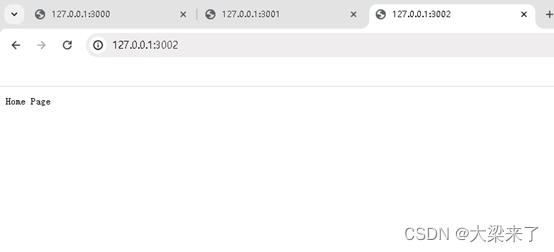

这里是“一人公司”的成长家园。我们提供从产品曝光、技术变现到法律财税的全栈内容,并连接云服务、办公空间等稀缺资源,助你专注创造,无忧运营。
更多推荐



 9
9 0
0- 0


 已为社区贡献11条内容

所有评论(0)