Android 小程序:随身记
My second Android app:随身记 !至计算器完工后,我进入了中期项目 BillBook 的开发阶段。此项目是独立开发的小应用,运用了 Activity 与 Fragment 之间的来回转换,以及 SQLite 的数据动态增删改查,最后配上计算器的算法结合而成。写这篇 blog 时项目已经完成测试。下文我会简介思路。
My second Android app:随身记 !
至计算器完工后,我进入了中期项目 BillBook 的开发阶段。此项目是独立开发的小应用,运用了 Activity 与 Fragment 之间的来回转换,以及 SQLite 的数据动态增删改查,最后配上计算器的算法结合而成。写这篇 blog 时项目已经完成测试。下文我会简介思路。
< 开发思路与细节 >
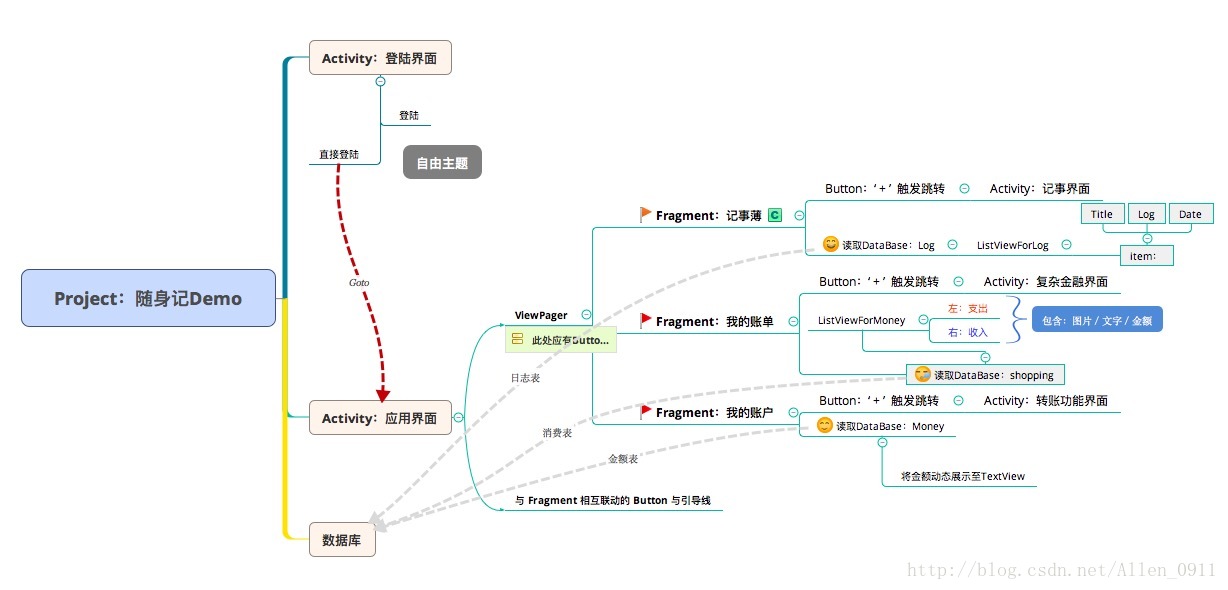
(1) Activity / Fragment / SQLite 之间的关系
(2)创建 SQLite
暂时没有加上账号密码列,所以采用了三张表记录数据,分别为:Log / Shopping / Money 。用来记录日志/消费(含收入)/钱包。
log表:
        /**
         * Log 表
         * @LogId 自增主键,标示日志生成顺序序号
         * @LogTitle 日志标题,非空
         * @LogContent 日志内容,非空
         * @LogDate 日志提交日期,非空
         */
        String LogTable = "create table Log("+
        "LogId Integer primary key Autoincrement,"+
        "LogTitle text not null,"+
        "LogContent text not null,"+
        "LogDate date not null)";
shopping表:
        /**
         * Shopping 表
         * @checkId 自增主键
         * @payment 金融方式(现金/储蓄....支付宝)
         * @image 金融项目Logo地址(int),非空
         * @name 金融项目名称,非空
         * @money 金额
         * @sc 只存在 1 或 -1 ,判断支出 or 收入
         */
        String ShoppingTable = "create table Shopping("+
        "checkId Integer primary key Autoincrement,"+
        "payment Integer not null,"+
        "image Integer not null,"+
        "name text not null,"+
        "money text,"+
        "sc Integer)";
Money表:
        /**
         * Money 表
         * @MoneyAll 总资产
         * @MoneyCash 现金金额
         * @MoneyCashCard 储蓄卡余额
         * @MoneyCreditCard 信用卡余额
         * @MoneyPay 支付宝余额
         */

        String MoneyTable = "create table Money_xx("+
        "MoneyAll text primary key,"+
        "MoneyCash text,"+
        "MoneyCashCard text,"+
        "MoneyCreditCard text,"+
        "MoneyPay text)";
(3)Fragment 跳转至 Activity
Fragment 跳转至 Activity 中需要将 Intent 的第一个参数修改一下:
Linear_log.setOnClickListener(new View.OnClickListener() {
            @Override
            public void onClick(View v) {
                new Intent(getActivity(),
                NewLogActivity.class));
            }
        });
(4)账单界面 ListView 适配器
到这一步,项目已经快过半了,为什么呢?因为适配器的内容主要来自于整个项目最复杂的金融布局:
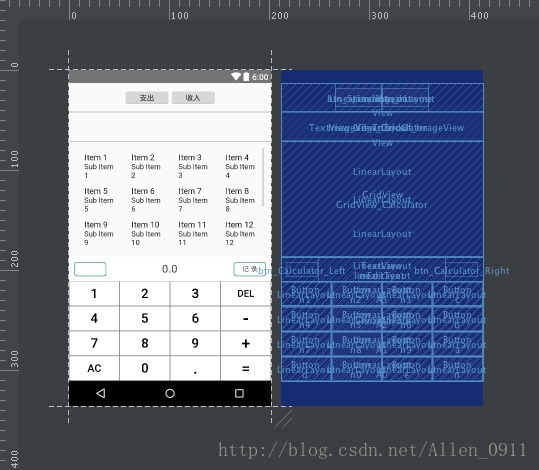
数据库的查询我们先放一边,首先解决金融界面的[记 录]键对数据库产生的 Update 操作。金融界面会提交 sc 作为判定支出与收入,由于项目初期我没有将图片放入数据库而是放进数组,所以这里我用了一个很麻烦的方法解决图片索引的问题:新建一个全局变量 sos 记忆图片索引。
        int sos = -1; //图片选择器
        mGridView_Calculator.setOnItemClickListener(new AdapterView.OnItemClickListener() {
            @Override
            public void onItemClick(AdapterView<?> parent, View view, int position, long id) {
                if(mGridView_Calculator.getAdapter() == spendingAdapter){
                    mImageView_Calculator.setBackground(getResources().getDrawable(spendingLogoImage[position]));
                    mTextView_X2_ToEndOf_ImageView.setText(spendingLogoName[position]);
                    sos = -(position)-1; //根据 item 位置拿到 sos
                }else{
                    mImageView_Calculator.setBackground(getResources().getDrawable(incomeLogoImage[position]));
                    mTextView_X2_ToEndOf_ImageView.setText(incomeLogoName[position]);
                    sos = position+1; //让 sos 用正负区分来体现其意义
                }
            }
        });
当程序到达ListView的适配器中:
        int x = Integer.parseInt(list.get(i).get("image").toString());
            //收入
        if(x > 0)
            int income = incomeLogoImage[x-1];
            mImageView_CheckLogo.setBackground(context.getResources().getDrawable(income));
            //支出
        }else if( x < 0){
            int spending = spendingLogoImage[-x-1];
            mImageView_CheckLogo.setBackground(context.getResources().getDrawable(spending));
        }
经过几番调试后解决了这个棘手的问题,也为下次开发上了一课:一定想好再动手!思路永远比写更重要。
(5) MoneyAll (总资产)的值在更新时如何确定?
为什么会出现这种情况?总资产和4种下属资产在更新的时候写在一个 SQL 语句中会出现总资产偏差,我们更新的下属值应与总值正确区分,而不要让总资产多次运算。

这里是“一人公司”的成长家园。我们提供从产品曝光、技术变现到法律财税的全栈内容,并连接云服务、办公空间等稀缺资源,助你专注创造,无忧运营。
更多推荐


 0
0 0
0- 0


 已为社区贡献1条内容

所有评论(0)