文件的上传
文件上传方便用户将本地文件传输到互联网上的应用程序或网站中,实现信息的共享和传递。它不仅提供了便捷的数据传输方式,还增强了用户的体验,使用户能够轻松分享个人创作、照片、视频、文档等内容。同时,文件上传也促进了远程协作和合作,使得团队成员可以方便地分享和访问文件,提高工作效率,本次将通过使用spring-boot实现文件上传与下载的功能。
目录
文件上传方便用户将本地文件传输到互联网上的应用程序或网站中,实现信息的共享和传递。它不仅提供了便捷的数据传输方式,还增强了用户的体验,使用户能够轻松分享个人创作、照片、视频、文档等内容。同时,文件上传也促进了远程协作和合作,使得团队成员可以方便地分享和访问文件,提高工作效率,本次将通过使用spring-boot实现文件上传与下载的功能。
1.文件上传
单个文件上传需要引入Java相关包,这里为了简单先写一个简单前端页面
<!DOCTYPE html>
<html lang="en">
<head>
    <meta charset="UTF-8">
    <title>fileload</title>
</head>
<body>
  <div class="m-auto row blue-div">
    <form action="http://localhost:8080/testc002/upload" method="POST" enctype="multipart/form-data">
        <div class="form-group">
            <label for="upload_single_file">Upload your file</label>
            <input type="file" name="single_file" id="upload_single_file" class="form-control-file"/><br>

        </div>
        <div class="form-group">
            <input type="submit" value="submit" class="btn btn-primary"/>
            <input type="reset" value="reset" class="btn btn-outline-secondary">
        </div>
    </form>
  </div>
</body>
</html>
特别注意:在 form 标签上要加上 enctype="multipart/form-data" 属性设置,不然 spring Boot 不容易解析
enctype="multipart/form-data"在HTML表单中用来指定当表单提交到服务器时,表单数据应该如何编码。当表单包括类型为file的input元素时,即允许用户上传文件,使用这种编码类型是必要的。这样可以确保文件在上传过程中不会被编码,而是以二进制形式发送。如果表单仅包含文本字段,通常使用默认的编码类型application/x-www-form-urlencoded。在使用multipart/form-data编码类型时,每个表单值或文件都作为一个“部分”(part)发送,每个部分都有可能有自己的HTTP头信息,比如Content-Type,这使得浏览器可以将文件作为原始二进制数据流来发送。
这里为了样式美观,同时引入了 bootstrap 框架
      <dependency>
            <groupId>org.webjars</groupId>
            <artifactId>bootstrap</artifactId>
            <version>4.4.1-1</version>
        </dependency>
正式编写接受 POST请求的接口。
文件实体类
public class UploadFileResponse {
    private String fileName;
    private String fileDownLoadUri;
    private String fileType;
    private long size;

    public UploadFileResponse(String fileName, String fileDownLoadUri, String fileType, long size) {
        this.fileName = fileName;
        this.fileDownLoadUri = fileDownLoadUri;
        this.fileType = fileType;
        this.size = size;
    }

    public String getFileName() {
        return fileName;
    }

    public void setFileName(String fileName) {
        this.fileName = fileName;
    }

    public String getFileDownLoadUri() {
        return fileDownLoadUri;
    }

    public void setFileDownLoadUri(String fileDownLoadUri) {
        this.fileDownLoadUri = fileDownLoadUri;
    }

    public String getFileType() {
        return fileType;
    }

    public void setFileType(String fileType) {
        this.fileType = fileType;
    }

    public long getSize() {
        return size;
    }

    public void setSize(long size) {
        this.size = size;
    }
}
针对上传的文件进行封装 编写属性类
import org.springframework.boot.context.properties.ConfigurationProperties;
import org.springframework.context.annotation.Configuration;
@Configuration
@ConfigurationProperties(prefix = "file")
public class FileStorageProperties {
    //上传到服务器的文件路径
    private String uploadDir;

    //获取上传路径
    public String getUploadDir() {
        return uploadDir;
    }

    //设置上传路径
    public void setUploadDir(String uploadDir) {
        this.uploadDir = uploadDir;
    }
}
在 properties 配置文件中写入文件路径信息
file.upload-dir=package封装文件存储异常类,当文件遇到意外时需要抛出的异常信息
public class FileStorageException extends RuntimeException{
    //只传入错误原因
    public FileStorageException(String message) {
        super(message);
    }
    //传入错误原因和错误信息
    public FileStorageException(String message, Throwable cause) {
        super(message, cause);
    }
}
找不到文件的异常信息
public class FileNotFoundException extends RuntimeException{
    public FileNotFoundException(String message) {
        super(message);
    }

    public FileNotFoundException(String message, Throwable cause) {
        super(message, cause);
    }
}
由于采用MVC的方式,将业务处理都封装到Service层
package org.example.service;

import org.example.Exception.FileStorageException;
import org.example.config.FileStorageProperties;
import org.springframework.beans.MutablePropertyValues;
import org.springframework.beans.factory.annotation.Autowired;
import org.springframework.core.io.Resource;
import org.springframework.core.io.UrlResource;
import org.springframework.stereotype.Service;
import org.springframework.util.StringUtils;
import org.springframework.web.multipart.MultipartFile;

import java.io.IOException;
import java.net.MalformedURLException;
import java.nio.file.Files;
import java.nio.file.Path;
import java.nio.file.Paths;
import java.nio.file.StandardCopyOption;
import java.util.Objects;

@Service
public class FileStorageService {

    private final Path fileStorageLocation;
    @Autowired(required = false)//找不到实例不会变异常而是设置为 null
    public FileStorageService(FileStorageProperties fileStorageProperties) {
        //normalize() 方法消除多余的斜杠.等。
        this.fileStorageLocation = Paths.get(fileStorageProperties.getUploadDir()).toAbsolutePath().normalize();
        try{
            //创建路经
            Files.createDirectories(this.fileStorageLocation);
        } catch (IOException ex) {
            throw new FileStorageException("Could not create the directory" +
                    " while the uploaded files will be stored.",ex);
        }
    }

    /**
     * 储存文件
     *
     * @param file 文件流对象
     * @return  String 文件名 | Exception
     */
    public String storeFile(MultipartFile file){
        //规划文件名
        // 1.此方法用于获取上传文件的原始文件名。当处理HTTP文件上传时,你可以通过这个方法来访问上传文件的原始文件名(即用户上传的文件在用户设备上的名称。
        String fileName = StringUtils.cleanPath(Objects.requireNonNull(file.getOriginalFilename()));//
        try {
            //2.检查文件中是否含有无效字符
            if (fileName.contains("..")){
                throw new FileStorageException("抱歉,文件名里面有无效字符 "+fileName);
            }
            //3.resolve将当前路径追加在源路径之后
            Path targetLocation = this.fileStorageLocation.resolve(fileName);
            //复制文件到目标路径
            Files.copy(file.getInputStream(),targetLocation, StandardCopyOption.REPLACE_EXISTING);
            return fileName;
        } catch (IOException e) {
            throw new FileStorageException("不能保存文件"+fileName+". 请重新尝试!",e);
        }
    }

    /**
     *
     * 加载文件资源
     * @param fileName 文件名
     * @return  Resource | Exception
     */
    public Resource loadFileResource(String fileName){
        try {
            Path filePath = this.fileStorageLocation.resolve(fileName).normalize();
            //将filePath转成uri后将其 构建 Resource对象
            Resource resource = new UrlResource(filePath.toUri());
            if (resource.exists()){
                return resource;
            }else {
                throw new FileStorageException("文件没找到 "+fileName);
            }
        } catch (MalformedURLException e) {
            throw new FileStorageException("文件没找到 "+fileName,e);
        }
    }

}
编写 controller 层
import org.example.pojo.UploadFileResponse;
import org.example.service.FileStorageService;
import org.springframework.beans.factory.annotation.Autowired;
import org.springframework.core.io.Resource;
import org.springframework.http.HttpHeaders;
import org.springframework.http.MediaType;
import org.springframework.http.ResponseEntity;
import org.springframework.web.bind.annotation.*;
import org.springframework.web.multipart.MultipartFile;
import org.springframework.web.servlet.support.ServletUriComponentsBuilder;

import javax.servlet.http.HttpServletRequest;
import java.io.IOException;

@RestController
@RequestMapping()
public class UploadController {
    @Autowired
    private FileStorageService fileStorageService;
    @PostMapping("/upload")
    public UploadFileResponse uploadFileResponse(@RequestParam("single_file")MultipartFile file){
        //存储文件并获得保存后的文件名称
        String fileName = fileStorageService.storeFile(file);
        //获取文件下载地址
        String fileDownloadUri = ServletUriComponentsBuilder.fromCurrentContextPath()
                .path("/downloadFile/")
                .path(fileName)
                .toUriString();
        //返回一个上传好的文件对象,这里返回下载地址,文件大小以及类型。
        return new UploadFileResponse(fileName,fileDownloadUri,file.getContentType(),file.getSize());
    }
    //根据文件名获取上传好的文件信息
    @GetMapping("/downloadFile/{fileName:.+}")
    public ResponseEntity<Resource> downloadFile(@PathVariable String fileName, HttpServletRequest request){
        //根据文件名获取文件存储资源
        Resource resource = fileStorageService.loadFileResource(fileName);
        //尝试确定文件的内容类型
        //Try  to determine file `s content type
        String contentType = null;
        try{
            //根据资源调用getMimeType()方法来获取文件的MIME类型(即文件的互联网媒体类型,例如"text/plain", "image/jpg"等
            contentType = request.getServletContext().getMimeType(resource.getFile()
                    .getAbsolutePath());
        } catch (IOException e) {
            System.out.println("Could not determine file type.");
        }
        //如果无法确定类型,则退回到默认内容类型
        //Fallback to the default content type if type could not be determined
        //如果无法确定文件的MIME类型,将其默认设置为"application/octet-stream"。
        // 这是一种二进制文件流的MIME类型,常用于表示不能识别文件类型的情况。
        if (contentType == null){
            contentType = "application/octect-stream";
        }
        //返回文件流
        return ResponseEntity.ok().contentType(MediaType.parseMediaType(contentType)).header(HttpHeaders.CONTENT_DISPOSITION
        ,"attachment;filename=\""+resource.getFilename()+"\"").body(resource);
    }

}
最后成功上传文件并可以成功下载:
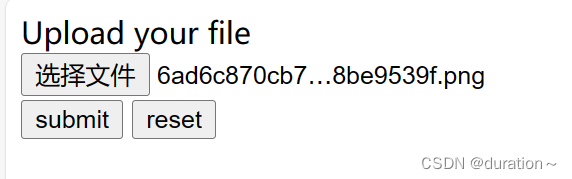


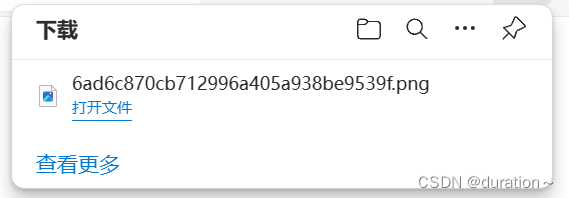
补充:
ServletUriComponentsBuilder是 Spring Framework 提供的一个用于构建和操作 Servlet 相关的 URI【统一资源标识符(Uniform Resource Identifier)】的辅助类。这个类主要用于在 Servlet 环境中创建和操作 URI,特别是在构建返回的响应中包含链接或定位资源时非常有用。它提供了一组静态方法,用于创建 URI,并且可以与 Spring Web MVC 框架的其他组件(如控制器、处理器等)无缝集成。
使用
ServletUriComponentsBuilder,您可以方便地构建包含应用程序上下文路径、请求路径、请求参数等信息的 URI。它还支持对 URI 进行更改、扩展和相对路径解析等操作。以下是
ServletUriComponentsBuilder常用的方法:
fromCurrentRequest():从当前的 Servlet 请求创建ServletUriComponentsBuilder。fromCurrentContextPath():从当前的 Servlet 上下文路径创建ServletUriComponentsBuilder。path(String path):将指定的路径添加到已创建的 URI 中。queryParam(String name, Object... values):将查询参数添加到已创建的 URI 中。build():根据已定义的信息构建 URI。
多个文件上传就是单个文件的循环,这里不进行更多了解。
2.文件上传限制和服务器限制
对于文件的类型和大小常常有限制,这一方面与业务有关也和服务器的安全有关,为了不被 shell 木马注入和提权,必须限制上传的文件类型,例如只能是 jpg 或者 png 格式的图片等。
public class ValidFileType {
    private List<String> validType = new ArrayList<>();

    public ValidFileType(List<String> validType) {
        if (validType.isEmpty()){
            validType.add("png");
            validType.add("jpg");
            validType.add("jepg");
        }
        this.validType=validType;
    }

    public List<String> getValidType() {
        return validType;
    }
}
使用也非常简单,遍历后进行判断即可。
3.aliOss文件上传
本地上传可能较大的占用本地存储空间,并不是很好的一种选择。所以,我们了解一下aliOss进行文件上传的这种云空间的方式。
简介
阿里云对象存储服务(Object Storage Service,简称OSS)为您提供基于网络的数据存取服务。使用OSS,您可以通过网络随时存储和调用包括文本、图片、音频和视频等在内的各种非结构化数据文件。 阿里云OSS将数据文件以对象(object)的形式上传到存储空间(bucket)中。
您可以进行以下操作:
-
创建一个或者多个存储空间,向每个存储空间中添加一个或多个文件。
-
通过获取已上传文件的地址进行文件的分享和下载。
-
通过修改存储空间或文件的属性或元信息来设置相应的访问权限。
-
在阿里云管理控制台执行基本和高级OSS任务。
-
使用阿里云开发工具包或直接在应用程序中进行RESTful API调用执行基本和高级OSS任务。
OSS开通
(1)打开 https://www.aliyun.com/ ,申请阿里云账号并完成实名认证。
(2)充值 (可以不用做)
(3)开通OSS
登录阿里云官网。 点击右上角的控制台。
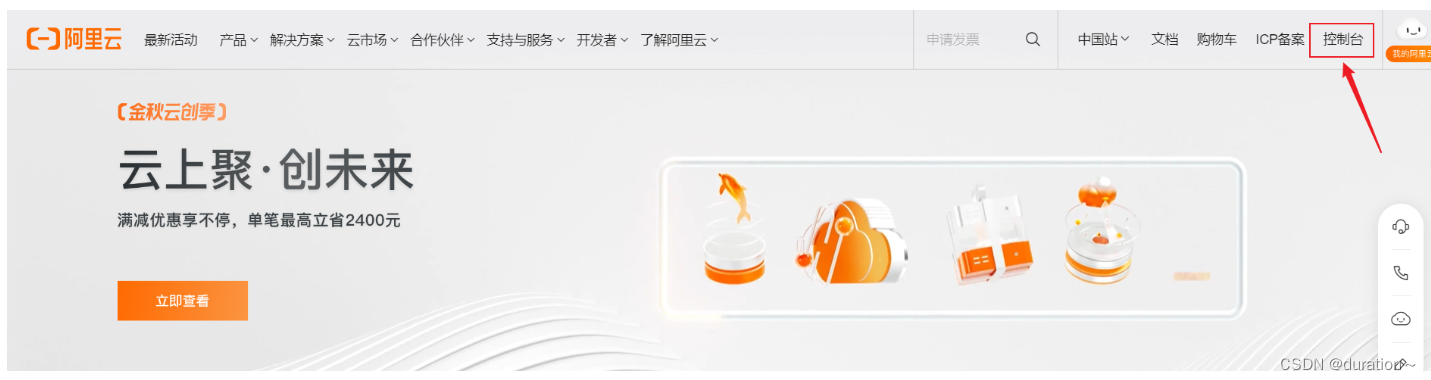
将鼠标移至产品,找到并单击对象存储OSS,打开OSS产品详情页面。在OSS产品详情页中的单击立即开通。
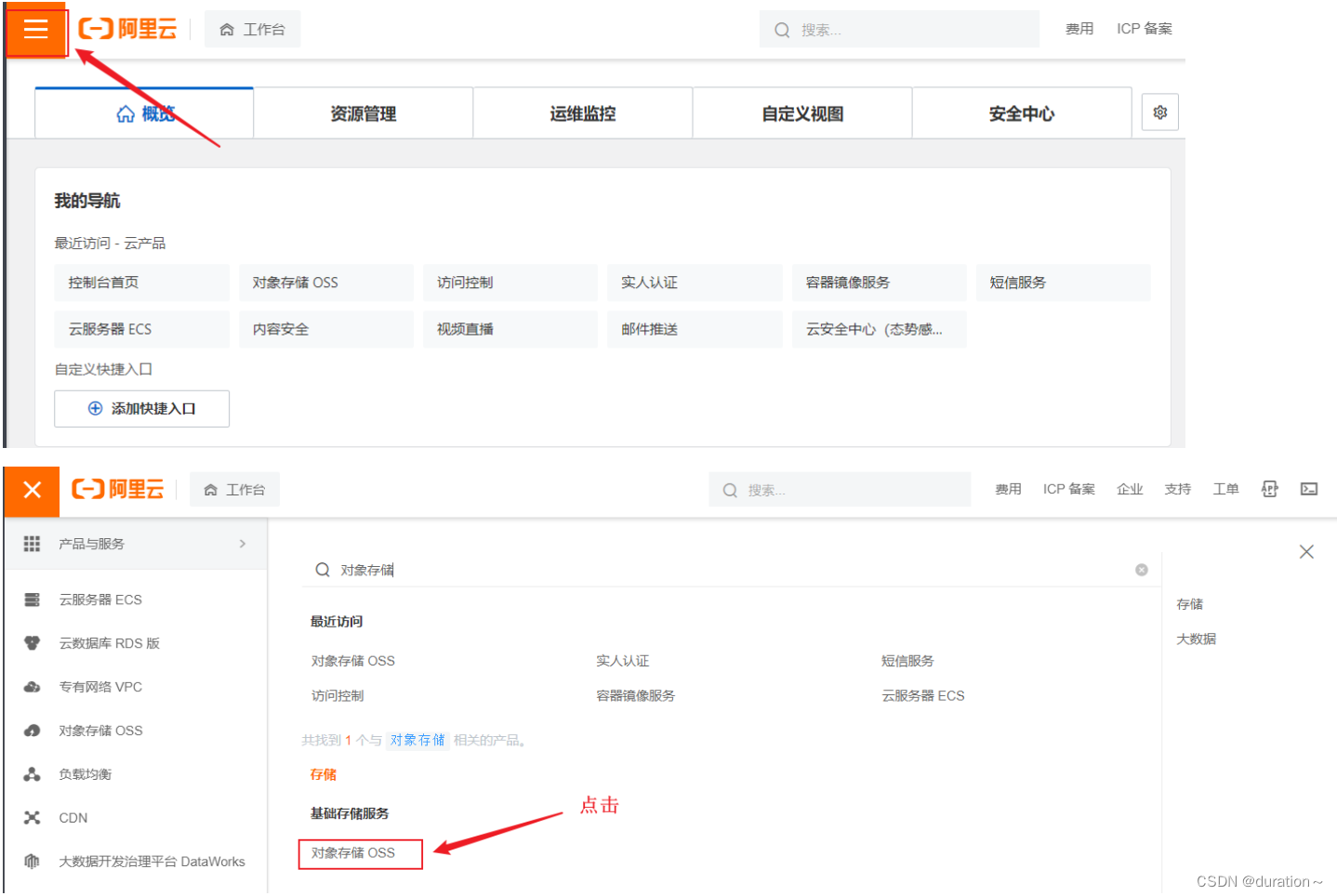

开通服务后,在OSS产品详情页面单击管理控制台直接进入OSS管理控制台界面。您也可以单击位于官网首页右上方菜单栏的控制台,进入阿里云管理控制台首页,然后单击左侧的对象存储OSS菜单进入OSS管理控制台界面。
(4)创建存储空间
新建Bucket,命名 ,读写权限为 ==公共读==。
(5)生成 AccessKey。
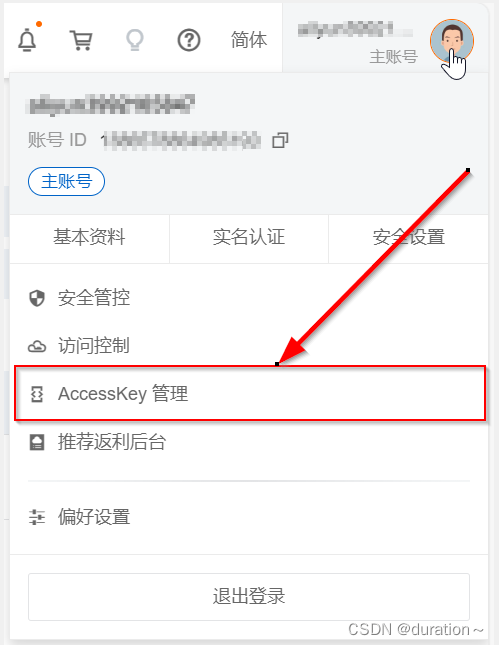
(6)成功生成 AccessKey,记住 endpoint、Bucket 名称、AccessKey ID 和 AccessKey Secret。

OSS快速开始
(1)创建测试工程,引入依赖
<dependency>
    <groupId>com.aliyun.oss</groupId>
    <artifactId>aliyun-sdk-oss</artifactId>
    <version>3.15.1</version>
</dependency>
(2)编写属性类以及属性文件信息。
配置类:
import lombok.Data;
import org.springframework.boot.context.properties.ConfigurationProperties;
import org.springframework.stereotype.Component;

@Component
@ConfigurationProperties(prefix = "alioss")
@Data
public class AliOssProperties {

    private String endpoint;
    private String accessKeyId;
    private String accessKeySecret;
    private String bucketName;

}
yml配置文件:
  alioss:
    endpoint: ${alioss.endpoint}
    access-key-id: ${alioss.access-key-id}
    access-key-secret: ${alioss.access-key-secret}
    bucket-name: ${alioss.bucket-name}
(3)新建类 AliOssUtil 对文件上传操作进行封装。
import com.aliyun.oss.ClientException;
import com.aliyun.oss.OSS;
import com.aliyun.oss.OSSClientBuilder;
import com.aliyun.oss.OSSException;
import lombok.AllArgsConstructor;
import lombok.Data;
import lombok.extern.slf4j.Slf4j;
import java.io.ByteArrayInputStream;

@Data
@AllArgsConstructor
@Slf4j
public class AliOssUtil {

    private String endpoint;
    private String accessKeyId;
    private String accessKeySecret;
    private String bucketName;

    /**
     * 文件上传
     *
     * @param bytes
     * @param objectName
     * @return
     */
    public String upload(byte[] bytes, String objectName) {

        // 创建OSSClient实例。
        OSS ossClient = new OSSClientBuilder().build(endpoint, accessKeyId, accessKeySecret);

        try {
            // 创建PutObject请求。
            ossClient.putObject(bucketName, objectName, new ByteArrayInputStream(bytes));
        } catch (OSSException oe) {
            System.out.println("Caught an OSSException, which means your request made it to OSS, "
                    + "but was rejected with an error response for some reason.");
            System.out.println("Error Message:" + oe.getErrorMessage());
            System.out.println("Error Code:" + oe.getErrorCode());
            System.out.println("Request ID:" + oe.getRequestId());
            System.out.println("Host ID:" + oe.getHostId());
        } catch (ClientException ce) {
            System.out.println("Caught an ClientException, which means the client encountered "
                    + "a serious internal problem while trying to communicate with OSS, "
                    + "such as not being able to access the network.");
            System.out.println("Error Message:" + ce.getMessage());
        } finally {
            if (ossClient != null) {
                ossClient.shutdown();
            }
        }

        //文件访问路径规则 https://BucketName.Endpoint/ObjectName
        StringBuilder stringBuilder = new StringBuilder("https://");
        stringBuilder
                .append(bucketName)
                .append(".")
                .append(endpoint)
                .append("/")
                .append(objectName);

        log.info("文件上传到:{}", stringBuilder.toString());

        return stringBuilder.toString();
    }
}
(4)对 AliOssUtil 进行配置,注册 AliOssUtil 的 Bean 对象。
import com.sky.properties.AliOssProperties;
import com.sky.utils.AliOssUtil;
import lombok.extern.slf4j.Slf4j;
import org.springframework.boot.autoconfigure.condition.ConditionalOnMissingBean;
import org.springframework.context.annotation.Bean;
import org.springframework.context.annotation.Configuration;

/**
 * 配置类,用于创建aliossUtil配置对象
 */
@Configuration
@Slf4j
public class OssConfiguration {
    @Bean
    @ConditionalOnMissingBean//保证全局唯一
    public AliOssUtil aliOssUtil(AliOssProperties aliOssProperties){
        log.info("开始创建阿里云文件上传工具类:{}",aliOssProperties);
        AliOssUtil aliOssUtil = new AliOssUtil(aliOssProperties.getEndpoint()
                , aliOssProperties.getAccessKeyId()
                , aliOssProperties.getAccessKeySecret(),
                aliOssProperties.getBucketName());
        return aliOssUtil;
    }
}
(5)定义 Controller 对文件进行上传。
import io.swagger.annotations.Api;
import io.swagger.annotations.ApiOperation;
import lombok.extern.slf4j.Slf4j;
import org.springframework.beans.factory.annotation.Autowired;
import org.springframework.web.bind.annotation.PostMapping;
import org.springframework.web.bind.annotation.RequestMapping;
import org.springframework.web.bind.annotation.RestController;
import org.springframework.web.multipart.MultipartFile;

import java.io.IOException;
import java.util.UUID;

/**
 * 通用接口
 */
@RestController
@RequestMapping("/admin/common")
@Api(tags = "通用接口")
@Slf4j
public class CommonController {
    @Autowired
    private AliOssUtil aliOssUtil;
    /**
     * 文件上传
     * @param file
     * @return
     */
    @PostMapping("/upload")
    @ApiOperation("文件上传")
    public Result<String> upload(MultipartFile file){
        log.info("文件上传,{}",file);
        try {
            //原始文件名
            String originalFilename = file.getOriginalFilename();
            //截取原始文件名的后缀
            String extension = originalFilename.substring(originalFilename.lastIndexOf("."));
            //构建新文件名称
            String objectName = UUID.randomUUID()+extension;
//            文件的请求路径
            String filePath = aliOssUtil.upload(file.getBytes(), objectName);
            return Result.success(filePath);
        } catch (IOException e) {
            log.error("文件上传失败, {}",e.getMessage());
            e.printStackTrace();
        }
        return Result.error("文件上传失败");
    }
}
MultipartFile 常见方法:
String getOriginalFilename(); //获取原始文件名
void transferTo(File dest); //将接收的文件转存到磁盘文件中
long getSize(); //获取文件的大小,单位:字节
byte[] getBytes(); //获取文件内容的字节数组
InputStream getInputStream(); //获取接收到的文件内容的输入流

这里是“一人公司”的成长家园。我们提供从产品曝光、技术变现到法律财税的全栈内容,并连接云服务、办公空间等稀缺资源,助你专注创造,无忧运营。
更多推荐


 24
24 0
0- 0


 已为社区贡献1条内容

所有评论(0)