Canvas 绘图教程:从基础到高级
本教程系统讲解 HTML5 Canvas 绘图技术,从基础概念到高级应用。主要内容包括:基本绘图操作(线条、图形、文字)、颜色与样式(填充、描边、渐变)、图形变换(平移、旋转、缩放)、动画绘制基础、高级动画效果(粒子系统、波浪效果)、性能优化技巧等。通过实践示例,读者将掌握 Canvas 的核心概念和常用技术,能够独立开发图形动画、游戏界面、数据可视化等项目。本教程适合具备基础 JavaScrip
·
一、引言
1.1 什么是 Canvas?
Canvas 是 HTML5 提供的一个用于绘制图形的 HTML 元素,它可以用 JavaScript 动态绘制图形、动画、游戏画面、数据可视化等。通过 Canvas,我们可以实现各种富有创意的视觉效果。
1.2 Canvas 能做什么?
- 游戏开发:2D 游戏场景和角色
- 数据可视化:图表、统计图、信息图
- 图像处理:滤镜、像素操作、图片合成
- 动画效果:交互动画、loading 效果
- 签名板:手写签名、绘图板
- 图形设计:基础图形、艺术创作
1.3 Canvas 的优势
- 性能优秀:直接操作像素,渲染性能好
- 原生支持:无需插件,浏览器原生支持
- 灵活性强:可以精确控制每个像素
- 交互便捷:易于响应用户输入
- 可导出图片:Canvas 内容可以导出为图片
二、基础知识
2.1 创建 Canvas
<canvas id="myCanvas" width="600" height="400"></canvas>const canvas = document.getElementById('myCanvas');
const ctx = canvas.getContext('2d');2.2 基本 API 参考
颜色、样式和阴影
// 颜色设置
ctx.fillStyle = color      // 填充颜色
ctx.strokeStyle = color    // 描边颜色
ctx.globalAlpha = alpha    // 透明度

// 线条样式
ctx.lineWidth = value      // 线条宽度
ctx.lineCap = type        // 线条端点样式:butt, round, square
ctx.lineJoin = type       // 线条连接样式:miter, round, bevel
ctx.miterLimit = value    // 斜接长度

// 阴影
ctx.shadowColor = color   // 阴影颜色
ctx.shadowBlur = value    // 阴影模糊级别
ctx.shadowOffsetX = value // 阴影水平偏移
ctx.shadowOffsetY = value // 阴影垂直偏移
线条绘制方法
ctx.beginPath()           // 开始路径
ctx.closePath()           // 闭合路径
ctx.moveTo(x, y)         // 移动到点
ctx.lineTo(x, y)         // 画直线
ctx.stroke()             // 描边
ctx.fill()               // 填充
矩形绘制方法
ctx.rect(x, y, width, height)     // 矩形路径
ctx.fillRect(x, y, width, height) // 填充矩形
ctx.strokeRect(x, y, width, height) // 描边矩形
ctx.clearRect(x, y, width, height)  // 清除矩形区域
圆弧和圆形
// 参数:圆心x, 圆心y, 半径r, 起始角度, 结束角度, 是否逆时针
ctx.arc(x, y, r, startAngle, endAngle, anticlockwise)

// 圆角矩形路径
ctx.arcTo(x1, y1, x2, y2, radius)
贝塞尔曲线
// 二次贝塞尔曲线
ctx.quadraticCurveTo(cpx, cpy, x, y)

// 三次贝塞尔曲线
ctx.bezierCurveTo(cp1x, cp1y, cp2x, cp2y, x, y)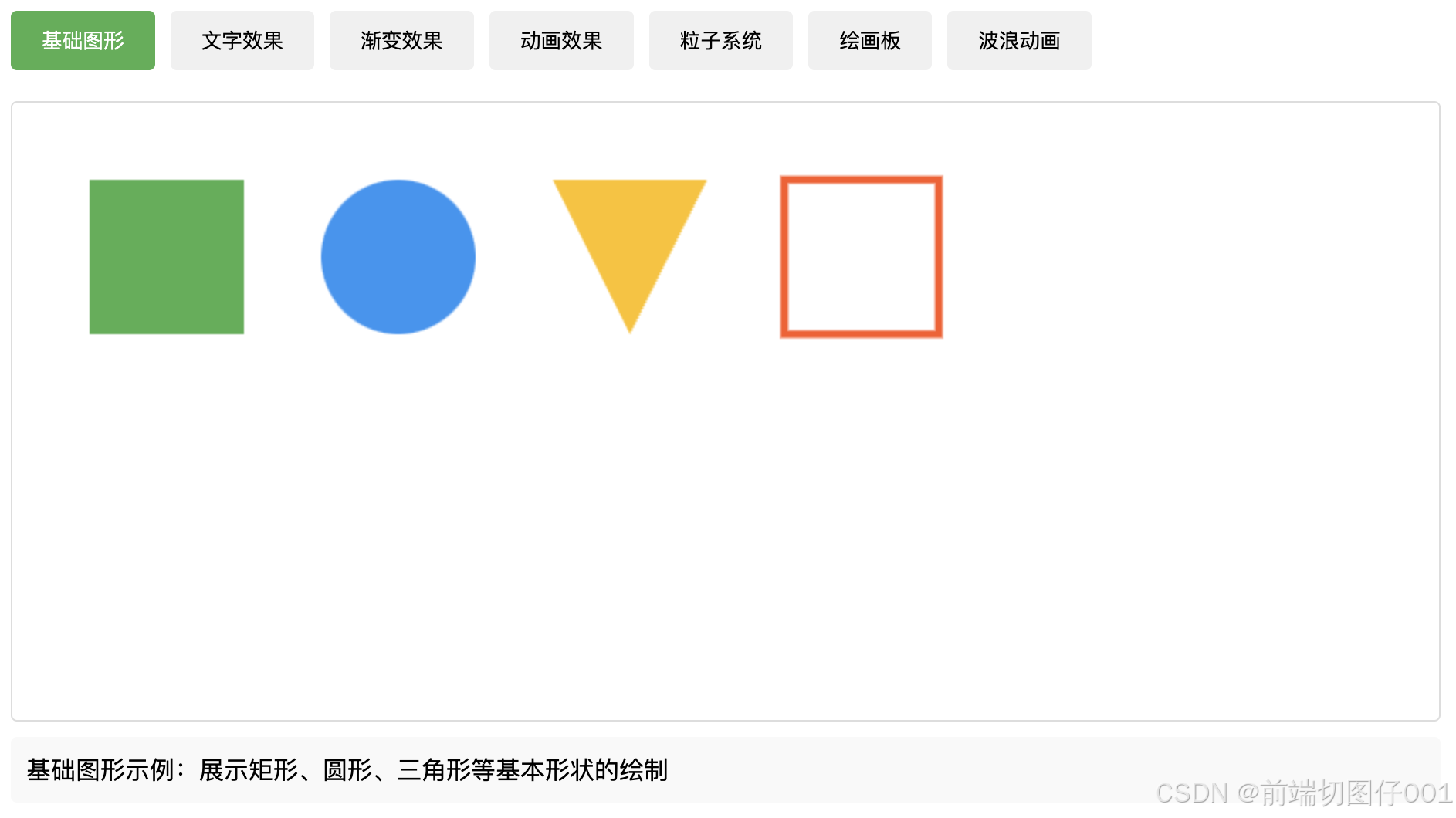
三、高级特性
3.1 渐变
// 线性渐变
let linearGradient = ctx.createLinearGradient(x0, y0, x1, y1);
linearGradient.addColorStop(0, 'color1');
linearGradient.addColorStop(1, 'color2');

// 径向渐变
let radialGradient = ctx.createRadialGradient(x0, y0, r0, x1, y1, r1);
radialGradient.addColorStop(0, 'color1');
radialGradient.addColorStop(1, 'color2');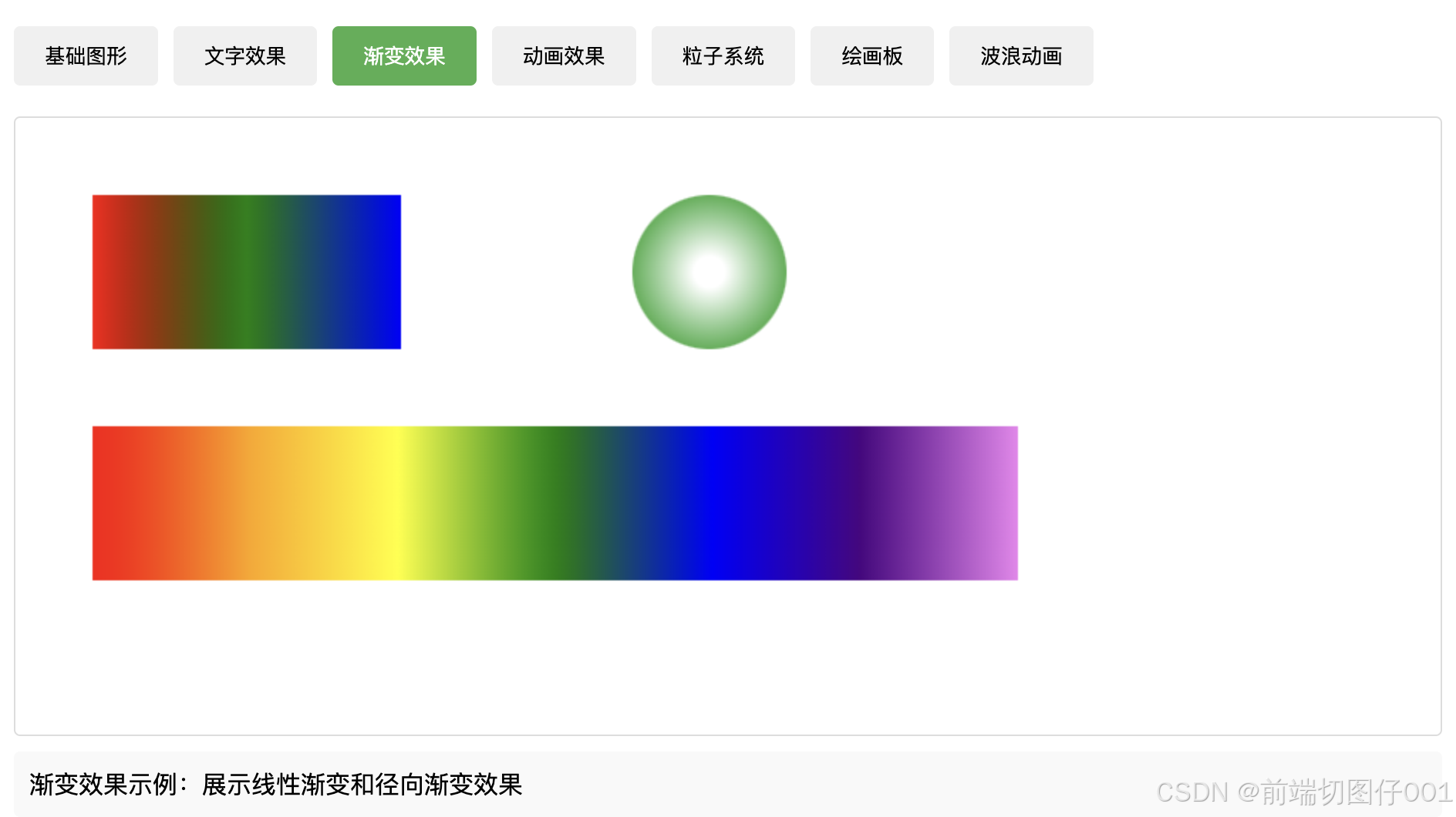
3.2 变换
ctx.translate(x, y)    // 平移
ctx.rotate(angle)      // 旋转
ctx.scale(x, y)        // 缩放
ctx.transform(a, b, c, d, e, f)  // 变换矩阵
ctx.setTransform(a, b, c, d, e, f)  // 重置变换矩阵
3.3 状态管理
ctx.save()     // 保存当前状态
ctx.restore()  // 恢复之前的状态
3.4 合成
ctx.globalCompositeOperation = type
// 常用类型:
// source-over(默认)
// source-in
// source-out
// destination-over
// lighter
// multiply
四、绘制示例
4.1 文字绘制
// 基础文字
ctx.font = '24px Arial';
ctx.fillStyle = '#333';
ctx.fillText('Hello Canvas!', 50, 50);

// 描边文字
ctx.strokeStyle = '#ff0000';
ctx.strokeText('Stroke Text', 50, 100);

// 文字对齐
ctx.textAlign = 'center';     // start, end, left, right, center
ctx.textBaseline = 'middle';  // top, hanging, middle, alphabetic, bottom
ctx.fillText('Centered Text', canvas.width/2, canvas.height/2);

// 文字阴影效果
ctx.shadowColor = 'rgba(0,0,0,0.5)';
ctx.shadowBlur = 4;
ctx.shadowOffsetX = 2;
ctx.shadowOffsetY = 2;
ctx.fillText('Shadow Text', 50, 150); 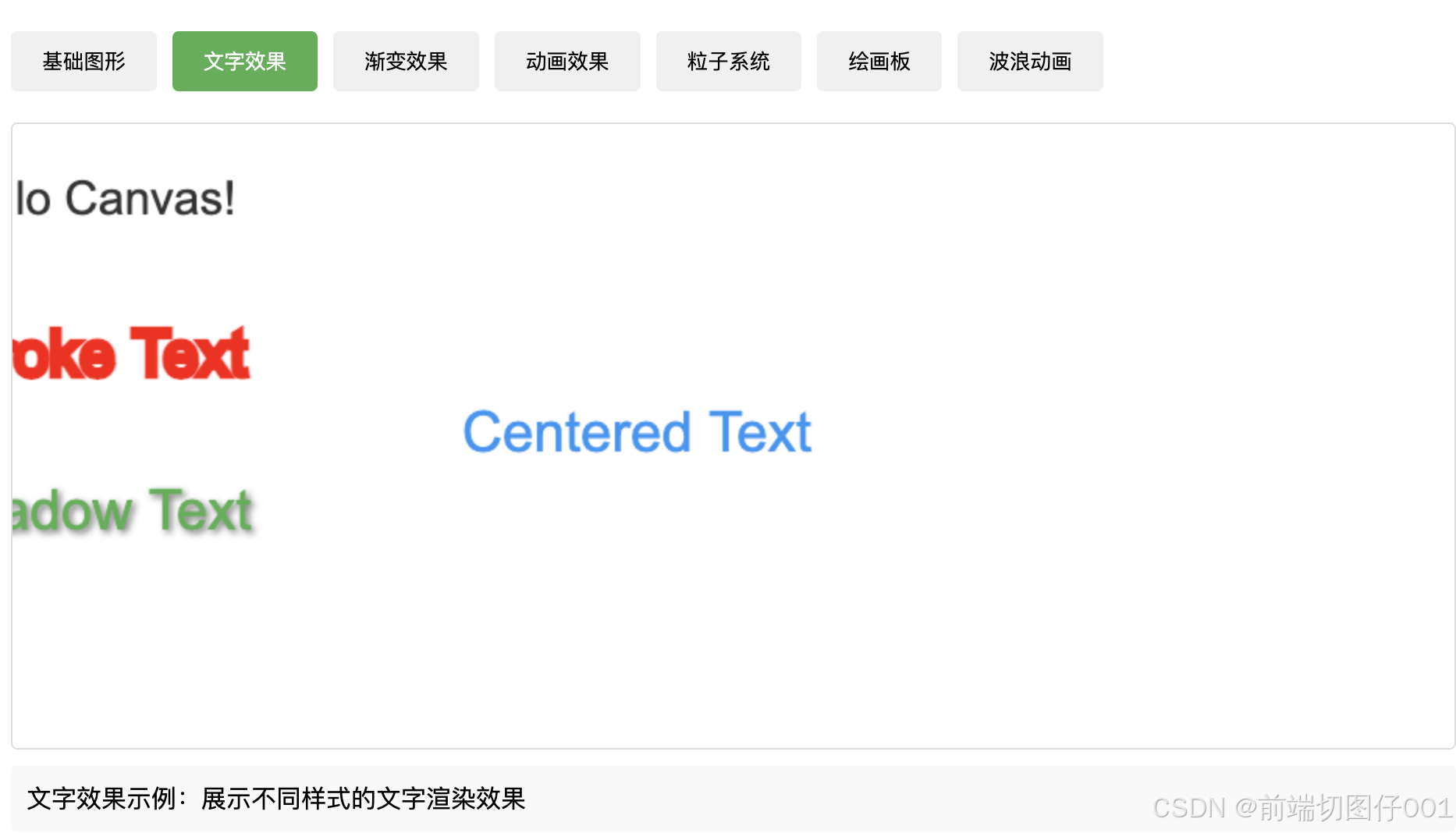
4.2 阴影效果示例
// 带阴影的矩形
ctx.shadowColor = 'rgba(0,0,0,0.3)';
ctx.shadowBlur = 10;
ctx.shadowOffsetX = 5;
ctx.shadowOffsetY = 5;
ctx.fillStyle = '#4CAF50';
ctx.fillRect(50, 50, 200, 100);

// 发光效果
ctx.shadowColor = '#ff0';
ctx.shadowBlur = 20;
ctx.shadowOffsetX = 0;
ctx.shadowOffsetY = 0;
ctx.fillStyle = '#ff0';
ctx.beginPath();
ctx.arc(200, 200, 30, 0, Math.PI * 2);
ctx.fill();
4.3 基础图形组合
function drawFace() {
    // 脸部轮廓
    ctx.beginPath();
    ctx.arc(100, 100, 50, 0, Math.PI * 2);
    ctx.fillStyle = '#ffdb4d';
    ctx.fill();
    ctx.stroke();

    // 眼睛
    ctx.beginPath();
    ctx.arc(80, 90, 10, 0, Math.PI * 2);  // 左眼
    ctx.arc(120, 90, 10, 0, Math.PI * 2); // 右眼
    ctx.fillStyle = '#fff';
    ctx.fill();
    ctx.stroke();

    // 嘴巴
    ctx.beginPath();
    ctx.arc(100, 110, 30, 0, Math.PI);
    ctx.stroke();
}
4.4 简单动画
// 弹跳球动画
let x = 50;
let y = 50;
let dx = 2;
let dy = 2;
let radius = 20;

function animate() {
    ctx.clearRect(0, 0, canvas.width, canvas.height);

    // 绘制小球
    ctx.beginPath();
    ctx.arc(x, y, radius, 0, Math.PI * 2);
    ctx.fillStyle = '#0095DD';
    ctx.fill();

    // 碰撞检测
    if (x + dx > canvas.width - radius || x + dx < radius) {
        dx = -dx;
    }
    if (y + dy > canvas.height - radius || y + dy < radius) {
        dy = -dy;
    }

    // 更新位置
    x += dx;
    y += dy;

    requestAnimationFrame(animate);
}
4.5 渐变效果
// 彩虹渐变
function drawRainbow() {
    let gradient = ctx.createLinearGradient(0, 0, 200, 0);
    gradient.addColorStop(0, 'red');
    gradient.addColorStop(0.17, 'orange');
    gradient.addColorStop(0.33, 'yellow');
    gradient.addColorStop(0.5, 'green');
    gradient.addColorStop(0.67, 'blue');
    gradient.addColorStop(0.83, 'indigo');
    gradient.addColorStop(1, 'violet');

    ctx.fillStyle = gradient;
    ctx.fillRect(50, 50, 200, 100);
}

// 光晕效果
function drawGlow() {
    let gradient = ctx.createRadialGradient(100, 100, 10, 100, 100, 50);
    gradient.addColorStop(0, 'white');
    gradient.addColorStop(1, 'transparent');

    ctx.fillStyle = gradient;
    ctx.beginPath();
    ctx.arc(100, 100, 50, 0, Math.PI * 2);
    ctx.fill();
}
4.6 高级动画效果
// 粒子系统
class Particle {
    constructor(x, y) {
        this.x = x;
        this.y = y;
        this.size = Math.random() * 5 + 1;
        this.speedX = Math.random() * 3 - 1.5;
        this.speedY = Math.random() * 3 - 1.5;
    }

    update() {
        this.x += this.speedX;
        this.y += this.speedY;
        if (this.size > 0.2) this.size -= 0.1;
    }

    draw() {
        ctx.fillStyle = 'rgba(255,255,255,0.8)';
        ctx.beginPath();
        ctx.arc(this.x, this.y, this.size, 0, Math.PI * 2);
        ctx.fill();
    }
}

// 使用粒子系统
let particles = [];
function createParticles(e) {
    const mouseX = e.x;
    const mouseY = e.y;
    for(let i = 0; i < 5; i++) {
        particles.push(new Particle(mouseX, mouseY));
    }
}

function animateParticles() {
    ctx.clearRect(0, 0, canvas.width, canvas.height);

    for(let i = 0; i < particles.length; i++) {
        particles[i].update();
        particles[i].draw();

        if(particles[i].size <= 0.2) {
            particles.splice(i, 1);
            i--;
        }
    }
    requestAnimationFrame(animateParticles);
}
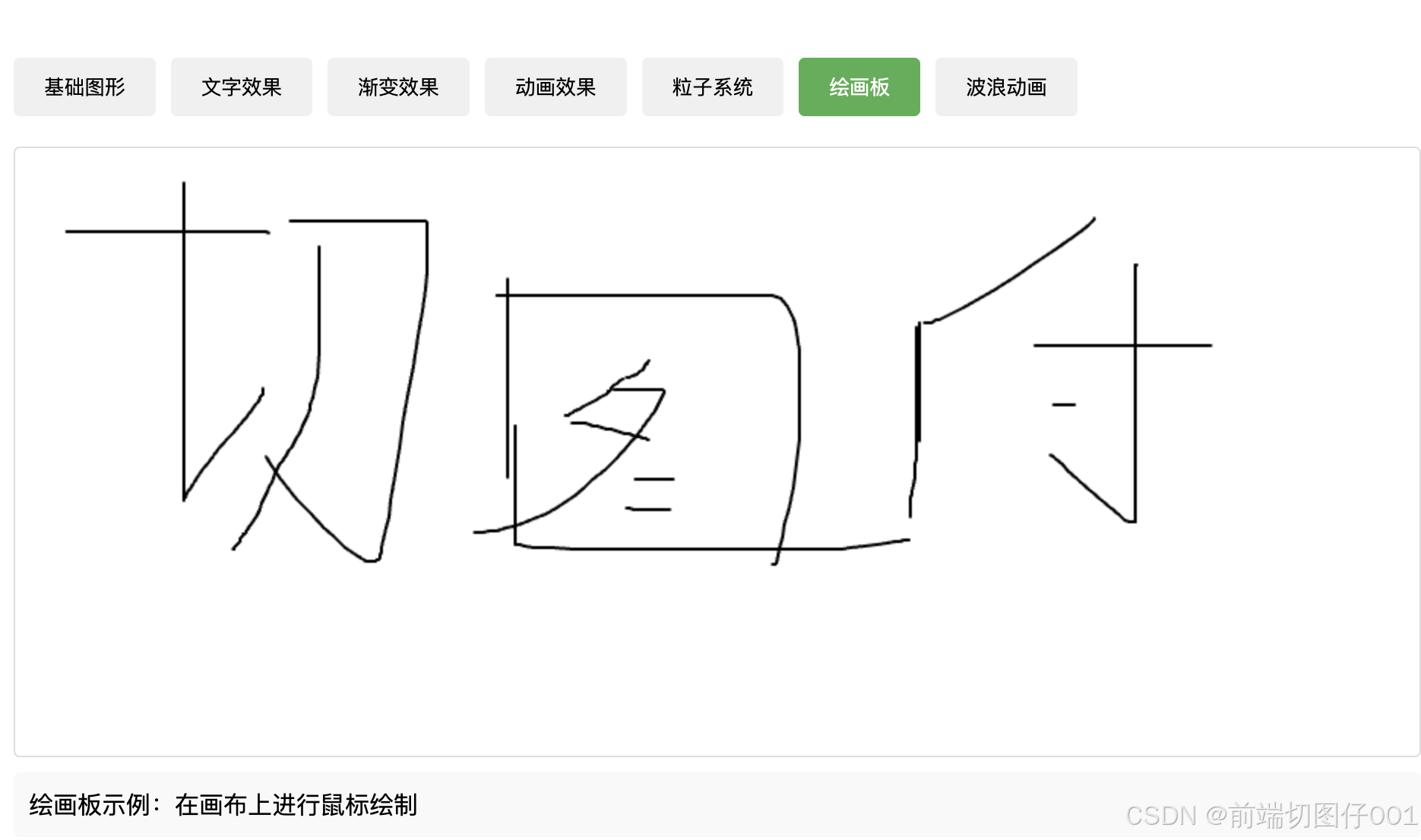
4.7 交互效果
// 绘画板效果
let isDrawing = false;
let lastX = 0;
let lastY = 0;

canvas.addEventListener('mousedown', startDrawing);
canvas.addEventListener('mousemove', draw);
canvas.addEventListener('mouseup', stopDrawing);
canvas.addEventListener('mouseout', stopDrawing);

function startDrawing(e) {
    isDrawing = true;
    [lastX, lastY] = [e.offsetX, e.offsetY];
}

function draw(e) {
    if (!isDrawing) return;

    ctx.beginPath();
    ctx.moveTo(lastX, lastY);
    ctx.lineTo(e.offsetX, e.offsetY);
    ctx.strokeStyle = '#000';
    ctx.lineWidth = 2;
    ctx.lineCap = 'round';
    ctx.stroke();

    [lastX, lastY] = [e.offsetX, e.offsetY];
}

function stopDrawing() {
    isDrawing = false;
}
4.8 高级视觉效果
// 波浪动画
function drawWave() {
    let offset = 0;
    function animate() {
        ctx.clearRect(0, 0, canvas.width, canvas.height);
        ctx.beginPath();
        ctx.moveTo(0, canvas.height/2);

        for(let i = 0; i < canvas.width; i++) {
            ctx.lineTo(
                i,
                canvas.height/2 + Math.sin(i * 0.02 + offset) * 20
            );
        }

        ctx.strokeStyle = '#4CAF50';
        ctx.stroke();
        offset += 0.05;
        requestAnimationFrame(animate);
    }
    animate();
}

// 模糊效果
ctx.filter = 'blur(4px)';
ctx.fillStyle = '#4CAF50';
ctx.fillRect(10, 10, 100, 100);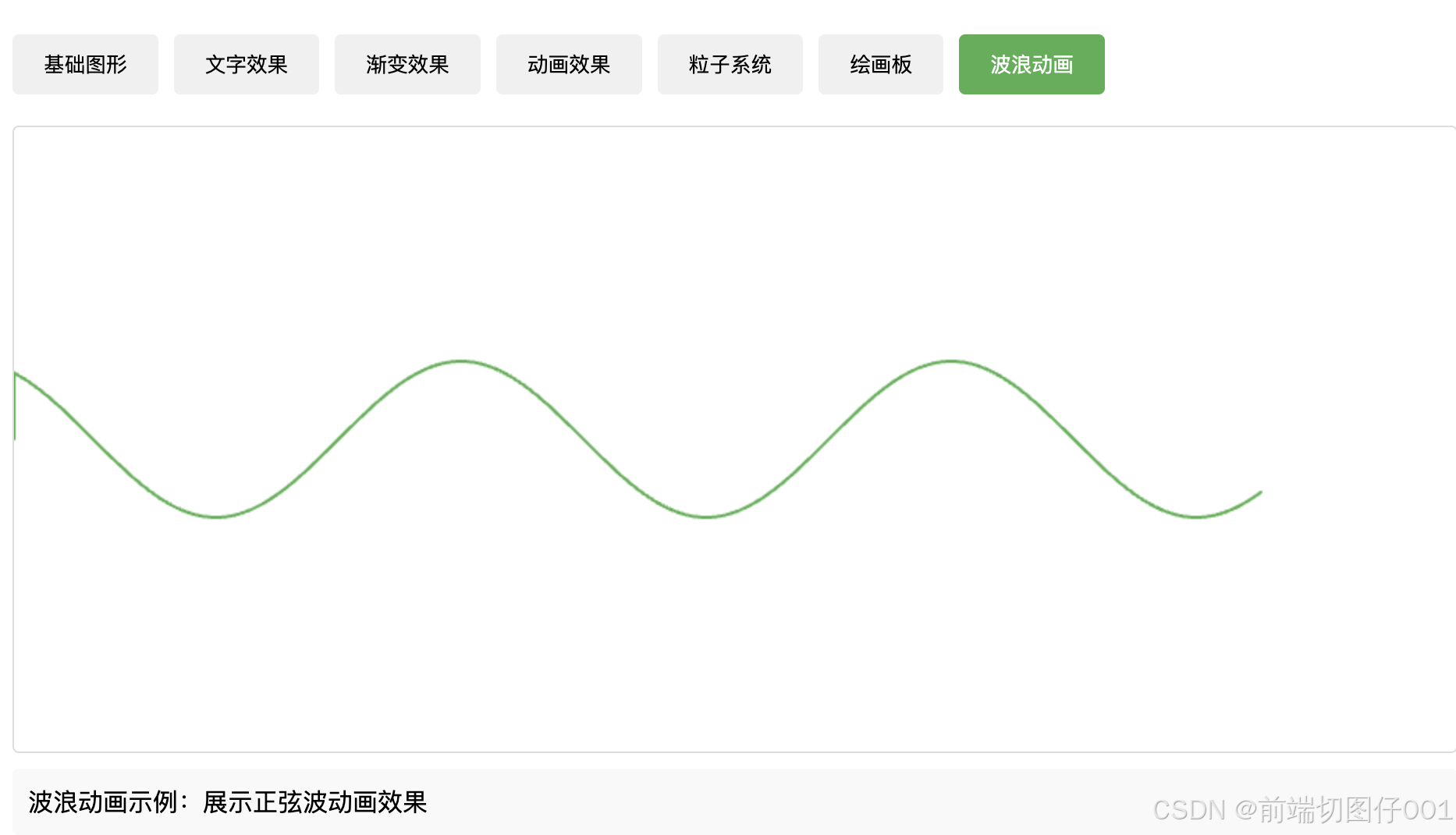
五、优化与性能
5.1 Canvas 性能优化技巧
1. 避免浮点数坐标
// 不推荐
ctx.drawImage(image, 10.5, 10.5);

// 推荐
ctx.drawImage(image, Math.floor(10.5), Math.floor(10.5));
2. 使用多层画布
// 创建背景层和动画层
const bgCanvas = document.createElement('canvas');
const spriteCanvas = document.createElement('canvas');

// 静态内容绘制在背景层
function drawBackground() {
    const bgCtx = bgCanvas.getContext('2d');
    // 绘制背景
}

// 动态内容绘制在精灵层
function drawSprites() {
    const spriteCtx = spriteCanvas.getContext('2d');
    // 绘制精灵
}
3. 批量绘制
// 不推荐
for (let i = 0; i < 100; i++) {
    ctx.beginPath();
    ctx.arc(x[i], y[i], 5, 0, Math.PI * 2);
    ctx.fill();
}

// 推荐
ctx.beginPath();
for (let i = 0; i < 100; i++) {
    ctx.arc(x[i], y[i], 5, 0, Math.PI * 2);
    ctx.moveTo(x[i] + 5, y[i]);
}
ctx.fill();
4. 适配高清屏幕
function setupHiDPI(canvas) {
    const dpr = window.devicePixelRatio || 1;
    const rect = canvas.getBoundingClientRect();

    canvas.width = rect.width * dpr;
    canvas.height = rect.height * dpr;
    canvas.style.width = rect.width + 'px';
    canvas.style.height = rect.height + 'px';

    const ctx = canvas.getContext('2d');
    ctx.scale(dpr, dpr);
    return ctx;
}
六、常见问题与解决方案
6.1 图像模糊问题
// 解决方案
function fixBlurryLines() {
    // 1. 确保坐标使用整数
    const x = Math.floor(10.5);

    // 2. 对齐到物理像素
    ctx.translate(0.5, 0.5);

    // 3. 使用适当的线宽
    ctx.lineWidth = 1;
}
6.2 图像平滑
// 禁用图像平滑
ctx.imageSmoothingEnabled = false;

// 设置平滑质量
ctx.imageSmoothingQuality = 'high'; // low, medium, high
6.3 内存管理
// 清理不再使用的资源
function cleanup() {
    // 清除画布内容
    ctx.clearRect(0, 0, canvas.width, canvas.height);

    // 释放图像资源
    image.src = '';
    image = null;

    // 移除事件监听器
    canvas.removeEventListener('mousemove', handleMouseMove);
}
七、调试技巧
7.1 使用网格辅助线
function drawGrid(size = 10) {
    ctx.save();
    ctx.strokeStyle = '#ddd';
    ctx.lineWidth = 0.5;

    for (let i = 0; i < canvas.width; i += size) {
        ctx.beginPath();
        ctx.moveTo(i, 0);
        ctx.lineTo(i, canvas.height);
        ctx.stroke();
    }

    for (let i = 0; i < canvas.height; i += size) {
        ctx.beginPath();
        ctx.moveTo(0, i);
        ctx.lineTo(canvas.width, i);
        ctx.stroke();
    }

    ctx.restore();
}
7.2 性能监控
// FPS计数器
class FPSCounter {
    constructor() {
        this.fps = 0;
        this.lastTime = performance.now();
        this.frames = 0;
    }

    update() {
        this.frames++;
        const time = performance.now();
        if (time >= this.lastTime + 1000) {
            this.fps = this.frames;
            this.frames = 0;
            this.lastTime = time;
        }
        return this.fps;
    }
}

const fpsCounter = new FPSCounter();
八、扩展阅读
8.1 推荐资源
- MDN Canvas教程
- HTML5 Canvas游戏开发
- 数据可视化相关书籍
- Canvas性能优化指南
8.2 进阶方向
- WebGL与3D图形
- 游戏开发
- 数据可视化
- 图像处理
- 动画制作
九、总结
Canvas是一个功能强大的HTML5绘图工具,掌握了以上内容后,你应该能够:
- 熟练使用基础API进行绘图
- 创建各种动画效果
- 处理用户交互
- 优化Canvas应用性能
- 解决常见问题
关键建议:
- 始终注意性能优化
- 保持代码结构清晰
- 适当使用面向对象的方式组织代码
- 注意浏览器兼容性
- 根据实际需求选择合适的实现方案
完整代码
<!DOCTYPE html>
<html>
<head>
    <title>Canvas 示例展示</title>
    <style>
        * {
            margin: 0;
            padding: 0;
            box-sizing: border-box;
        }

        .container {
            max-width: 1200px;
            margin: 20px auto;
            padding: 20px;
        }

        .tabs {
            display: flex;
            flex-wrap: wrap;
            gap: 10px;
            margin-bottom: 20px;
        }

        .tab {
            padding: 10px 20px;
            background: #f0f0f0;
            border: none;
            border-radius: 4px;
            cursor: pointer;
            transition: background 0.3s;
        }

        .tab:hover {
            background: #e0e0e0;
        }

        .tab.active {
            background: #4CAF50;
            color: white;
        }

        .canvas-container {
            border: 1px solid #ddd;
            border-radius: 4px;
            overflow: hidden;
        }

        canvas {
            display: block;
        }

        .description {
            margin-top: 10px;
            padding: 10px;
            background: #f9f9f9;
            border-radius: 4px;
        }
    </style>
</head>
<body>
    <div class="container">
        <div class="tabs">
            <button class="tab active" onclick="switchDemo('basicShapes', event)">基础图形</button>
            <button class="tab" onclick="switchDemo('textEffects', event)">文字效果</button>
            <button class="tab" onclick="switchDemo('gradients', event)">渐变效果</button>
            <button class="tab" onclick="switchDemo('animation', event)">动画效果</button>
            <button class="tab" onclick="switchDemo('particles', event)">粒子系统</button>
            <button class="tab" onclick="switchDemo('drawing', event)">绘画板</button>
            <button class="tab" onclick="switchDemo('wave', event)">波浪动画</button>
        </div>

        <div class="canvas-container">
            <canvas id="demoCanvas" width="800" height="400"></canvas>
        </div>

        <div class="description" id="demoDescription">
            点击上方按钮查看不同效果
        </div>
    </div>

    <script>
        const canvas = document.getElementById('demoCanvas');
        const ctx = canvas.getContext('2d');
        let animationId = null;
        let currentDemo = '';

        // 清除当前动画
        function clearCurrentAnimation() {
            if (animationId) {
                cancelAnimationFrame(animationId);
                animationId = null;
            }
            ctx.clearRect(0, 0, canvas.width, canvas.height);
        }

        // 基础图形示例
        function drawBasicShapes() {
            clearCurrentAnimation();

            // 矩形
            ctx.fillStyle = '#4CAF50';
            ctx.fillRect(50, 50, 100, 100);

            // 圆形
            ctx.beginPath();
            ctx.arc(250, 100, 50, 0, Math.PI * 2);
            ctx.fillStyle = '#2196F3';
            ctx.fill();

            // 三角形
            ctx.beginPath();
            ctx.moveTo(400, 150);
            ctx.lineTo(350, 50);
            ctx.lineTo(450, 50);
            ctx.closePath();
            ctx.fillStyle = '#FFC107';
            ctx.fill();

            // 描边矩形
            ctx.strokeStyle = '#FF5722';
            ctx.lineWidth = 5;
            ctx.strokeRect(500, 50, 100, 100);
        }

        // 文字效果示例
        function drawTextEffects() {
            clearCurrentAnimation();

            // 基础文字
            ctx.font = '30px Arial';
            ctx.fillStyle = '#333';
            ctx.fillText('Hello Canvas!', 50, 50);

            // 描边文字
            ctx.font = '40px Arial';
            ctx.strokeStyle = '#ff0000';
            ctx.strokeText('Stroke Text', 50, 150);

            // 带阴影的文字
            ctx.font = '36px Arial';
            ctx.shadowColor = 'rgba(0,0,0,0.5)';
            ctx.shadowBlur = 4;
            ctx.shadowOffsetX = 2;
            ctx.shadowOffsetY = 2;
            ctx.fillStyle = '#4CAF50';
            ctx.fillText('Shadow Text', 50, 250);

            // 居中文字
            ctx.textAlign = 'center';
            ctx.textBaseline = 'middle';
            ctx.fillStyle = '#2196F3';
            ctx.shadowColor = 'transparent';
            ctx.fillText('Centered Text', canvas.width/2, canvas.height/2);
        }

        // 渐变效果示例
        function drawGradients() {
            clearCurrentAnimation();

            // 线性渐变
            let linearGradient = ctx.createLinearGradient(50, 50, 250, 50);
            linearGradient.addColorStop(0, 'red');
            linearGradient.addColorStop(0.5, 'green');
            linearGradient.addColorStop(1, 'blue');

            ctx.fillStyle = linearGradient;
            ctx.fillRect(50, 50, 200, 100);

            // 径向渐变
            let radialGradient = ctx.createRadialGradient(450, 100, 10, 450, 100, 50);
            radialGradient.addColorStop(0, 'white');
            radialGradient.addColorStop(1, '#4CAF50');

            ctx.fillStyle = radialGradient;
            ctx.beginPath();
            ctx.arc(450, 100, 50, 0, Math.PI * 2);
            ctx.fill();

            // 彩虹渐变
            let rainbowGradient = ctx.createLinearGradient(50, 200, 650, 200);
            rainbowGradient.addColorStop(0, 'red');
            rainbowGradient.addColorStop(0.17, 'orange');
            rainbowGradient.addColorStop(0.33, 'yellow');
            rainbowGradient.addColorStop(0.5, 'green');
            rainbowGradient.addColorStop(0.67, 'blue');
            rainbowGradient.addColorStop(0.83, 'indigo');
            rainbowGradient.addColorStop(1, 'violet');

            ctx.fillStyle = rainbowGradient;
            ctx.fillRect(50, 200, 600, 100);
        }

        // 动画效果示例
        function startAnimation() {
            let x = 50;
            let y = 200;
            let dx = 2;
            let dy = -2;
            let radius = 20;

            function animate() {
                ctx.clearRect(0, 0, canvas.width, canvas.height);

                ctx.beginPath();
                ctx.arc(x, y, radius, 0, Math.PI * 2);
                ctx.fillStyle = '#0095DD';
                ctx.fill();

                if (x + dx > canvas.width - radius || x + dx < radius) {
                    dx = -dx;
                }
                if (y + dy > canvas.height - radius || y + dy < radius) {
                    dy = -dy;
                }

                x += dx;
                y += dy;

                animationId = requestAnimationFrame(animate);
            }

            animate();
        }

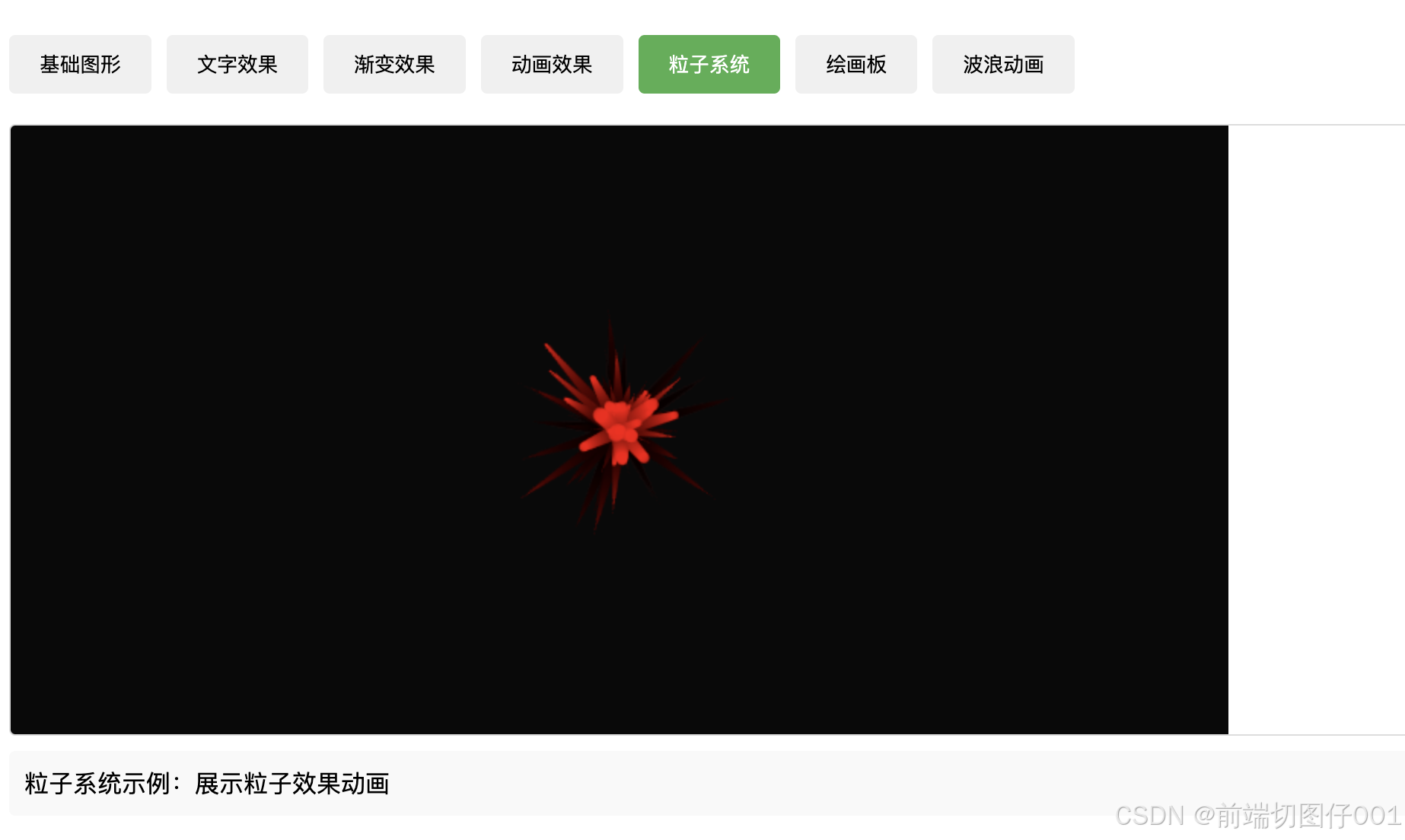
        // 粒子系统
        class Particle {
            constructor(x, y) {
                this.x = x;
                this.y = y;
                this.size = Math.random() * 5 + 1;
                this.speedX = Math.random() * 3 - 1.5;
                this.speedY = Math.random() * 3 - 1.5;
            }

            update() {
                this.x += this.speedX;
                this.y += this.speedY;
                if (this.size > 0.2) this.size -= 0.1;
            }

            draw() {
                ctx.fillStyle = 'rgba(255,0,0,0.8)';
                ctx.beginPath();
                ctx.arc(this.x, this.y, this.size, 0, Math.PI * 2);
                ctx.fill();
            }
        }

        let particles = [];

        function startParticleSystem() {
            function animate() {
                ctx.fillStyle = 'rgba(0,0,0,0.05)';
                ctx.fillRect(0, 0, canvas.width, canvas.height);

                if (particles.length < 100) {
                    particles.push(new Particle(canvas.width/2, canvas.height/2));
                }

                for(let i = 0; i < particles.length; i++) {
                    particles[i].update();
                    particles[i].draw();

                    if(particles[i].size <= 0.2) {
                        particles.splice(i, 1);
                        i--;
                    }
                }

                animationId = requestAnimationFrame(animate);
            }

            animate();
        }

        // 绘画板
        function setupDrawing() {
            clearCurrentAnimation();

            let isDrawing = false;
            let lastX = 0;
            let lastY = 0;

            function startDrawing(e) {
                isDrawing = true;
                [lastX, lastY] = [e.offsetX, e.offsetY];
            }

            function draw(e) {
                if (!isDrawing) return;

                ctx.beginPath();
                ctx.moveTo(lastX, lastY);
                ctx.lineTo(e.offsetX, e.offsetY);
                ctx.strokeStyle = '#000';
                ctx.lineWidth = 2;
                ctx.lineCap = 'round';
                ctx.stroke();

                [lastX, lastY] = [e.offsetX, e.offsetY];
            }

            function stopDrawing() {
                isDrawing = false;
            }

            canvas.addEventListener('mousedown', startDrawing);
            canvas.addEventListener('mousemove', draw);
            canvas.addEventListener('mouseup', stopDrawing);
            canvas.addEventListener('mouseout', stopDrawing);
        }

        // 波浪动画
        function startWaveAnimation() {
            let offset = 0;

            function animate() {
                ctx.clearRect(0, 0, canvas.width, canvas.height);
                ctx.beginPath();
                ctx.moveTo(0, canvas.height/2);

                for(let i = 0; i < canvas.width; i++) {
                    ctx.lineTo(
                        i,
                        canvas.height/2 + Math.sin(i * 0.02 + offset) * 50
                    );
                }

                ctx.strokeStyle = '#4CAF50';
                ctx.lineWidth = 2;
                ctx.stroke();

                offset += 0.05;
                animationId = requestAnimationFrame(animate);
            }

            animate();
        }

        // 切换演示
        function switchDemo(demo, event) {
            // 更新按钮状态
            document.querySelectorAll('.tab').forEach(tab => {
                tab.classList.remove('active');
            });

            if (event) {
                event.target.classList.add('active');
            } else {
                document.querySelector(`[onclick="switchDemo('${demo}', event)"]`).classList.add('active');
            }

            // 清除之前的事件监听
            canvas.removeEventListener('mousedown', ()=>{});
            canvas.removeEventListener('mousemove', ()=>{});
            canvas.removeEventListener('mouseup', ()=>{});
            canvas.removeEventListener('mouseout', ()=>{});

            // 清除动画
            clearCurrentAnimation();
            particles = [];

            // 执行新的演示
            switch(demo) {
                case 'basicShapes':
                    drawBasicShapes();
                    document.getElementById('demoDescription').textContent =
                        '基础图形示例:展示矩形、圆形、三角形等基本形状的绘制';
                    break;
                case 'textEffects':
                    drawTextEffects();
                    document.getElementById('demoDescription').textContent =
                        '文字效果示例:展示不同样式的文字渲染效果';
                    break;
                case 'gradients':
                    drawGradients();
                    document.getElementById('demoDescription').textContent =
                        '渐变效果示例:展示线性渐变和径向渐变效果';
                    break;
                case 'animation':
                    startAnimation();
                    document.getElementById('demoDescription').textContent =
                        '动画效果示例:展示简单的弹球动画';
                    break;
                case 'particles':
                    startParticleSystem();
                    document.getElementById('demoDescription').textContent =
                        '粒子系统示例:展示粒子效果动画';
                    break;
                case 'drawing':
                    setupDrawing();
                    document.getElementById('demoDescription').textContent =
                        '绘画板示例:在画布上进行鼠标绘制';
                    break;
                case 'wave':
                    startWaveAnimation();
                    document.getElementById('demoDescription').textContent =
                        '波浪动画示例:展示正弦波动画效果';
                    break;
            }

            currentDemo = demo;
        }

        // 初始化显示基础图形
        switchDemo('basicShapes', null);
    </script>
</body>
</html>
这里是“一人公司”的成长家园。我们提供从产品曝光、技术变现到法律财税的全栈内容,并连接云服务、办公空间等稀缺资源,助你专注创造,无忧运营。
更多推荐

 12
12 0
0- 0



 已为社区贡献1条内容

所有评论(0)