Android圆形按钮示例
android mvp示例In this tutorial you will learn how to create a round button in android.在本教程中,您将学习如何在android中创建圆形按钮。Shape drawable resource is used to define shape of a view. Below I have shared an e...
In this tutorial you will learn how to create a round button in android.
在本教程中,您将学习如何在android中创建圆形按钮。
Shape drawable resource is used to define shape of a view. Below I have shared an example to to make a circle button.
形状可绘制资源用于定义视图的形状。 下面我分享了一个制作圆圈按钮的示例。
Android圆形按钮示例 (Android Round Button Example)
Create a xml file inside res/drawable folder.
在res / drawable文件夹中创建一个xml文件。
round_button.xml
round_button.xml
<?xml version="1.0" encoding="utf-8"?>
<shape xmlns:android="http://schemas.android.com/apk/res/android"
    android:shape="oval">
    <stroke
        android:color="#FF6F00"
        android:width="3dip"/>
    <solid android:color="#FFC107"/>
    <size android:width="100dp" android:height="100dp"/>
</shape>
shape: Defines shape of view. It can be rectangle, oval, line and ring. In this case we are using oval shape to make the button circular.
shape:定义视图的形状。 它可以是矩形,椭圆形,线形和环形。 在这种情况下,我们使用椭圆形使按钮变为圆形。
stroke: Defines boundary of shape.
笔触:定义形状的边界。
solid: Defines background color of shape.
实体:定义形状的背景色。
size: Defines size of shape.
size:定义形状的大小。
Now set this xml as background of the button.
现在,将此xml设置为按钮的背景。
<Button
        android:layout_width="wrap_content"
        android:layout_height="wrap_content"
        android:text="Button"
        android:background="@drawable/round_button"/>
The button will look like:
该按钮将如下所示:
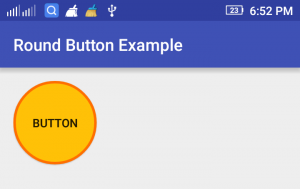
You can customize its color and size according to your need.
您可以根据需要自定义其颜色和大小。
翻译自: https://www.thecrazyprogrammer.com/2016/10/android-round-button-example.html

这里是“一人公司”的成长家园。我们提供从产品曝光、技术变现到法律财税的全栈内容,并连接云服务、办公空间等稀缺资源,助你专注创造,无忧运营。
更多推荐


 10
10 0
0- 0


 已为社区贡献1条内容

所有评论(0)