Python项目Git工作流:团队协作最佳实践
·
Python项目Git工作流:团队协作最佳实践
引言
Git是现代软件开发中不可或缺的版本控制工具,掌握良好的Git工作流对于团队协作至关重要。作为一名从Python转向Rust的后端开发者,我在实践中总结了Git工作流的最佳实践。本文将深入探讨Python项目中的Git工作流,帮助你提升团队协作效率。
一、Git基础回顾
1.1 Git核心概念
| 概念 | 说明 |
|---|---|
| Commit | 代码提交,包含变更和提交信息 |
| Branch | 分支,独立的开发线 |
| Merge | 合并分支 |
| Pull Request | 代码审查请求 |
| Rebase | 重新设置提交基线 |
1.2 常用Git命令
# 创建分支
git checkout -b feature/user-auth

# 添加文件
git add .

# 提交
git commit -m "feat: add user authentication"

# 推送
git push origin feature/user-auth

# 拉取
git pull origin main
二、Git工作流模式
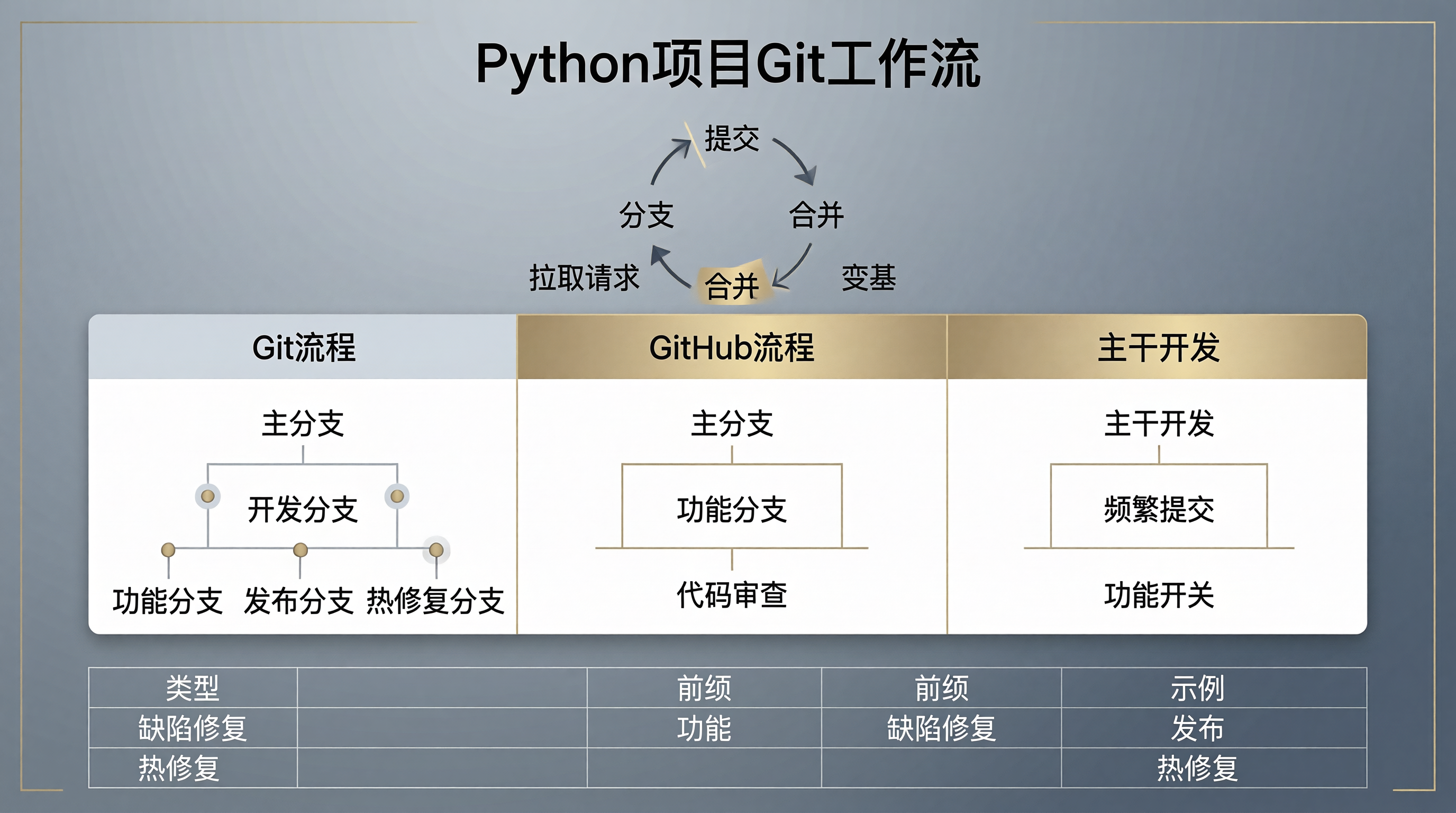
2.1 Git Flow
main (稳定分支)
    |
    +-- develop (开发分支)
            |
            +-- feature/* (功能分支)
            +-- release/* (发布分支)
            +-- hotfix/* (热修复分支)
操作流程:
# 创建功能分支
git checkout -b feature/user-auth develop

# 开发完成后合并到develop
git checkout develop
git merge --no-ff feature/user-auth

# 删除功能分支
git branch -d feature/user-auth
2.2 GitHub Flow
main (主分支)
    |
    +-- feature/* (功能分支)
操作流程:
# 创建功能分支
git checkout -b feature/user-auth main

# 开发完成后推送
git push origin feature/user-auth

# 创建Pull Request进行代码审查

# 审查通过后合并到main
git checkout main
git merge feature/user-auth
2.3 Trunk Based Development
main (主分支)
    |
    +-- short-lived feature branches (短期功能分支)
特点:
- 频繁提交到main分支
- 使用功能开关控制功能发布
- 适合持续集成/持续部署
三、分支命名规范
3.1 分支类型
| 类型 | 前缀 | 示例 |
|---|---|---|
| 功能 | feature/ |
feature/user-auth |
| Bug修复 | bugfix/ |
bugfix/login-error |
| 热修复 | hotfix/ |
hotfix/production-crash |
| 文档 | docs/ |
docs/api-update |
| 重构 | refactor/ |
refactor/database-layer |
| 测试 | test/ |
test/user-service |
3.2 命名示例
# 功能分支
feature/user-registration
feature/payment-integration

# Bug修复分支
bugfix/email-sending-failure
bugfix/api-response-format

# 热修复分支
hotfix/security-vulnerability
hotfix/database-connection
四、提交信息规范
4.1 Conventional Commits
<type>(<scope>): <description>

[optional body]

[optional footer]
类型说明:
| 类型 | 说明 |
|---|---|
feat |
新功能 |
fix |
Bug修复 |
docs |
文档更新 |
style |
代码格式 |
refactor |
重构 |
test |
测试 |
chore |
构建/工具 |
4.2 提交示例
# 好的提交信息
git commit -m "feat(user): add login endpoint"
git commit -m "fix(api): handle null response from database"
git commit -m "docs(readme): update installation instructions"

# 不好的提交信息
git commit -m "update code"
git commit -m "fix stuff"
git commit -m "changes"
4.3 详细提交信息
git commit -m "feat(payment): add stripe integration

- Implement Stripe payment gateway
- Add webhook handling for payment events
- Update payment status tracking

Closes #123"
五、代码审查流程
5.1 Pull Request模板
## Description
Brief description of changes

## Type of change
- [ ] Bug fix (non-breaking change which fixes an issue)
- [ ] New feature (non-breaking change which adds functionality)
- [ ] Breaking change (fix or feature that would cause existing functionality to not work as expected)
- [ ] Documentation update

## Testing
- [ ] Unit tests added
- [ ] Integration tests added
- [ ] Manual testing performed

## Related Issues
Closes #123
5.2 代码审查检查清单
- 代码符合项目风格指南
- 有适当的测试覆盖
- 没有调试代码残留
- 文档已更新
- 没有引入新的依赖
- 性能影响已评估
5.3 代码审查礼仪
- 及时响应:PR创建后尽快进行审查
- 保持专业:专注于代码质量,不进行人身攻击
- 提供上下文:解释为什么提出修改建议
- 接受反馈:审查者的建议通常是为了改进代码
六、冲突解决
6.1 处理合并冲突
# 拉取最新代码
git checkout feature/user-auth
git pull origin main

# 查看冲突文件
git status

# 手动解决冲突后
git add .
git commit -m "fix: resolve merge conflicts"
git push origin feature/user-auth
6.2 使用Rebase避免冲突
# 在功能分支上rebase
git checkout feature/user-auth
git rebase main

# 如果有冲突,解决后继续
git rebase --continue

# 强制推送
git push -f origin feature/user-auth
七、标签管理
7.1 创建标签
# 创建轻量标签
git tag v1.0.0

# 创建带注释的标签
git tag -a v1.0.0 -m "Version 1.0.0"

# 推送标签
git push origin v1.0.0
git push origin --tags
7.2 标签命名规范
# 版本标签
v1.0.0
v1.0.1
v2.0.0-beta.1

# 发布标签
release/1.0.0
release/1.0.1
八、Git钩子
8.1 预提交钩子
#!/bin/bash
# .git/hooks/pre-commit

# 运行代码格式化
black .

# 运行代码检查
flake8 .

# 运行测试
pytest

exit $?
8.2 使用pre-commit框架
# .pre-commit-config.yaml
repos:
- repo: https://github.com/psf/black
  rev: 23.1.0
  hooks:
  - id: black
    language_version: python3.11

- repo: https://github.com/PyCQA/flake8
  rev: 6.0.0
  hooks:
  - id: flake8

- repo: https://github.com/pre-commit/mirrors-mypy
  rev: v1.0.1
  hooks:
  - id: mypy
九、实战案例:完整的Git工作流
# 1. 从main分支创建功能分支
git checkout main
git pull origin main
git checkout -b feature/user-auth

# 2. 开发功能
# 修改代码...
git add .
git commit -m "feat(user): add login endpoint"

# 3. 同步main分支
git checkout main
git pull origin main
git checkout feature/user-auth
git merge main

# 4. 解决冲突(如果有)
# 修改冲突文件...
git add .
git commit -m "fix: resolve merge conflicts"

# 5. 推送分支
git push origin feature/user-auth

# 6. 创建Pull Request进行代码审查

# 7. 审查通过后合并
git checkout main
git merge --no-ff feature/user-auth
git push origin main

# 8. 删除功能分支
git branch -d feature/user-auth
git push origin --delete feature/user-auth
十、Git最佳实践
10.1 保持提交原子化
# 不好的做法
git commit -m "add login and logout"

# 好的做法
git commit -m "feat(user): add login endpoint"
git commit -m "feat(user): add logout endpoint"
10.2 定期同步远程分支
# 定期拉取main分支
git checkout main
git pull origin main

# 同步到功能分支
git checkout feature/user-auth
git merge main
10.3 使用.gitignore
# .gitignore
__pycache__/
*.pyc
*.pyo
*.pyd
.Python
.env
.venv/
*.egg-info/
10.4 避免直接修改main分支
# 不好的做法
git checkout main
git add .
git commit -m "quick fix"
git push origin main

# 好的做法
git checkout -b hotfix/quick-fix main
git add .
git commit -m "fix: quick fix"
git push origin hotfix/quick-fix
# 创建PR并合并
总结
Git工作流是团队协作的基础。通过本文的学习,你应该掌握了以下核心要点:
- Git基础:核心概念、常用命令
- 工作流模式:Git Flow、GitHub Flow、Trunk Based
- 分支命名:规范的分支命名约定
- 提交规范:Conventional Commits
- 代码审查:PR流程、审查清单
- 冲突解决:合并冲突、Rebase
- 标签管理:版本标签、发布标签
- Git钩子:pre-commit框架
- 最佳实践:原子化提交、定期同步
作为从Python转向Rust的后端开发者,掌握Git工作流对于团队协作至关重要。良好的Git习惯可以显著提升团队的开发效率和代码质量。

这里是“一人公司”的成长家园。我们提供从产品曝光、技术变现到法律财税的全栈内容,并连接云服务、办公空间等稀缺资源,助你专注创造,无忧运营。
更多推荐

 8
8 0
0- 0


 已为社区贡献43条内容

所有评论(0)