用 AI Agent 给晶圆厂算产能:从0到1搭建 FabCapacityAgent 全记录
用 AI Agent 给晶圆厂算产能:从0到1搭建 FabCapacityAgent 全记录
一个制造部工程师的 AI 实践:不依赖 LangChain,纯 Python 手搓 PTA Agent 框架,
实现晶圆厂产能的实时监控、瓶颈诊断、预测规划。附完整源码和架构设计思路。
github:https://github.com/BumbleBee-ZDS/FabCapacityAgent
写在前面:为什么我要做这件事
一名半导体晶圆厂的制造部工程师,日常工作就是管产线、盯产能。
说实话,产能这件事在 Fab 里是个"老大难":
- 工序多:一片晶圆从投片到出片,要经过光刻、刻蚀、沉积、离子注入、扩散、CMP、量测、清洗等几百道工序,任何一道卡住,后面全堵
- 设备贵:一台 EUV 光刻机动辄上亿美元,OEE 每掉 1 个点,一个月就是几百万的损失
- 变量多:PM(预防性维护)、Down(宕机)、Setup(换线)、产品切换……影响产能的因素多到让人头大
- 决策靠经验:很多产能规划还是靠"老师傅"拍脑袋,Excel 拉一拉,经验估一估
2026 年,全球半导体进入扩产超级周期。SEMI 数据显示,2026 年全球 300mm 晶圆厂设备支出预计达 1330 亿美元,中国新增 12 英寸产能占全球 77%。产能管理的重要性前所未有。
中国信通院在《工业智能创新发展报告(2026年)》中明确提出:"智能模型 + 数字孪生 + 智能体"将构成未来工业系统架构。
于是我想:能不能用 AI Agent 来替代这些重复性的产能计算和分析工作?
不是那种花里胡哨的大模型聊天机器人,而是真正能感知产线数据、分析瓶颈、给出决策建议的智能体系统。
于是我用 Python + Streamlit 搭了一个 MVP——FabCapacityAgent。今天把整个设计思路和实现过程分享出来。
一、需求分析:Fab 产能到底要算什么?
在动手写代码之前,我先梳理了 Fab 产能管理的核心场景:
1.1 三大核心场景
| 场景 | 痛点 | 期望 |
|---|---|---|
| 实时监控 | 设备状态、WIP 分布靠人盯,反应慢 | 自动采集、异常告警、一目了然 |
| 历史分析 | OEE 趋势、Cycle Time 波动靠手动拉报表 | 自动趋势分析、瓶颈定位、异常检测 |
| 产能规划 | 加设备、调 OEE 的影响靠 Excel 估 | What-If 仿真、蒙特卡洛模拟、量化对比 |
1.2 关键 KPI 体系
做 Fab 的都知道,产能不是单一数字,而是一组指标:
OEE = 可用率(Availability) × 性能率(Performance) × 良率(Quality)
UPH = 完工晶圆数 / 设备运行小时数
Cycle Time = 出片时间 - 投片时间
Throughput = 统计周期内完工晶圆总数
Bottleneck Rate = 瓶颈工序利用率 / 全厂平均利用率
1.3 为什么用 Agent 而不是写个脚本?
你可能会问:这些计算写几个 Python 脚本不就行了,为什么要搞 Agent?
关键区别在于:
- 脚本:输入 → 计算 → 输出,一次性的、被动的
- Agent:感知 → 思考 → 行动,循环的、主动的、可组合的
Agent 架构的好处:
- 可编排:4 个 Agent 串联,每个 Agent 职责单一,可独立调试
- 可扩展:想加一个"排产优化 Agent",直接插入 Pipeline 即可
- 可解释:每个 Agent 的输入输出都有日志,决策过程透明
- 可增强:Think 阶段可以接 LLM,让分析结论更自然、更有洞察
二、架构设计:四 Agent 串联的 PTA 循环
2.1 整体架构
用户查询 / 定时触发
↓

┌──────────────────────────────────────────────────────┐
│              Orchestrator (编排器)                     │
│                                                       │
│  ┌──────────────┐  ┌──────────────┐                 │
│  │ Perception   │──▶│  Analysis    │                 │
│  │   Agent      │  │    Agent     │                 │
│  │ 感知数据     │  │ 分析瓶颈     │                 │
│  └──────────────┘  └──────────────┘                 │
│        │                   │                         │
│        ▼                   ▼                         │
│  ┌──────────────┐  ┌──────────────┐                 │
│  │ Decision     │──▶│ Execution    │                 │
│  │   Agent      │  │    Agent     │                 │
│  │ 生成决策     │  │ 输出报告     │                 │
│  └──────────────┘  └──────────────┘                 │
└──────────────────────────────────────────────────────┘

↓

产能分析报告 + 优化建议 + What-If 对比
2.2 PTA 循环:Agent 的核心抽象
每个 Agent 都遵循 Perceive → Think → Act 三阶段循环:
| 阶段 | 职责 | 示例 |
|---|---|---|
| Perceive | 从环境/上游采集数据 | 查数据库获取近 24h 设备状态 |
| Think | 分析推理、生成决策 | 计算 OEE、识别瓶颈工序 |
| Act | 输出结构化结果 | 生成瓶颈报告、写回上下文 |
这个设计参考了经典的 BDI(Belief-Desire-Intention)Agent 模型,但做了极简化——不引入任何重型框架,纯 Python 实现。
2.3 四个 Agent 的职责分工
| Agent | 职责 | 输入 | 输出 | 调用服务 |
|---|---|---|---|---|
| PerceptionAgent | 采集 MES 数据,构建产能快照 | window_hours=24 | 全厂/工序级 KPI 快照 | CapacityCalculator |
| AnalysisAgent | 趋势分析 + 瓶颈诊断 | 快照 + 历史数据 | 瓶颈报告 + 根因分析 | BottleneckDetector |
| DecisionAgent | 产能预测 + What-If 仿真 | 瓶颈报告 | 7/30 天预测 + 情景对比 | Predictor + WhatIfSimulator |
| ExecutionAgent | 汇总生成 Markdown 报告 | 前三步全部输出 | 结构化产能分析报告 | LLM(可选) |
三、核心代码实现
3.1 Agent 基类:PTA 循环的灵魂
# agents/base_agent.py

from abc import ABC, abstractmethod
from dataclasses import dataclass, field
from datetime import datetime
from typing import Any
import logging
import time

logger = logging.getLogger(__name__)


@dataclass
class AgentResult:
    """Agent 执行结果的标准封装"""
    agent_name: str
    status: str  # "success" | "error" | "skipped"
    perception: dict = field(default_factory=dict)
    decision: dict = field(default_factory=dict)
    action: dict = field(default_factory=dict)
    duration_s: float = 0.0
    error_msg: str = ""
    timestamp: str = field(default_factory=lambda: datetime.now().isoformat())


class BaseAgent(ABC):
    """
    PTA Agent 基类
    所有 Agent 继承此类,实现 perceive / think / act 三个方法
    """

    def __init__(self, name: str, role: str, config: dict | None = None):
        self.name = name
        self.role = role
        self.config = config or {}
        self.logger = logging.getLogger(f"agent.{name}")

    @abstractmethod
    def perceive(self, context: dict) -> dict:
        """感知阶段:从环境采集数据"""
        ...

    @abstractmethod
    def think(self, perception: dict) -> dict:
        """思考阶段:分析推理,生成决策"""
        ...

    @abstractmethod
    def act(self, decision: dict) -> dict:
        """行动阶段:执行动作,输出结果"""
        ...

    def run(self, context: dict) -> AgentResult:
        """执行完整的 PTA 循环"""
        result = AgentResult(agent_name=self.name, status="success")
        start = time.perf_counter()

        try:
            # 1. Perceive
            self.logger.info(f"[{self.name}] Perceive 开始...")
            perception = self.perceive(context)
            result.perception = perception

            # 2. Think
            self.logger.info(f"[{self.name}] Think 开始...")
            decision = self.think(perception)
            result.decision = decision

            # 3. Act
            self.logger.info(f"[{self.name}] Act 开始...")
            action = self.act(decision)
            result.action = action

        except Exception as e:
            result.status = "error"
            result.error_msg = str(e)
            self.logger.error(f"[{self.name}] 执行失败: {e}")

        result.duration_s = round(time.perf_counter() - start, 3)
        self.logger.info(f"[{self.name}] 完成, 耗时 {result.duration_s}s")
        return result
设计要点:
- 用
@dataclass封装结果,结构清晰 run()方法内置try-except,单个 Agent 失败不会拖垮整条 Pipeline- 每个阶段都有日志,方便调试
3.2 感知 Agent:构建产能快照
# agents/perception_agent.py

from agents.base_agent import BaseAgent
from services.capacity_calculator import CapacityCalculator


class PerceptionAgent(BaseAgent):
    """
    感知 Agent:从数据库采集近 N 小时 MES 数据,
    构建全厂产能快照 (CapacitySnapshot)
    """

    def __init__(self, config: dict | None = None):
        super().__init__(
            name="PerceptionAgent",
            role="数据采集与状态感知",
            config=config,
        )
        self.calculator = CapacityCalculator()

    def perceive(self, context: dict) -> dict:
        """从数据库拉取实时数据"""
        window_hours = context.get("window_hours", 24)
        raw_data = self.calculator.query_recent_data(window_hours)
        return {
            "window_hours": window_hours,
            "raw_data": raw_data,
            "record_count": len(raw_data.get("lot_history", [])),
        }

    def think(self, perception: dict) -> dict:
        """计算 KPI 快照"""
        snapshot = self.calculator.build_snapshot(
            window_hours=perception["window_hours"]
        )
        return {"snapshot": snapshot}

    def act(self, decision: dict) -> dict:
        """结构化输出快照"""
        snapshot = decision["snapshot"]
        return {
            "summary": {
                "total_oee": snapshot.get("overall_oee", 0),
                "total_wip": snapshot.get("total_wip", 0),
                "total_uph": snapshot.get("overall_uph", 0),
                "bottleneck_step": snapshot.get("bottleneck_step", "N/A"),
            },
            "step_details": snapshot.get("step_details", []),
            "equipment_status": snapshot.get("equipment_status", {}),
        }
3.3 编排器:串联四个 Agent
# agents/orchestrator.py

from agents.perception_agent import PerceptionAgent
from agents.analysis_agent import AnalysisAgent
from agents.decision_agent import DecisionAgent
from agents.execution_agent import ExecutionAgent


class AgentOrchestrator:
    """
    Agent 编排器:按 Perception → Analysis → Decision → Execution
    顺序串联执行,支持全链路和单 Agent 调用
    """

    def __init__(self, config: dict | None = None):
        self.config = config or {}
        self.agents = {
            "perception": PerceptionAgent(config),
            "analysis": AnalysisAgent(config),
            "decision": DecisionAgent(config),
            "execution": ExecutionAgent(config),
        }
        self.pipeline_order = ["perception", "analysis", "decision", "execution"]
        self.execution_log = []

    def run_full_pipeline(self, query_params: dict | None = None) -> dict:
        """执行全链路 4-Agent Pipeline"""
        context = query_params or {}
        self.execution_log = []
        results = {}

        for agent_key in self.pipeline_order:
            agent = self.agents[agent_key]
            result = agent.run(context)
            results[agent_key] = result
            self.execution_log.append(result)

            # 将当前 Agent 的输出注入上下文,供下游使用
            context[f"{agent_key}_output"] = result.action

            # 如果某个 Agent 失败,后续 Agent 标记为 skipped
            if result.status == "error":
                for remaining in self.pipeline_order[
                    self.pipeline_order.index(agent_key) + 1:
                ]:
                    results[remaining] = type(result)(
                        agent_name=remaining, status="skipped"
                    )
                break

        return {
            "results": results,
            "execution_log": self.execution_log,
            "total_duration": sum(r.duration_s for r in self.execution_log),
            "status": "success" if all(
                r.status == "success" for r in self.execution_log
            ) else "partial_failure",
        }

    def run_single_agent(self, agent_key: str, context: dict | None = None):
        """单独运行某个 Agent(调试用)"""
        agent = self.agents.get(agent_key)
        if not agent:
            raise ValueError(f"未知 Agent: {agent_key}")
        return agent.run(context or {})
3.4 产能计算引擎:OEE / UPH / 瓶颈检测
# services/capacity_calculator.py(核心方法节选)

import sqlite3
import pandas as pd
from utils.helpers import safe_div, safe_round


class CapacityCalculator:
    """晶圆厂产能计算引擎"""

    def __init__(self, db_path: str = "data/fab_capacity.db"):
        self.db_path = db_path

    def _get_conn(self):
        return sqlite3.connect(self.db_path)

    def calculate_oee(self, equipment_id: str, days: int = 7) -> dict:
        """
        OEE = Availability × Performance × Quality
        """
        conn = self._get_conn()
        try:
            # 可用率 = 实际运行时间 / 计划运行时间
            plan_hours = days * 24 * 0.95  # 扣除 5% PM 时间
            df_run = pd.read_sql(
                "SELECT SUM(duration_h) as run_h FROM equipment_events "
                "WHERE equipment_id=? AND event_type='Run' "
                "AND start_time >= datetime('now', ?)",
                conn, params=(equipment_id, f"-{days} days")
            )
            run_hours = df_run["run_h"].iloc[0] or 0
            availability = safe_div(run_hours, plan_hours)

            # 性能率 = 实际产出 / 理论产出
            df_out = pd.read_sql(
                "SELECT SUM(wafers_out) as total_out FROM lot_history "
                "WHERE equipment_id=? AND start_time >= datetime('now', ?)",
                conn, params=(equipment_id, f"-{days} days")
            )
            actual_out = df_out["total_out"].iloc[0] or 0
            theoretical_out = run_hours * 8  # 假设标准 WPH=8
            performance = safe_div(actual_out, theoretical_out)

            # 良率 = 合格产出 / 总产出
            df_def = pd.read_sql(
                "SELECT SUM(wafers_out) as out, SUM(defect_count) as def "
                "FROM lot_history WHERE equipment_id=? "
                "AND start_time >= datetime('now', ?)",
                conn, params=(equipment_id, f"-{days} days")
            )
            total_out = df_def["out"].iloc[0] or 0
            total_def = df_def["def"].iloc[0] or 0
            quality = safe_div(total_out - total_def, total_out)

            oee = availability * performance * quality

            return {
                "equipment_id": equipment_id,
                "availability": safe_round(availability, 4),
                "performance": safe_round(performance, 4),
                "quality": safe_round(quality, 4),
                "oee": safe_round(oee, 4),
                "oee_pct": f"{oee * 100:.1f}%",
            }
        finally:
            conn.close()

    def detect_bottleneck(self, days: int = 7) -> list[dict]:
        """
        瓶颈检测:按工序计算利用率,排序找出 Top-N 瓶颈
        """
        conn = self._get_conn()
        try:
            df = pd.read_sql(
                "SELECT process_step, COUNT(*) as moves, "
                "AVG(duration_h) as avg_ct "
                "FROM lot_history "
                "WHERE start_time >= datetime('now', ?) "
                "GROUP BY process_step ORDER BY moves DESC",
                conn, params=(f"-{days} days",)
            )
            total_moves = df["moves"].sum()
            df["utilization"] = df["moves"] / total_moves
            df = df.sort_values("utilization", ascending=False)

            bottlenecks = []
            for _, row in df.head(3).iterrows():
                bottlenecks.append({
                    "step": row["process_step"],
                    "moves": int(row["moves"]),
                    "avg_cycle_time_h": safe_round(row["avg_ct"], 2),
                    "utilization": safe_round(row["utilization"], 4),
                    "severity": "HIGH" if row["utilization"] > 0.2 else "MEDIUM",
                })
            return bottlenecks
        finally:
            conn.close()
3.5 What-If 仿真 + 蒙特卡洛
# services/what_if_simulator.py(核心方法节选)

import numpy as np


class WhatIfSimulator:
    """What-If 情景仿真器"""

    def simulate_add_equipment(
        self, step: str, add_count: int, baseline: dict
    ) -> dict:
        """模拟增加设备后的产能变化"""
        current_cap = baseline.get("effective_capacity", {})
        step_cap = current_cap.get(step, {})
        current_units = step_cap.get("equipment_count", 1)
        current_uph = step_cap.get("uph", 8)

        new_units = current_units + add_count
        # 简化模型:产能线性增长,但有边际递减
        efficiency_factor = 1 - 0.02 * add_count  # 每加一台效率降2%
        new_uph = current_uph * new_units * efficiency_factor / current_units

        return {
            "scenario": f"在 {step} 增加 {add_count} 台设备",
            "step": step,
            "before": {"units": current_units, "uph": current_uph},
            "after": {"units": new_units, "uph": round(new_uph, 2)},
            "improvement_pct": round(
                (new_uph - current_uph) / current_uph * 100, 1
            ),
        }

    def monte_carlo_simulation(
        self, baseline_throughput: float,
        oee_variance: float = 0.05,
        n_simulations: int = 1000,
    ) -> dict:
        """蒙特卡洛模拟:评估产能波动风险"""
        simulations = np.random.normal(
            loc=baseline_throughput,
            scale=baseline_throughput * oee_variance,
            size=n_simulations,
        )
        return {
            "mean": round(float(np.mean(simulations)), 1),
            "std": round(float(np.std(simulations)), 1),
            "p5": round(float(np.percentile(simulations, 5)), 1),
            "p95": round(float(np.percentile(simulations, 95)), 1),
            "prob_below_target": round(
                float(np.mean(simulations < baseline_throughput * 0.9)), 4
            ),
        }
四、模拟数据:没有真实 MES 数据怎么办?
做 MVP 最大的问题是数据。真实 Fab 的 MES 数据涉及商业机密,不可能随便拿出来。
所以我写了一个 MES 数据模拟器,生成符合半导体制造统计特征的模拟数据:
4.1 模拟参数
# config/settings.yaml
data_generator:
  history_days: 90          # 生成 90 天历史数据
  lots_per_day: 60          # 日均投料 60 批
  seed: 42                  # 固定随机种子,可复现
  equipment_count: 120      # 120 台设备
  wafer_per_lot: 25         # 每批 25 片
  pm_ratio: 0.05            # PM 占比 5%
  down_probability: 0.02    # 宕机概率 2%
4.2 数据库表设计(6 张表)
| 表名 | 说明 | 预期行数 |
|---|---|---|
| equipment | 设备主数据(ID/类型/工序/状态/WPH) | 120 |
| lots | 批次信息(产品/优先级/当前工序) | ~5,000 |
| lot_history | 核心表:工序历史记录 | ~70,000 |
| equipment_events | 设备事件日志(Run/Down/PM/Setup) | ~10,000 |
| daily_output | 日产出汇总 | ~90 |
| agent_logs | Agent 执行日志 | 持续增长 |
4.3 数据生成的"真实感"设计
为了让模拟数据足够逼真,我在生成器中加入了以下"噪声":
# data/generator.py 节选

def generate_lot_duration(base_hours: float, rng: np.random.Generator) -> float:
    """模拟工序时长:基础时间 + 随机波动 + 偶发异常"""
    # 正常波动:±20%
    duration = base_hours * rng.uniform(0.8, 1.2)

    # 5% 概率出现异常(设备故障导致等待)
    if rng.random() < 0.05:
        duration *= rng.uniform(1.5, 3.0)

    return round(duration, 2)
五、Streamlit 可视化:5 个页面
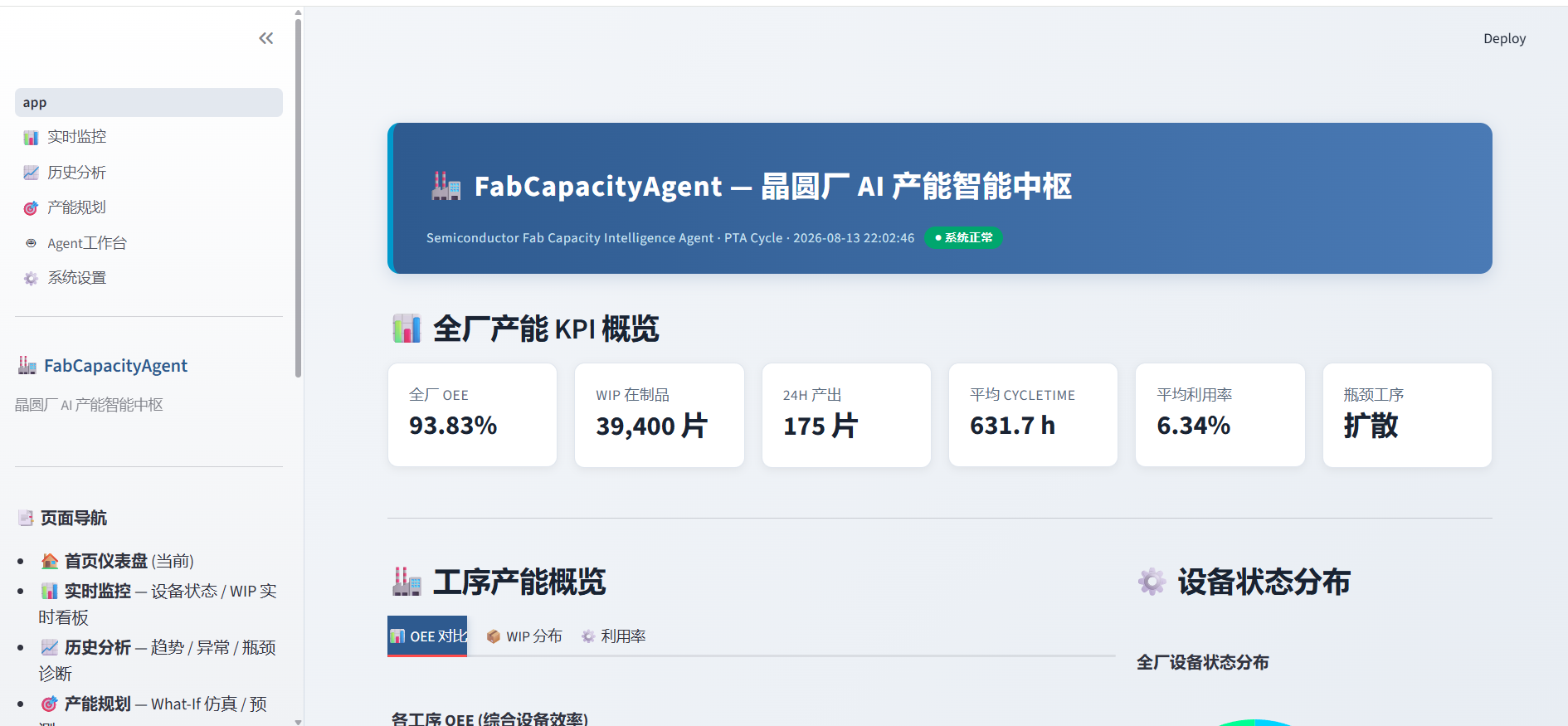
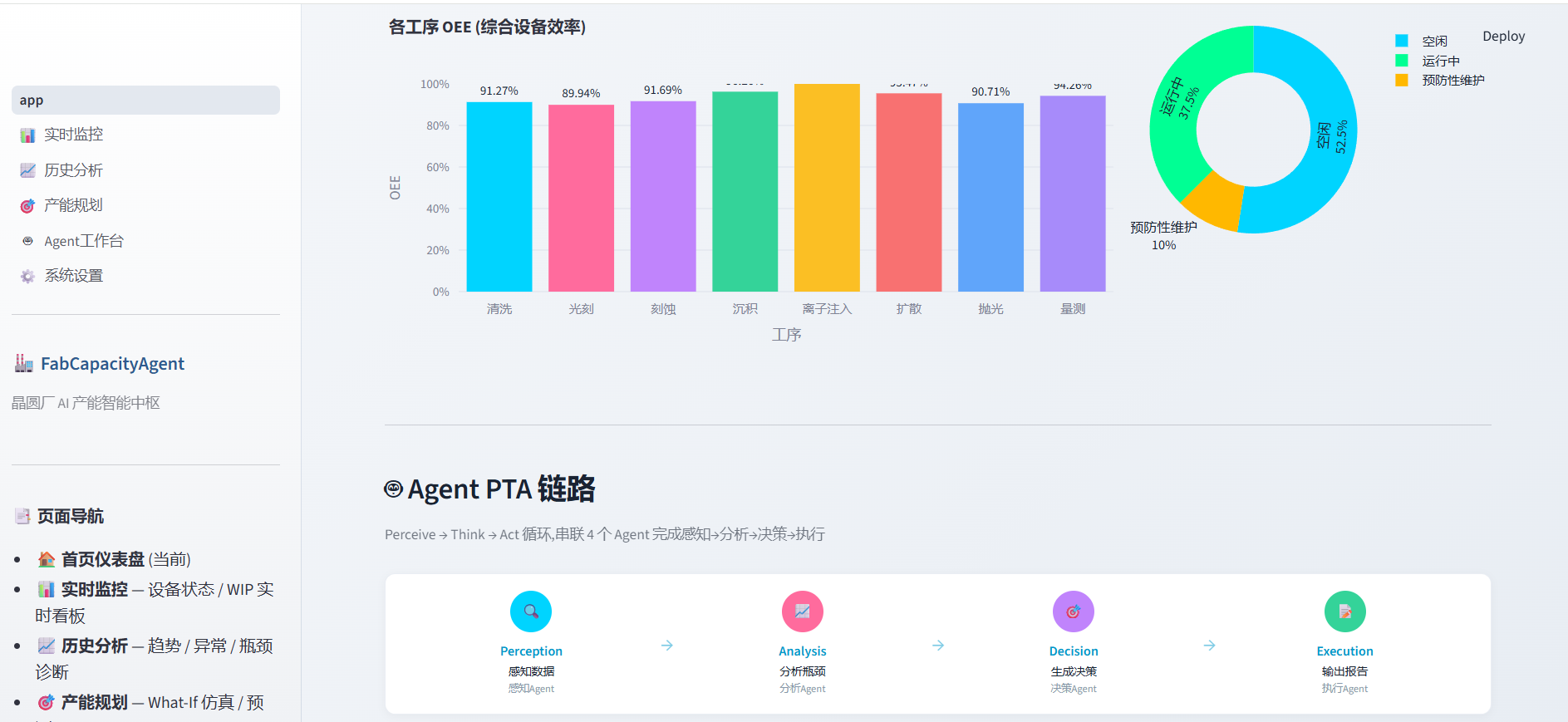
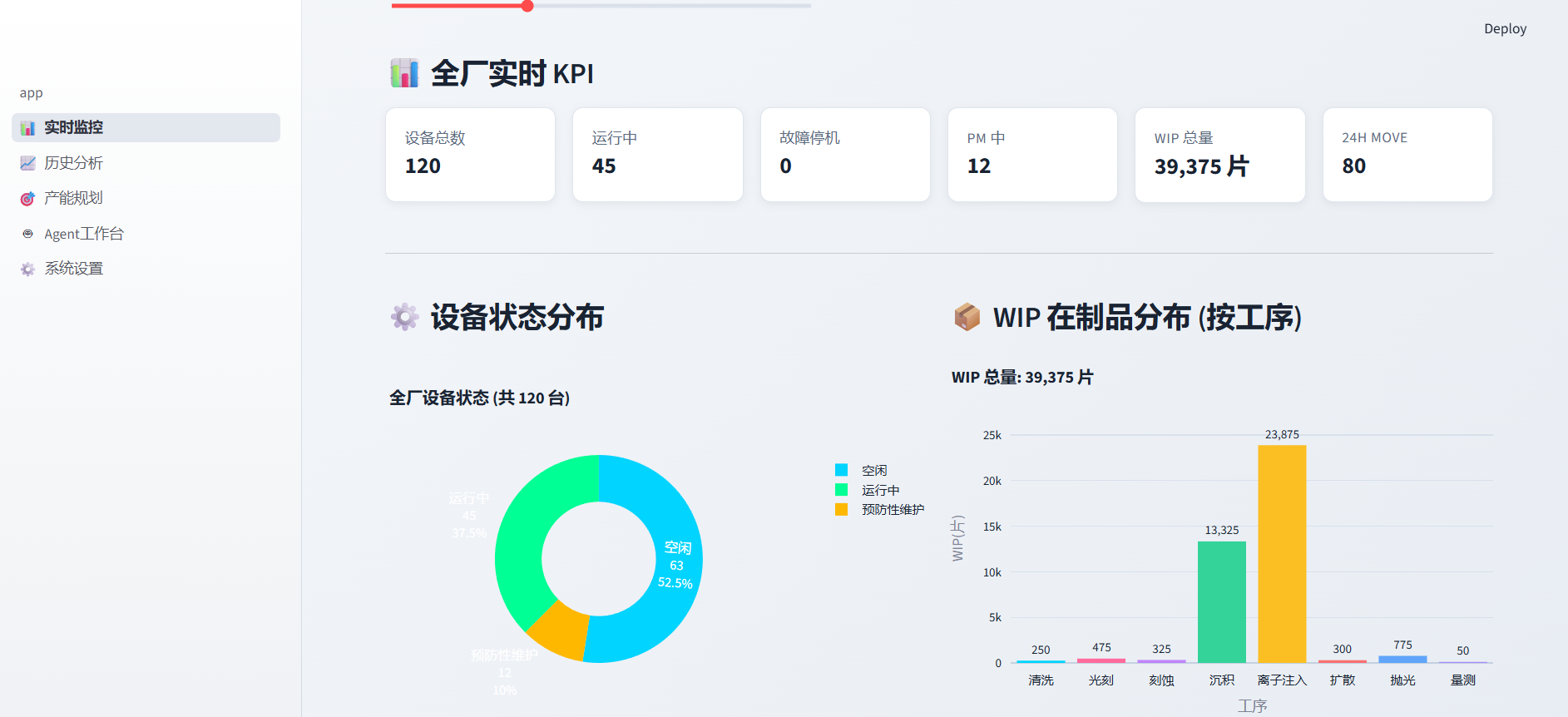
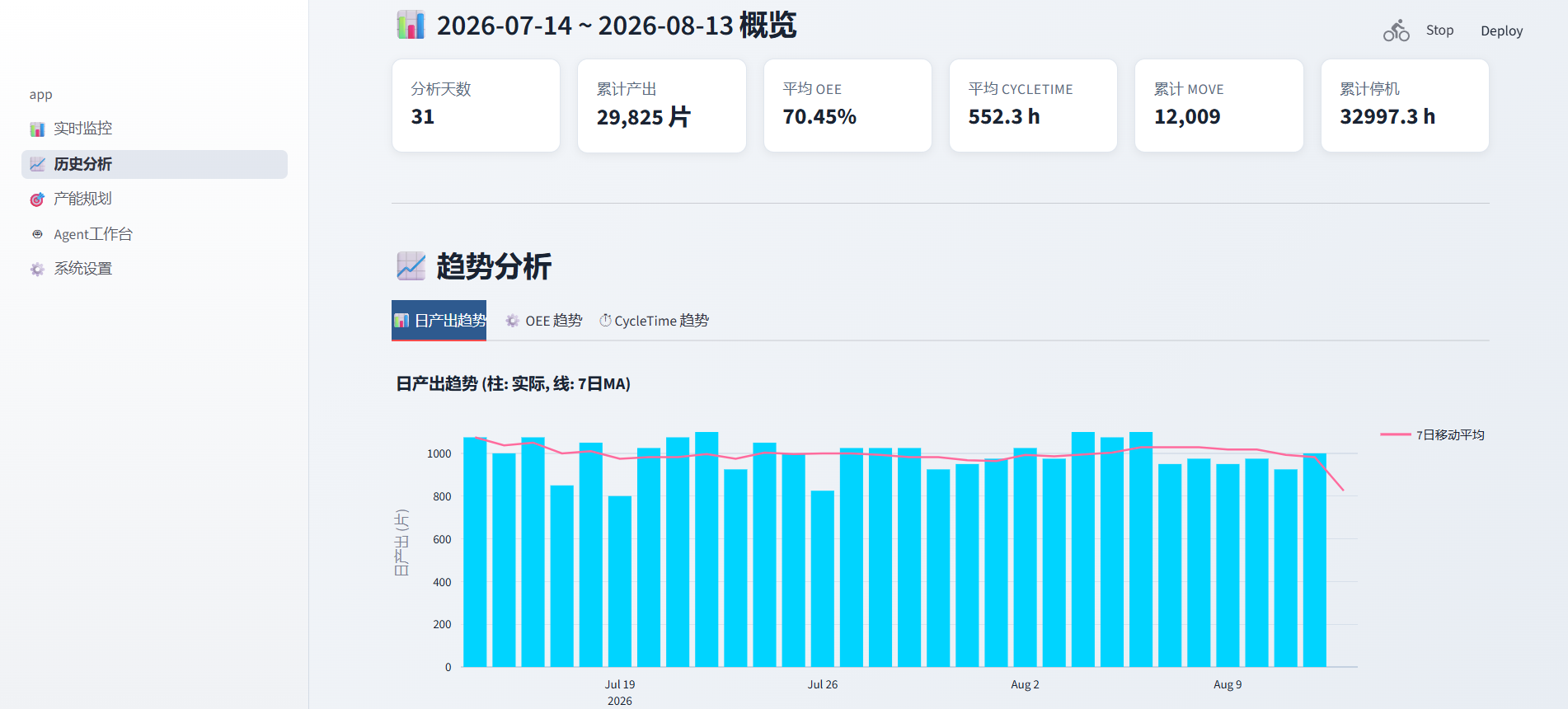
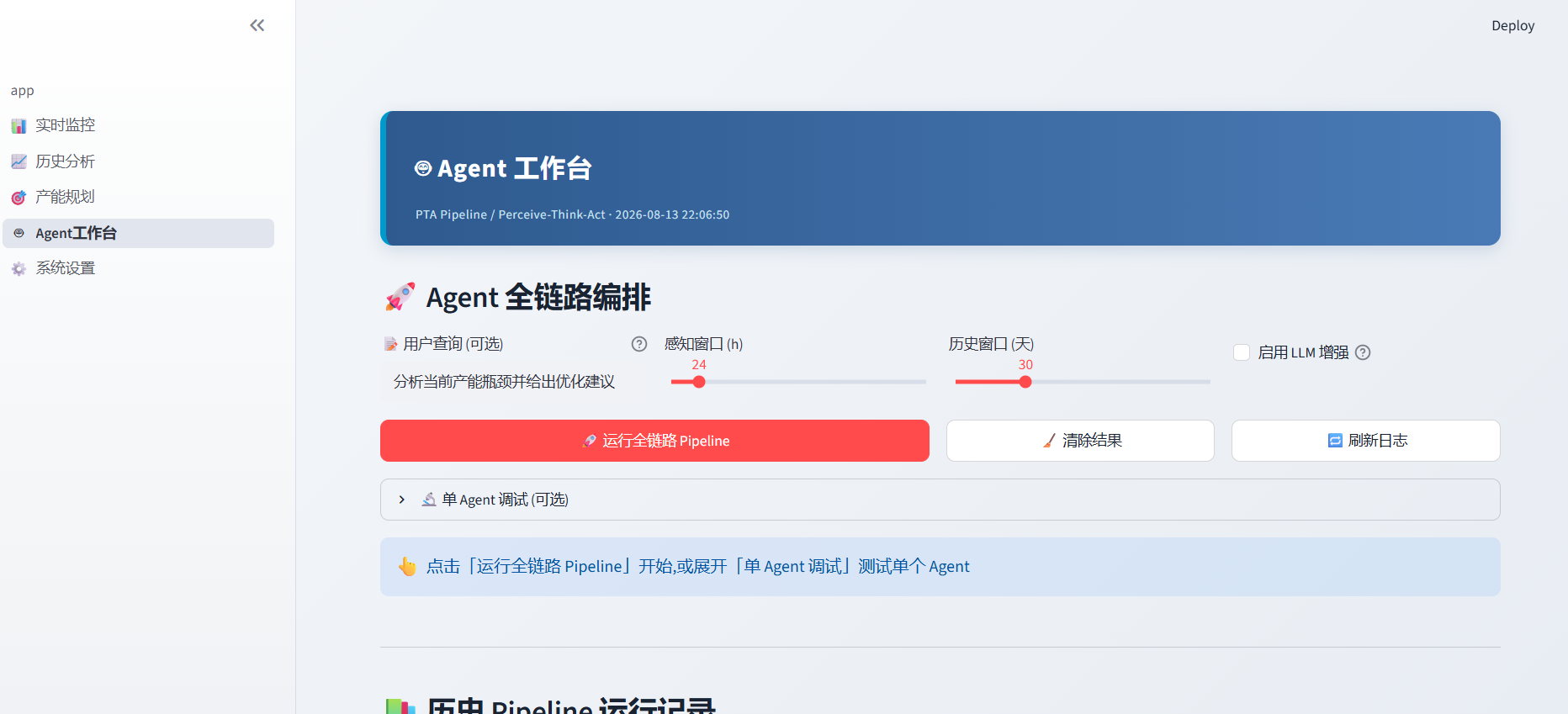
5.1 页面总览
| 页面 | 功能 | 核心组件 |
|---|---|---|
| 📊 实时监控 | 设备状态、WIP、Move 实时看板 | st.metric + Plotly 饼图/柱状图 |
| 📈 历史分析 | OEE 趋势、Cycle Time、Pareto | Plotly 折线图 + 异常标注 |
| 🎯 产能规划 | 预测 + What-If + 蒙特卡洛 | 滑块交互 + 置信区间 |
| 🤖 Agent 工作台 | 全链路运行 + 单 Agent 调试 | Pipeline 流程图 + 执行日志 |
| ⚙️ 系统设置 | LLM 配置、数据重建 | 表单 + 按钮 |
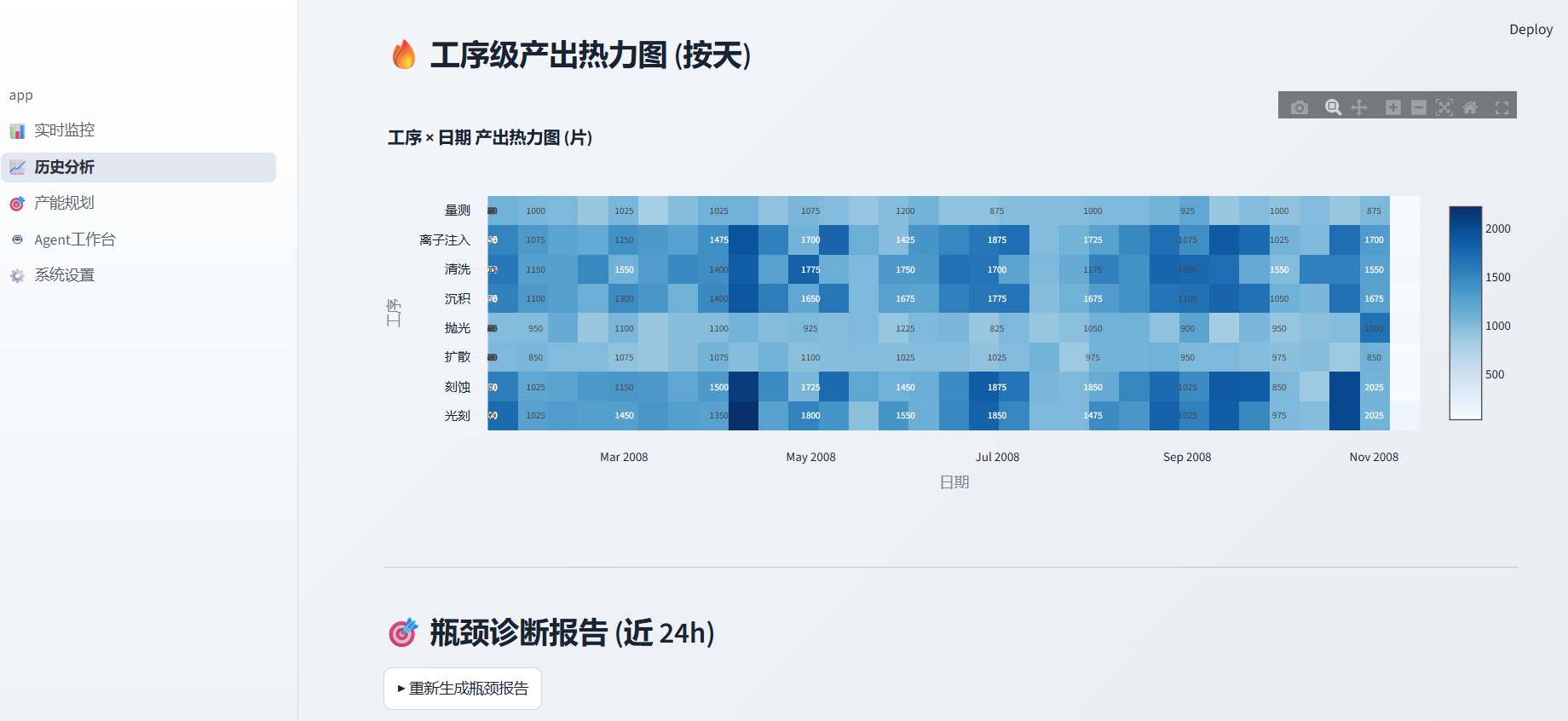
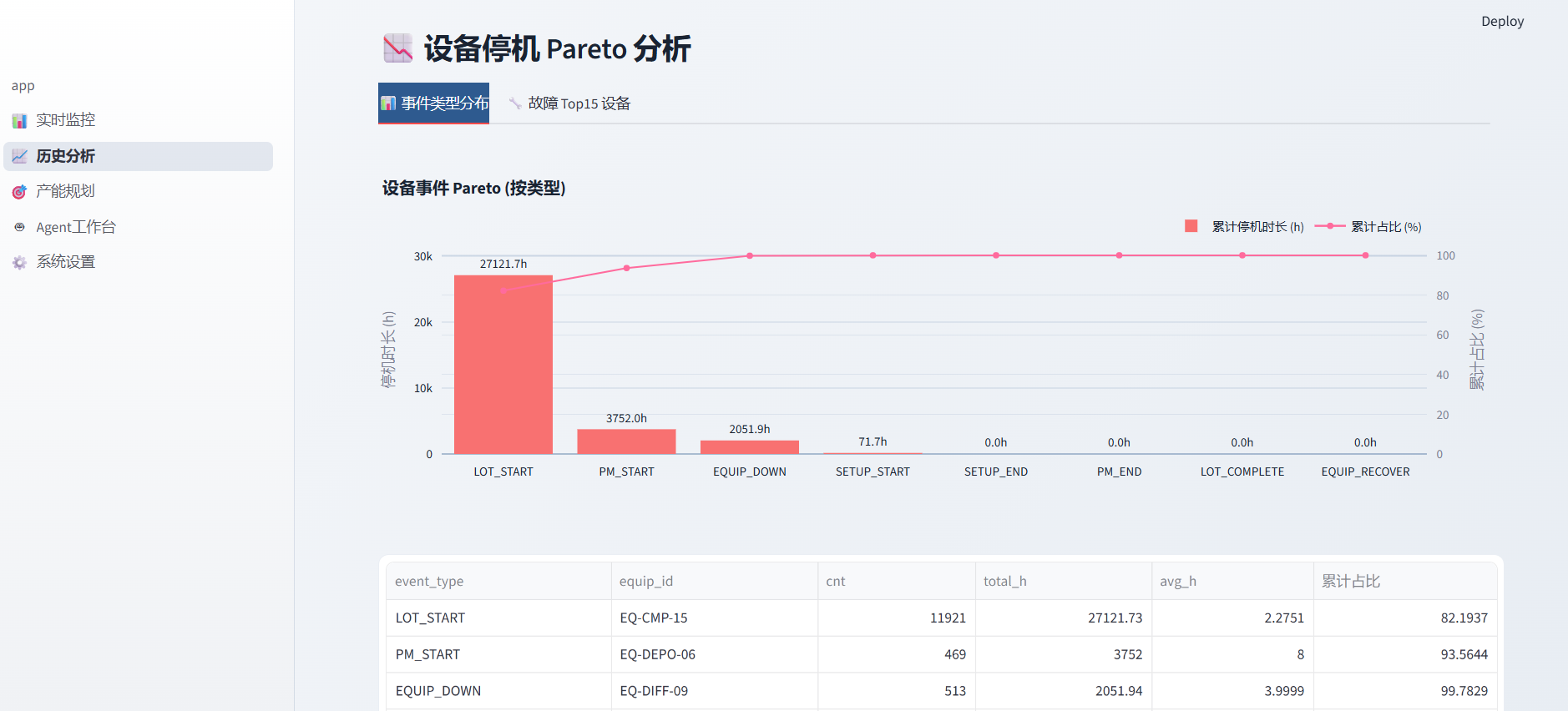
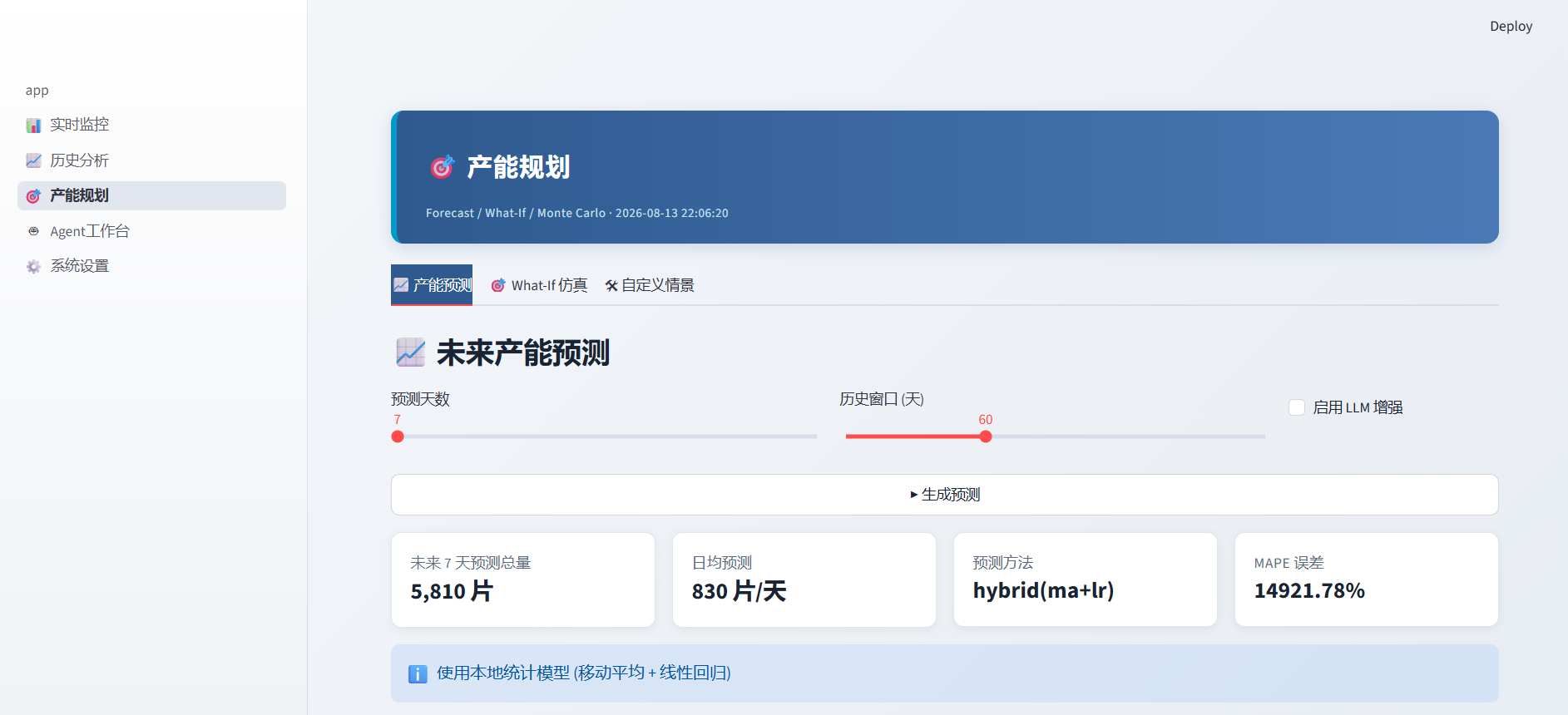
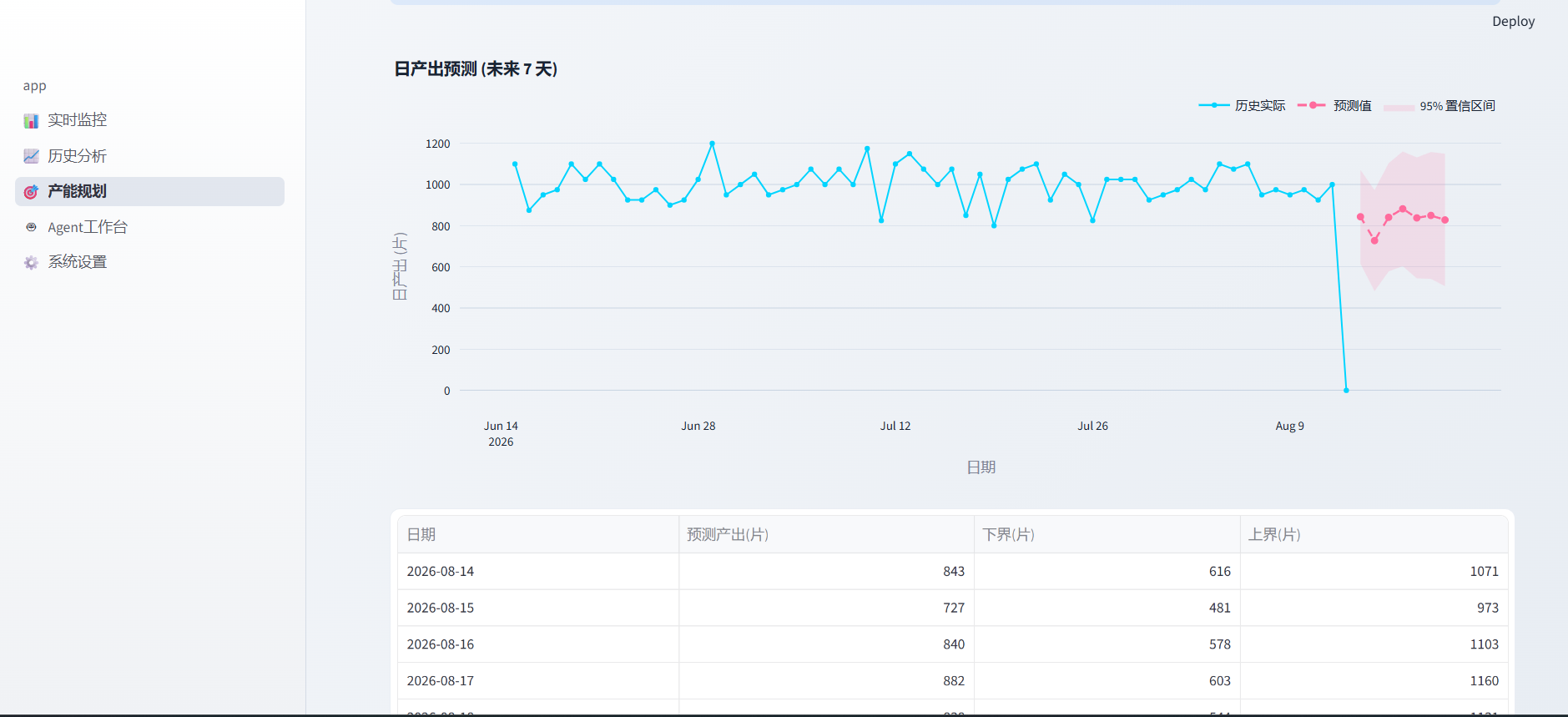
5.2 实时监控页面(核心代码)
# pages/1_📊_实时监控.py

import streamlit as st
import plotly.express as px
import plotly.graph_objects as go

st.set_page_config(page_title="实时产能监控", page_icon="📊", layout="wide")
st.title("📊 实时产能监控")

# ── 顶部 KPI 卡片 ──
col1, col2, col3, col4 = st.columns(4)
with col1:
    st.metric("今日产出 (wafers)", "1,523", delta="+3.2%")
with col2:
    st.metric("当前 WIP", "2,847 片", delta="-120")
with col3:
    st.metric("全厂 OEE", "82.3%", delta="+1.1%")
with col4:
    st.metric("瓶颈工序", "PHOTO (光刻)", delta_color="inverse")

# ── 设备状态饼图 ──
col_left, col_right = st.columns(2)
with col_left:
    st.subheader("设备状态分布")
    fig_pie = px.pie(
        values=[85, 12, 15, 8],
        names=["Run", "Down", "PM", "Idle"],
        color_discrete_map={
            "Run": "#2ecc71", "Down": "#e74c3c",
            "PM": "#f39c12", "Idle": "#95a5a6"
        },
    )
    st.plotly_chart(fig_pie, use_container_width=True)

with col_right:
    st.subheader("各工序 WIP 分布")
    # ... Plotly 柱状图
5.3 Agent 工作台(最有意思的页面)
# pages/4_🤖_Agent工作台.py

st.title("🤖 Agent 工作台")

# Pipeline 可视化
st.subheader("Agent Pipeline")
cols = st.columns(4)
agent_names = ["🔍 感知", "📊 分析", "🎯 决策", "📝 执行"]
agent_status = ["✅ 完成", "✅ 完成", "⏳ 执行中", "⏸ 待执行"]

for i, (name, status) in enumerate(zip(agent_names, agent_status)):
    with cols[i]:
        st.markdown(f"**{name}**")
        st.markdown(f"状态: {status}")
        if i < 3:
            st.markdown("→")

# 全链路运行按钮
if st.button("🚀 运行全链路分析", type="primary"):
    with st.spinner("Agent Pipeline 执行中..."):
        orchestrator = AgentOrchestrator()
        result = orchestrator.run_full_pipeline({"window_hours": 24})

    # 展示每个 Agent 的执行结果
    for agent_key, agent_result in result["results"].items():
        with st.expander(
            f"{agent_result.agent_name} | "
            f"{agent_result.status} | "
            f"{agent_result.duration_s}s"
        ):
            st.json(agent_result.action)
六、LLM 增强:让报告更"像人写的"
MVP 中我预留了 LLM 接口,支持 DeepSeek 和通义千问:
# utils/llm_client.py

import os
import requests
from dotenv import load_dotenv

load_dotenv()


class LLMClient:
    """轻量级 LLM 客户端(OpenAI 兼容 API)"""

    def __init__(self):
        self.deepseek_key = os.getenv("DEEPSEEK_API_KEY")
        self.qwen_key = os.getenv("DASHSCOPE_API_KEY")
        self.available = bool(self.deepseek_key or self.qwen_key)

    def generate_analysis(self, data_summary: str) -> str:
        """用 LLM 生成自然语言分析摘要"""
        if not self.available:
            return self._fallback_template(data_summary)

        prompt = f"""你是一位半导体晶圆厂的资深产能工程师。
请根据以下产能数据,撰写一段 200 字以内的分析摘要,
要求:指出瓶颈、给出优化建议、语言专业简练。

数据摘要:
{data_summary}
"""
        # 调用 API...
        # 未配置时回退到本地模板
        return self._fallback_template(data_summary)

    def _fallback_template(self, data_summary: str) -> str:
        """无 LLM 时的本地模板"""
        return f"[本地模板] 基于当前数据分析:{data_summary[:100]}..."
设计原则:LLM 是增强,不是依赖。不配 API Key,系统照样跑。
七、测试:23 个用例全覆盖
# 运行测试
python tests/test_capacity.py
| 测试类 | 用例数 | 覆盖范围 |
|---|---|---|
| TestDatabase | 5 | 连接 / 表结构 / 行数 |
| TestCapacityCalculator | 5 | OEE / WIP / Snapshot / 理论产能 |
| TestPredictor | 2 | 单目标 / 多目标预测 |
| TestBottleneckDetector | 1 | 瓶颈检测报告 |
| TestWhatIfSimulator | 4 | Baseline / 预设 / 对比 / 自定义 |
| TestAgents | 2 | 单 Agent / Orchestrator |
| TestOrchestratorPipeline | 1 | 全链路 4-Agent 串联 |
| TestUtils | 3 | safe_div / safe_round / 常量 |
八、如何跑起来
# 1. 克隆项目
git clone <your-repo-url>
cd fab_capacity_agent

# 2. 安装依赖
pip install -r requirements.txt

# 3. 启动(首次会自动生成 90 天模拟数据)
streamlit run app.py
浏览器自动打开 http://localhost:8501,即可看到完整仪表盘。
requirements.txt
streamlit>=1.28
pandas>=2.0
numpy>=1.24
scikit-learn>=1.3
plotly>=5.17
PyYAML>=6.0
python-dotenv>=1.0
requests>=2.31
九、踩坑与思考
坑 1:Streamlit 的缓存陷阱
@st.cache_data 对 SQLite 连接对象不友好,会报 UnhashableTypeError。解决方案:缓存查询结果而非连接对象。
@st.cache_data(ttl=300)  # 缓存 5 分钟
def get_daily_output(days: int) -> pd.DataFrame:
    conn = sqlite3.connect("data/fab_capacity.db")  # 每次新建连接
    df = pd.read_sql("SELECT * FROM daily_output ...", conn)
    conn.close()
    return df
坑 2:Agent 之间的数据传递
最初我用全局变量传递 Agent 输出,结果多页面并发时数据串了。改为 context 字典注入:
context["perception_output"] = perception_result.action
context["analysis_output"] = analysis_result.action
坑 3:模拟数据的"真实感"
纯随机数据看起来太均匀,不像真实产线。加入了:
- 周期性波动(周末产出降低)
- 设备宕机聚集效应(一台 Down 后,相关设备也容易 Down)
- PM 后的产能爬坡(PM 结束后前 2 小时效率只有 80%)
十、roadmap:MVP 之后怎么走?
| 阶段 | 目标 | 关键技术 |
|---|---|---|
| MVP(已完成) | 模拟数据 + 基础分析 | SQLite + 线性回归 |
| V1.1 | 接入真实 MES 数据 | REST API / OPC-UA 连接器 |
| V1.2 | 时序预测升级 | Prophet / LSTM |
| V2.0 | 数字孪生集成 | 设备级仿真 + 实时映射 |
| V3.0 | 自主决策闭环 | 强化学习排产 + 自动执行 |
十一、完整项目结构
fab_capacity_agent/
├── app.py                          # Streamlit 主入口
├── config/
│   └── settings.yaml               # 全局配置
├── data/
│   ├── generator.py                # MES 模拟数据生成器
│   ├── fab_capacity.db             # SQLite(自动生成)
│   └── reports/                    # Agent 报告(自动生成)
├── models/
│   ├── database.py                 # DB 管理器
│   ├── equipment.py                # 设备模型 + DAO
│   ├── wafer.py                    # 批次模型 + DAO
│   └── capacity.py                 # 产能快照 + 日志 DAO
├── services/
│   ├── capacity_calculator.py      # OEE/UPH/WIP 计算
│   ├── predictor.py                # 产能预测
│   ├── bottleneck_detector.py      # 瓶颈检测
│   └── what_if_simulator.py        # What-If + 蒙特卡洛
├── agents/
│   ├── base_agent.py               # PTA 基类
│   ├── perception_agent.py         # 感知 Agent
│   ├── analysis_agent.py           # 分析 Agent
│   ├── decision_agent.py           # 决策 Agent
│   ├── execution_agent.py          # 执行 Agent
│   └── orchestrator.py             # 编排器
├── pages/
│   ├── 1_📊_实时监控.py
│   ├── 2_📈_历史分析.py
│   ├── 3_🎯_产能规划.py
│   ├── 4_🤖_Agent工作台.py
│   └── 5_⚙️_系统设置.py
├── utils/
│   ├── constants.py                # 工序/状态/KPI 常量
│   ├── helpers.py                  # 工具函数
│   ├── llm_client.py               # LLM 客户端
│   └── ui_components.py            # 共享 UI 组件
├── tests/
│   └── test_capacity.py            # 23 个测试用例
├── requirements.txt
└── README.md
写在最后
作为一个每天跟产线打交道的制造工程师,我深知产能管理不是算个数字那么简单。它背后是设备状态、工艺约束、排产逻辑、人员调度的复杂博弈。
AI Agent 不是要替代工程师的判断,而是把重复性的数据采集、计算、报告工作自动化,让我们把精力放在真正需要人类智慧的决策上。
这个 MVP 还很粗糙,但它验证了一个核心思路:
用 Agent 架构把产能管理从"人找数据"变成"数据找人"。

这里是“一人公司”的成长家园。我们提供从产品曝光、技术变现到法律财税的全栈内容,并连接云服务、办公空间等稀缺资源,助你专注创造,无忧运营。
更多推荐


 10
10 0
0- 0


 已为社区贡献8条内容

所有评论(0)