WSL2 Ubuntu 安装Hermes Agent
一、相关链接
官网
https://hermes-agent.nousresearch.com/
国内镜像站
https://hermes-agent.ac.cn/
文档
https://hermes-agent.nousresearch.com/docs/
中文文档
https://hermes-agent.ac.cn/docs
github
https://github.com/NousResearch/hermes-agent
二、安装Ubuntu
wsl --install -d Ubuntu-24.04 --name hermes --location E:\wsl2\hermes
三、安装hermes
3.1 官方安装命令(失败)
curl -fsSL https://raw.githubusercontent.com/NousResearch/hermes-agent/main/scripts/install.sh | bash
Install ripgrep for faster file search ffmpeg for TTS voice messages? [Y/n] Y
已经在hosts配置了raw.githubusercontent.com,不开网络代理,比较慢,还报错。
admin@UD26:~$ curl -fsSL https://raw.githubusercontent.com/NousResearch/hermes-agent/main/scripts/install.sh | bash


┌─────────────────────────────────────────────────────────┐
│             ⚕ Hermes Agent Installer                    │
├─────────────────────────────────────────────────────────┤
│  An open source AI agent by Nous Research.              │
└─────────────────────────────────────────────────────────┘

✓ Detected: linux (ubuntu)
→ Installing managed uv into /home/uadmin/.hermes/bin ...
✓ Managed uv installed (uv 0.11.28 (x86_64-unknown-linux-gnu))
→ Checking Python 3.11...
→ Python 3.11 not found, installing via uv...
Installed Python 3.11.15 in 22.58s
 + cpython-3.11.15-linux-x86_64-gnu (python3.11)
warning: `/home/uadmin/.local/bin` is not on your PATH. To use installed Python executables, run `export PATH="/home/uadmin/.local/bin:$PATH"` or `uv python update-shell`.
✓ Python installed: Python 3.11.15
→ Checking Git...
✓ Git 2.43.0 found
→ Checking Node.js (for browser tools)...
→ Node.js not found — installing Node.js 22 LTS...
→ Downloading node-v22.23.1-linux-x64.tar.xz...
→ Extracting to ~/.hermes/node/...
✓ Node.js v22.23.1 installed to ~/.hermes/node/
→ Checking internet connectivity for package install and web tools...
⚠ Could not reach https://duckduckgo.com/
⚠ Network checks failed. Hermes install may complete, but web search and dependency downloads can fail.
→ Verify internet/DNS and retry if pip install fails.
→ Checking ripgrep (fast file search)...
→ Checking ffmpeg (TTS voice messages)...

→ sudo is needed ONLY to install optional system packages (ripgrep ffmpeg) via your package manager.
→ Hermes Agent itself does not require or retain root access.
Install ripgrep for faster file search ffmpeg for TTS voice messages? [Y/n] Y
⚠ ripgrep not installed (file search will use grep fallback)
→ To install ripgrep manually:
→   sudo apt install ripgrep
⚠ ffmpeg not installed (TTS voice messages will be limited)
→ To install ffmpeg manually:
→   sudo apt install ffmpeg
→ Installing to /home/uadmin/.hermes/hermes-agent...
→ Trying SSH clone...
→ SSH failed, trying HTTPS...
Cloning into '/home/uadmin/.hermes/hermes-agent'...
fatal: unable to access 'https://github.com/NousResearch/hermes-agent.git/': Recv failure: Connection timed out
✗ Failed to clone repository
就算开了网络代理,下载也很慢,最后还报错。
admin@UD26:~$ curl -fsSL https://raw.githubusercontent.com/NousResearch/hermes-agent/main/scripts/install.sh | bash


┌─────────────────────────────────────────────────────────┐
│             ⚕ Hermes Agent Installer                    │
├─────────────────────────────────────────────────────────┤
│  An open source AI agent by Nous Research.              │
└─────────────────────────────────────────────────────────┘

✓ Detected: linux (ubuntu)
✓ Managed uv found (uv 0.11.28 (x86_64-unknown-linux-gnu))
→ Checking Python 3.11...
✓ Python found: Python 3.11.15
→ Checking Git...
✓ Git 2.43.0 found
→ Checking Node.js (for browser tools)...
✓ Node.js v22.23.1 found (Hermes-managed)
→ Checking internet connectivity for package install and web tools...
⚠ Could not reach https://duckduckgo.com/
⚠ Network checks failed. Hermes install may complete, but web search and dependency downloads can fail.
→ Verify internet/DNS and retry if pip install fails.
→ Checking ripgrep (fast file search)...
→ Checking ffmpeg (TTS voice messages)...

→ sudo is needed ONLY to install optional system packages (ripgrep ffmpeg) via your package manager.
→ Hermes Agent itself does not require or retain root access.
Install ripgrep for faster file search ffmpeg for TTS voice messages? [Y/n] Y
[sudo] password for uadmin:
Reading package lists... Done
Building dependency tree... Done
Reading state information... Done
E: Unable to locate package ripgrep
E: Unable to locate package ffmpeg
⚠ ripgrep not installed (file search will use grep fallback)
→ To install ripgrep manually:
→   sudo apt install ripgrep
⚠ ffmpeg not installed (TTS voice messages will be limited)
→ To install ffmpeg manually:
→   sudo apt install ffmpeg
→ Installing to /home/uadmin/.hermes/hermes-agent...
→ Trying SSH clone...
→ SSH failed, trying HTTPS...
Cloning into '/home/uadmin/.hermes/hermes-agent'...
remote: Enumerating objects: 7030, done.
remote: Counting objects: 100% (7030/7030), done.
remote: Compressing objects: 100% (6693/6693), done.
error: RPC failed; curl 56 Recv failure: Connection reset by peer
error: 2575 bytes of body are still expected
fetch-pack: unexpected disconnect while reading sideband packet
fatal: early EOF
fatal: fetch-pack: invalid index-pack output
✗ Failed to clone repository
3.2 国内镜像安装
curl -fsSL https://hermes-agent.ac.cn/install.sh | bash
开开网络代理,安装报错
admin@UD26:~$ curl -fsSL https://hermes-agent.ac.cn/install.sh | bash


┌─────────────────────────────────────────────────────────┐
│             ⚕ Hermes Agent Installer                    │
├─────────────────────────────────────────────────────────┤
│  An open source AI agent by Nous Research.              │
└─────────────────────────────────────────────────────────┘

✓ Detected: linux (ubuntu)
✓ Managed uv found (uv 0.11.28 (x86_64-unknown-linux-gnu))
→ Checking Python 3.11...
✓ Python found: Python 3.11.15
→ Checking Git...
✓ Git 2.43.0 found
→ Checking Node.js (for browser tools)...
✓ Node.js v22.23.1 found (Hermes-managed)
→ Checking internet connectivity for package install and web tools...
⚠ Could not reach https://duckduckgo.com/
⚠ Network checks failed. Hermes install may complete, but web search and dependency downloads can fail.
→ Verify internet/DNS and retry if pip install fails.
→ Checking ripgrep (fast file search)...
✓ ripgrep 14.1.0 found
→ Checking ffmpeg (TTS voice messages)...
✓ ffmpeg 6.1.1-3ubuntu5 found
→ Installing to /home/uadmin/.hermes/hermes-agent...
→ Trying SSH clone...
→ SSH failed, trying HTTPS...
Cloning into '/home/uadmin/.hermes/hermes-agent'...
fatal: unable to access 'https://github.com/NousResearch/hermes-agent.git/': GnuTLS recv error (-110): The TLS connection was non-properly terminated.
✗ Failed to clone repository
开了网络代理,也报错
admin@UD26:~$ curl -fsSL https://hermes-agent.ac.cn/install.sh | bash


┌─────────────────────────────────────────────────────────┐
│             ⚕ Hermes Agent Installer                    │
├─────────────────────────────────────────────────────────┤
│  An open source AI agent by Nous Research.              │
└─────────────────────────────────────────────────────────┘

✓ Detected: linux (ubuntu)
✓ Managed uv found (uv 0.11.28 (x86_64-unknown-linux-gnu))
→ Checking Python 3.11...
✓ Python found: Python 3.11.15
→ Checking Git...
✓ Git 2.43.0 found
→ Checking Node.js (for browser tools)...
✓ Node.js v22.23.1 found (Hermes-managed)
→ Checking internet connectivity for package install and web tools...
⚠ Could not reach https://duckduckgo.com/
⚠ Network checks failed. Hermes install may complete, but web search and dependency downloads can fail.
→ Verify internet/DNS and retry if pip install fails.
→ Checking ripgrep (fast file search)...
✓ ripgrep 14.1.0 found
→ Checking ffmpeg (TTS voice messages)...
✓ ffmpeg 6.1.1-3ubuntu5 found
→ Installing to /home/uadmin/.hermes/hermes-agent...
→ Trying SSH clone...
→ SSH failed, trying HTTPS...
Cloning into '/home/uadmin/.hermes/hermes-agent'...
remote: Enumerating objects: 7030, done.
remote: Counting objects: 100% (7030/7030), done.
remote: Compressing objects: 100% (6693/6693), done.
error: RPC failed; curl 92 HTTP/2 stream 5 was not closed cleanly: CANCEL (err 8)
error: 5656 bytes of body are still expected
fetch-pack: unexpected disconnect while reading sideband packet
fatal: early EOF
fatal: fetch-pack: invalid index-pack output
✗ Failed to clone repository
3.3 手动git安装
先解决ripgrep、ffmpeg部分安装错误
# 启用universe官方仓库(ripgrep、ffmpeg均在此仓库)
sudo add-apt-repository universe -y
# 更新包索引
sudo apt update -y
# 安装缺失依赖
sudo apt install -y ripgrep ffmpeg
手动git安装
# 创建目录
mkdir -p ~/.hermes/hermes-agent
# 进入目标目录
cd ~/.hermes/hermes-agent

# 初始化Git仓库
git init
# 绑定官方远程仓库
git remote add origin https://github.com/NousResearch/hermes-agent.git
# 拉取main分支代码
git fetch --depth 1 origin main
# git checkout main
git fetch --depth 1 origin main,这句很快,一点都不卡。
3.4 再使用国内镜像安装
curl -fsSL https://hermes-agent.ac.cn/install.sh | bash
这回就能正常安装了,
3.4.1安装向导选择
建议不选Quick Setup (Nous Portal),这个以后还得开网络代理访问,建议选择Full setup,可以选国内模型,如阿里云百炼AIP Key,DeepSeek,Ollama等。
日志:开始安装向导
→ Starting setup wizard...


┌─────────────────────────────────────────────────────────┐
│             ⚕ Hermes Agent Setup Wizard                │
├─────────────────────────────────────────────────────────┤
│  Let's configure your Hermes Agent installation.       │
│  Press Ctrl+C at any time to exit.                     │
└─────────────────────────────────────────────────────────┘
--------------------------------------------------------------------------------------------
选择默认,回车
How would you like to set up Hermes?
  ↑↓ navigate  ENTER/SPACE select  ESC cancel

 → (●) Quick Setup (Nous Portal) — free OAuth login, no API keys, model + tools (recommended)
   (○) Full setup — configure every provider, tool & option yourself (bring your own keys)
   (○) Blank Slate — everything off except the bare minimum; opt in to each capability
---------------------------------------------------------------------------------------------
日志:
    Skipped (keeping current)


◆ Nous Portal
  One subscription, 300+ models, plus the Tool Gateway:
    web search, image generation, TTS, browser automation.
  Sign up: https://portal.nousresearch.com/manage-subscription

Not logged into Nous Portal. Starting login...

Starting Hermes login via Nous Portal...
Portal: https://portal.nousresearch.com

To continue:
  1. Open: https://portal.nousresearch.com/manage-subscription?user_code=EXLM-1234
  2. If prompted, enter code: EXLM-1234
  (Opened browser for verification)
Waiting for approval (polling every 1s)...
gio: https://portal.nousresearch.com/manage-subscription?user_code=EXLM-1234: Operation not supported

操作:
访问:https://portal.nousresearch.com/manage-subscription?user_code=EXLM-1234,订阅0美元的,(使用的邮箱+验证码)

日志:
Login successful!
  Auth state: /home/uadmin/.hermes/auth.json

-----------------------------------------------------------------------------------------------------------
选择默认,回车
Your free Nous tool pool — pick the tools to enable:
  ↑↓ navigate  SPACE toggle  ENTER confirm  ESC cancel

 → [✓] Web search & extract (Firecrawl)
   [✓] Image generation (FAL)
   [✓] Text-to-speech (OpenAI TTS)
   [✓] Speech-to-text (OpenAI Whisper)
   [✓] Browser automation (Browser Use)
------------------------------------------------------------------------
日志:
Showing 2 curated models — use "Enter custom model name" for others.

Default model set to: tencent/hy3:free
  Config updated: /home/uadmin/.hermes/config.yaml (model.provider=nous)
  ✓ Browser automation (Browser Use): enabled via free tool pool
  ✓ Image generation (FAL): enabled via free tool pool
  ✓ Speech-to-text (OpenAI Whisper): enabled via free tool pool
  ✓ Text-to-speech (OpenAI TTS): enabled via free tool pool
  ✓ Web search & extract (Firecrawl): enabled via free tool pool

------------------------------------------------------------------------
选择默认,回车
Select terminal backend:
  ↑↓ navigate  ENTER/SPACE select  ESC cancel

   (○) Local - run directly on this machine (default)
   (○) Docker - isolated container with configurable resources
   (○) Modal - serverless cloud sandbox
   (○) SSH - run on a remote machine
   (○) Daytona - persistent cloud development environment
   (○) Singularity/Apptainer - HPC-friendly container
 → (●) Keep current (local)
--------------------------------------------------------------
日志:
◆ Terminal Backend
  Choose where Hermes runs shell commands and code.
  This affects tool execution, file access, and isolation.
     Guide: https://hermes-agent.nousresearch.com/docs/user-guide/configuration#terminal-backend-configuration

    Skipped (keeping current)

  Keeping current backend: local
✓ Applied recommended defaults:
    Max iterations: 150
    Tool progress: all
    Compression threshold: 0.50
    Session reset: never (use /reset or compression)
    Run `hermes setup agent` later to customize.


✓ Setup complete! You're ready to go.

    Configure all settings:    hermes setup
    Connect Telegram/Discord:  hermes setup gateway

-------------------------------------------------------
↓选择跳过(Skip),回车
Connect a messaging platform? (Telegram, Discord, etc.)
  ↑↓ navigate  ENTER/SPACE select  ESC cancel

 → (●) Set up messaging now (recommended)
   (○) Skip — set up later with 'hermes setup gateway'
-------------------------------------------------------
日志:
◆ Tool Availability Summary
  10/11 tool categories available:

   ✓ Vision (image analysis)
   ✓ Web Search & Extract (Nous subscription)
   ✓ Browser Automation (Nous Browser Use)
   ✓ Image Generation (Nous subscription)
   ✓ Video Generation (FAL)
   ✓ Text-to-Speech (OpenAI via Nous subscription)
   ✓ Modal Execution (optional via Nous subscription)
   ✗ Skills Hub (GitHub) (missing GITHUB_TOKEN)
   ✓ Terminal/Commands
   ✓ Task Planning (todo)
   ✓ Skills (view, create, edit)

⚠ Some tools are disabled. Run 'hermes setup tools' to configure them,
⚠ or edit ~/.hermes/.env directly to add the missing API keys.
3.4.2 安装日志
admin@UD26:~$ curl -fsSL https://hermes-agent.ac.cn/install.sh | bash


┌─────────────────────────────────────────────────────────┐
│             ⚕ Hermes Agent Installer                    │
├─────────────────────────────────────────────────────────┤
│  An open source AI agent by Nous Research.              │
└─────────────────────────────────────────────────────────┘

✓ Detected: linux (ubuntu)
✓ Managed uv found (uv 0.11.28 (x86_64-unknown-linux-gnu))
→ Checking Python 3.11...
✓ Python found: Python 3.11.15
→ Checking Git...
✓ Git 2.43.0 found
→ Checking Node.js (for browser tools)...
✓ Node.js v22.23.1 found
→ Checking internet connectivity for package install and web tools...
✓ Internet connectivity looks good
→ Checking ripgrep (fast file search)...
✓ ripgrep 14.1.0 found
→ Checking ffmpeg (TTS voice messages)...
✓ ffmpeg 6.1.1-3ubuntu5 found
→ Installing to /home/uadmin/.hermes/hermes-agent...
→ Existing installation found, updating...
→ Local changes detected, stashing before update...
Saved working directory and index state On main: hermes-install-autostash-20260711-114507
From https://github.com/NousResearch/hermes-agent
 * branch                main       -> FETCH_HEAD
Already on 'main'
Your branch is up to date with 'origin/main'.
From https://github.com/NousResearch/hermes-agent
 * branch                main       -> FETCH_HEAD
Already up to date.
→ Restoring local changes...
Already up to date.
On branch main
Your branch is up to date with 'origin/main'.

Untracked files:
  (use "git add <file>..." to include in what will be committed)
        .install_method

nothing added to commit but untracked files present (use "git add" to track)
⚠ Local changes were restored on top of the updated codebase.
⚠ Review git diff / git status if Hermes behaves unexpectedly.
✓ Repository ready
→ Creating virtual environment with Python 3.11...
→ Virtual environment already exists, recreating...
Using CPython 3.11.15
Creating virtual environment at: venv
Activate with: source venv/bin/activate
✓ Virtual environment ready (Python 3.11)
→ Installing dependencies...
→ Trying tier: hash-verified (uv.lock) ...
→ (this resolves + downloads the curated [all] set — first run on a
→  fresh venv can take 1-5 minutes; uv prints progress below)
Resolved 233 packages in 2ms
Installed 95 packages in 52ms
 + agent-client-protocol==0.9.0
 + aiohappyeyeballs==2.6.1
 + aiohttp==3.14.1
 + aiosignal==1.4.0
 + annotated-doc==0.0.4
 + annotated-types==0.7.0
 + anyio==4.12.1
 + attrs==25.4.0
 + certifi==2026.5.20
 + cffi==2.0.0
 + charset-normalizer==3.4.4
 + click==8.3.1
 + croniter==6.0.0
 + cryptography==46.0.7
 + defusedxml==0.7.1
 + distro==1.9.0
 + fastapi==0.133.1
 + fire==0.7.1
 + frozenlist==1.8.0
 + google-api-core==2.30.3
 + google-api-python-client==2.194.0
 + google-auth==2.55.1
 + google-auth-httplib2==0.3.1
 + google-auth-oauthlib==1.3.1
 + googleapis-common-protos==1.73.0
 + h11==0.16.0
 + hermes-agent==0.18.2 (from file:///home/uadmin/.hermes/hermes-agent)
 + httpcore==1.0.9
 + httplib2==0.31.2
 + httptools==0.7.1
 + httpx==0.28.1
 + httpx-sse==0.4.3
 + idna==3.15
 + jinja2==3.1.6
 + jiter==0.13.0
 + jsonschema==4.26.0
 + jsonschema-specifications==2025.9.1
 + markdown==3.10.2
 + markdown-it-py==4.0.0
 + markupsafe==3.0.3
 + mcp==1.26.0
 + mdurl==0.1.2
 + multidict==6.7.1
 + oauthlib==3.3.1
 + openai==2.24.0
 + packaging==26.0
 + pathspec==1.1.1
 + pillow==12.2.0
 + prompt-toolkit==3.0.52
 + propcache==0.4.1
 + proto-plus==1.27.2
 + protobuf==6.33.5
 + psutil==7.2.2
 + ptyprocess==0.7.0
 + pyasn1==0.6.3
 + pyasn1-modules==0.4.2
 + pycparser==3.0
 + pydantic==2.13.4
 + pydantic-core==2.46.4
 + pydantic-settings==2.13.1
 + pygments==2.19.2
 + pyjwt==2.13.0
 + pyparsing==3.3.2
 + python-dateutil==2.9.0.post0
 + python-dotenv==1.2.2
 + python-multipart==0.0.27
 + pytz==2025.2
 + pyyaml==6.0.3
 + referencing==0.37.0
 + requests==2.33.0
 + requests-oauthlib==2.0.0
 + rich==14.3.3
 + rpds-py==0.30.0
 + ruamel-yaml==0.18.17
 + ruamel-yaml-clib==0.2.15
 + simple-term-menu==1.6.6
 + six==1.17.0
 + sniffio==1.3.1
 + socksio==1.0.0
 + sse-starlette==3.3.2
 + starlette==1.0.1
 + tenacity==9.1.4
 + termcolor==3.3.0
 + tqdm==4.67.3
 + typing-extensions==4.15.0
 + typing-inspection==0.4.2
 + uritemplate==4.2.0
 + urllib3==2.7.0
 + uvicorn==0.41.0
 + uvloop==0.22.1
 + watchfiles==1.1.1
 + wcwidth==0.6.0
 + websockets==15.0.1
 + yarl==1.22.0
 + youtube-transcript-api==1.2.4
✓ Main package installed (hash-verified via uv.lock)
✓ All dependencies installed
→ Installing Node.js dependencies (browser tools)...
✅ Browser tools ready. Run: python run_agent.py --help
✓ Node.js dependencies installed
→ Installing browser engine (Playwright Chromium)...
⚠ No sudo available — skipping system-library install (--with-deps).
→ Ask an administrator to run, one time, as root:
→   sudo npx playwright install-deps chromium
→   (from /home/uadmin/.hermes/hermes-agent, after Node.js deps are installed)
→ Installing Chromium binary into this user's Playwright cache...
✓ Browser engine setup complete
→ Installing TUI dependencies...
✅ Browser tools ready. Run: python run_agent.py --help
✓ TUI dependencies installed
→ Setting up hermes command...
✓ Installed hermes launcher → ~/.local/bin/hermes
→ ~/.local/bin already on PATH
✓ hermes command ready
→ Setting up configuration files...
→ ~/.hermes/.env already exists, keeping it
→ ~/.hermes/config.yaml already exists, keeping it
✓ Configuration directory ready: ~/.hermes/
→ Syncing bundled skills to ~/.hermes/skills/ ...
Syncing bundled skills into ~/.hermes/skills/ ...

Done: 0 new, 0 updated, 72 unchanged. 72 total bundled.
✓ Skills synced to ~/.hermes/skills/

→ Starting setup wizard...


┌─────────────────────────────────────────────────────────┐
│             ⚕ Hermes Agent Setup Wizard                │
├─────────────────────────────────────────────────────────┤
│  Let's configure your Hermes Agent installation.       │
│  Press Ctrl+C at any time to exit.                     │
└─────────────────────────────────────────────────────────┘

    Skipped (keeping current)


◆ Nous Portal
  One subscription, 300+ models, plus the Tool Gateway:
    web search, image generation, TTS, browser automation.
  Sign up: https://portal.nousresearch.com/manage-subscription

Not logged into Nous Portal. Starting login...

Starting Hermes login via Nous Portal...
Portal: https://portal.nousresearch.com

To continue:
  1. Open: https://portal.nousresearch.com/manage-subscription?user_code=5RAN-1234
  2. If prompted, enter code: 5RAN-1234
  (Opened browser for verification)
Waiting for approval (polling every 1s)...
gio: https://portal.nousresearch.com/manage-subscription?user_code=5RAN-1234: Operation not supported


Login successful!
  Auth state: /home/uadmin/.hermes/auth.json

Showing 2 curated models — use "Enter custom model name" for others.

Default model set to: tencent/hy3:free
  Config updated: /home/uadmin/.hermes/config.yaml (model.provider=nous)
  ✓ Browser automation (Browser Use): enabled via free tool pool
  ✓ Image generation (FAL): enabled via free tool pool
  ✓ Speech-to-text (OpenAI Whisper): enabled via free tool pool
  ✓ Text-to-speech (OpenAI TTS): enabled via free tool pool
  ✓ Web search & extract (Firecrawl): enabled via free tool pool

◆ Terminal Backend
  Choose where Hermes runs shell commands and code.
  This affects tool execution, file access, and isolation.
     Guide: https://hermes-agent.nousresearch.com/docs/user-guide/configuration#terminal-backend-configuration

    Skipped (keeping current)

  Keeping current backend: local
✓ Applied recommended defaults:
    Max iterations: 150
    Tool progress: all
    Compression threshold: 0.50
    Session reset: never (use /reset or compression)
    Run `hermes setup agent` later to customize.


✓ Setup complete! You're ready to go.

    Configure all settings:    hermes setup
    Connect Telegram/Discord:  hermes setup gateway


◆ Tool Availability Summary
  10/11 tool categories available:

   ✓ Vision (image analysis)
   ✓ Web Search & Extract (Nous subscription)
   ✓ Browser Automation (Nous Browser Use)
   ✓ Image Generation (Nous subscription)
   ✓ Video Generation (FAL)
   ✓ Text-to-Speech (OpenAI via Nous subscription)
   ✓ Modal Execution (optional via Nous subscription)
   ✗ Skills Hub (GitHub) (missing GITHUB_TOKEN)
   ✓ Terminal/Commands
   ✓ Task Planning (todo)
   ✓ Skills (view, create, edit)

⚠ Some tools are disabled. Run 'hermes setup tools' to configure them,
⚠ or edit ~/.hermes/.env directly to add the missing API keys.


┌─────────────────────────────────────────────────────────┐
│              ✓ Setup Complete!                          │
└─────────────────────────────────────────────────────────┘

📁 All your files are in ~/.hermes/:

   Settings:  /home/uadmin/.hermes/config.yaml
   API Keys:  /home/uadmin/.hermes/.env
   Data:      /home/uadmin/.hermes/cron/, sessions/, logs/

────────────────────────────────────────────────────────────

📝 To edit your configuration:

   hermes setup          Re-run the full wizard
   hermes setup model    Change model/provider
   hermes setup terminal Change terminal backend
   hermes setup gateway  Configure messaging
   hermes setup tools    Configure tool providers

   hermes config         View current settings
   hermes config edit    Open config in your editor
   hermes config set <key> <value>
                          Set a specific value

   Or edit the files directly:
   nano /home/uadmin/.hermes/config.yaml
   nano /home/uadmin/.hermes/.env

────────────────────────────────────────────────────────────

🚀 Ready to go!

   hermes              Start chatting
   hermes gateway      Start messaging gateway
   hermes doctor       Check for issues


┌─────────────────────────────────────────────────────────┐
│              ✓ Installation Complete!                   │
└─────────────────────────────────────────────────────────┘


📁 Your files:

   Config:    /home/uadmin/.hermes/config.yaml
   API Keys:  /home/uadmin/.hermes/.env
   Data:      /home/uadmin/.hermes/cron/, sessions/, logs/
   Code:      /home/uadmin/.hermes/hermes-agent

─────────────────────────────────────────────────────────

🚀 Commands:

   hermes              Start chatting
   hermes setup        Configure API keys & settings
   hermes config       View/edit configuration
   hermes config edit  Open config in editor
   hermes gateway install Install gateway service (messaging + cron)
   hermes update       Update to latest version

─────────────────────────────────────────────────────────

⚡ Reload your shell to use 'hermes' command:

   source ~/.bashrc
3.5 重新配置hermes setup
不选Quick Setup (Nous Portal),这个以后还得开网络代理访问,
建议选择Full setup,可以选国内模型,如阿里云百炼AIP Key,DeepSeek,Ollama等。
hermes setup操作
Configure all settings:    hermes setup

uadmin@UD26:~$ hermes setup

┌─────────────────────────────────────────────────────────┐
│             ⚕ Hermes Agent Setup Wizard                │
├─────────────────────────────────────────────────────────┤
│  Let's configure your Hermes Agent installation.       │
│  Press Ctrl+C at any time to exit.                     │
└─────────────────────────────────────────────────────────┘


◆ Reconfigure
✓ You already have Hermes configured.
  Running the full wizard — each prompt shows your current value.
  Press Enter to keep it, or type a new value to change it.

  Tip: jump straight to a section with 'hermes setup model|terminal|
       gateway|tools|agent', or fill only missing items with --quick.

◆ Configuration Location
  Config file:  /home/uadmin/.hermes/config.yaml
  Secrets file: /home/uadmin/.hermes/.env
  Data folder:  /home/uadmin/.hermes
  Install dir:  /home/uadmin/.hermes/hermes-agent

  You can edit these files directly or use 'hermes config edit'

◆ Inference Provider
  Choose how to connect to your main chat model.
     Guide: https://hermes-agent.nousresearch.com/docs/integrations/providers


  Current model:    tencent/hy3:free
  Active provider:  Nous Portal

------------------------------------------------------------------------------

Select provider:
  ↑↓ navigate  ENTER/SPACE select  ESC cancel

 → (●) Nous Portal (Everything your agent needs, 300+ models with bundled tool use)  ← currently active
   (○) OpenRouter (Pay-per-use API aggregator)
   (○) Mixture of Agents (named presets; aggregator acts after reference models)
   (○) NovitaAI (Cloud: Model API, Agent Sandbox, GPU Cloud)
   (○) LM Studio (Local desktop app with built-in model server)
   (○) Anthropic (Claude models via API key or Claude Code)
   (○) OpenAI ▸ (Codex CLI or direct OpenAI API)
   (○) Qwen Cloud / DashScope (Qwen + multi-provider)
   (○) xAI Grok ▸ (Direct API or SuperGrok / Premium+ OAuth)
   (○) Xiaomi MiMo (MiMo-V2.5 and V2 models: pro, omni, flash)
   (○) Tencent TokenHub (Hy3 Preview via tokenhub.tencentmaas.com)
   (○) NVIDIA NIM (Nemotron models via build.nvidia.com or local NIM)
   (○) GitHub Copilot ▸ (GitHub token API or copilot --acp process)
   (○) Hugging Face Inference Providers
   (○) Google AI Studio (Native Gemini API)
   (○) Google Vertex AI (Gemini via GCP; OAuth2 service account or ADC, GCP billing/quotas)
   (○) DeepSeek (V3, R1, coder, direct API)
   (○) Z.AI / GLM (Zhipu direct API)
   (○) Kimi / Moonshot ▸ (Coding Plan, Moonshot global & China endpoints)
   (○) StepFun Step Plan (Agent / coding models via Step Plan API)
   (○) MiniMax ▸ (Global, OAuth Coding Plan & China endpoints)
   (○) Ollama Cloud (Cloud-hosted open models, ollama.com)
   (○) Arcee AI (Trinity models, direct API)
   (○) GMI Cloud (Multi-model direct API)
   (○) Kilo Code (Kilo Gateway API)
   (○) OpenCode ▸ (Zen pay-as-you-go or Go subscription)
   (○) AWS Bedrock (Claude, Nova, Llama, DeepSeek; IAM or API key)
   (○) Azure Foundry (OpenAI-style or Anthropic-style endpoint, your Azure AI deployment)
   (○) Qwen OAuth (Reuses local Qwen CLI login)
   (○) Alibaba Cloud Coding Plan (Dedicated coding tier)
   (○) custom (direct API)
   (○) Custom endpoint (enter URL manually)
   (○) Configure auxiliary models...
   (○) Leave unchanged

选这个可以用阿里云百炼的API Key
   (●) Qwen Cloud / DashScope (Qwen + multi-provider)

------------------------------------------------------------------------------

No Qwen Cloud API key configured.
DASHSCOPE_API_KEY (or Enter to cancel): ***********************************
API key saved.

Base URL [https://dashscope-intl.aliyuncs.com/compatible-mode/v1]:https://dashscope.aliyuncs.com/compatible-mode/v1

Base URL改成国内版的地址:
https://dashscope.aliyuncs.com/compatible-mode/v1

------------------------------------------------------------------------------

Select default model:
  ↑↓ navigate  ENTER/SPACE select  / search  ESC cancel

 → (●) qwen3-omni-flash
   (○) qwen3-coder-plus
   (○) qwen-plus
   (○) qwen3-coder-30b-a3b-instruct
   (○) qwen3-omni-flash-realtime
   (○) qwen3-32b
   (○) qwen-omni-turbo-realtime
   (○) qwen-plus-character-ja
   (○) qwen3-next-80b-a3b-instruct
   (○) qwen3.7-plus
   (○) qwen3.6-35b-a3b
   (○) qwen3.7-max
   (○) qwen3-max
   (○) qwen2-5-omni-7b
   (○) qwen3-8b
   (○) qwen2-5-14b-instruct
   (○) qwen3-next-80b-a3b-thinking
   (○) qvq-max
   (○) qwen3.6-flash
   (○) qwen2-5-vl-72b-instruct
   (○) qwen3-vl-plus
   (○) qwen3.5-plus
   (○) qwen-omni-turbo
   (○) qwen2-5-72b-instruct
   (○) qwen-flash
   (○) qwen3-vl-235b-a22b
   (○) qwen3-vl-30b-a3b
   (○) qwen-vl-max
   (○) qwen3.5-27b
   (○) qwen-max
   (○) qwen3-235b-a22b
   (○) qwen3.6-27b
   (○) qwen3.5-35b-a3b
   (○) qwen3-coder-480b-a35b-instruct
   (○) qwq-plus
   (○) qwen2-5-32b-instruct
   (○) qwen3.5-397b-a17b
   (○) qwen3-coder-flash
   (○) qwen3-14b
   (○) qwen-turbo
   (○) qwen2-5-7b-instruct
   (○) qwen2-5-vl-7b-instruct
   (○) qwen3.6-max-preview
   (○) qwen3.5-122b-a10b
   (○) qwen-vl-plus
   (○) qwen3.6-plus
   (○) kimi-k2.5
   (○) qwen3-coder-next
   (○) glm-5
   (○) glm-4.7
   (○) MiniMax-M2.5
   (○) Enter custom model name
 → (○) Skip (keep current)

选这个:
   (●) qwen3.6-flash

--------------------------------------------------------------

Select terminal backend:
  ↑↓ navigate  ENTER/SPACE select  ESC cancel

   (○) Local - run directly on this machine (default)
   (○) Docker - isolated container with configurable resources
   (○) Modal - serverless cloud sandbox
   (○) SSH - run on a remote machine
   (○) Daytona - persistent cloud development environment
   (○) Singularity/Apptainer - HPC-friendly container
 → (●) Keep current (local)

 保持默认

 -------------------------------------------------------------

 Select platforms to configure:
  ↑↓ navigate  SPACE toggle  ENTER confirm  ESC cancel

 → [ ] 💬 Mattermost  (not configured)
   [ ] 📡 Signal  (not configured)
   [ ] 💬 Weixin / WeChat  (not configured)
   [ ] 💬 BlueBubbles (iMessage)  (not configured)
   [ ] 🐧 QQ Bot  (not configured)
   [ ] 💎 Yuanbao  (not configured)
   [ ] 🐳 DingTalk  (not configured)
   [ ] 🎮 Discord  (not configured)
   [ ] 📧 Email  (not configured)
   [ ] 🪽 Feishu / Lark  (not configured)
   [ ] 💬 Google Chat  (not configured)
   [ ] 🏠 Home Assistant  (not configured)
   [ ] 💬 IRC  (not configured)
   [ ] 💚 LINE  (not configured)
   [ ] 🔐 Matrix  (not configured)
   [ ] 🔔 ntfy  (not configured)
   [ ] 📱 iMessage via Photon  (not configured)
   [ ] 🔔 Raft  (not configured)
   [ ] 🔒 SimpleX Chat  (not configured)
   [ ] 💼 Slack  (not configured)
   [ ] 📱 SMS (Twilio)  (not configured)
   [ ] 💼 Microsoft Teams  (not configured)
   [ ] ✈️ Telegram  (not configured)
   [ ] 💼 WeCom (Enterprise WeChat)  (not configured)
   [ ] 💼 WeCom Callback (self-built apps)  (not configured)
   [ ] 💬 WhatsApp  (not configured)

按ESC 取消

 -------------------------------------------------------------

配置Agent 类 CLI 工具
Select an option:
  ↑↓ navigate  ENTER/SPACE select  ESC cancel

 → (●) Configure 🖥️  CLI  (17/25 enabled)
   (○) Reconfigure an existing tool's provider or API key
   (○) Done

选这个后
(●) Configure 🖥️  CLI  (17/25 enabled)
-----------------------------------------------------------

Tools for 🖥️  CLI
  ↑↓ navigate  SPACE toggle  ENTER confirm  ESC cancel

 → [✓] 🔍 Web Search & Scraping  (web_search, web_extract)
   [✓] 🌐 Browser Automation  (navigate, click, type, scroll)
   [✓] 💻 Terminal & Processes  (terminal, process)
   [✓] 📁 File Operations  (read, write, patch, search)
   [✓] ⚡ Code Execution  (execute_code)
   [✓] 👁️  Vision / Image Analysis  (vision_analyze)
   [ ] 🎬 Video Analysis  (video_analyze (requires video-capable model))
   [✓] 🎨 Image Generation  (image_generate)
   [ ] 🎬 Video Generation  (video_generate (text/image/reference))
   [ ] 🐦 X (Twitter) Search  (x_search (requires xAI OAuth or XAI_API_KEY))
   [✓] 🔊 Text-to-Speech  (text_to_speech)
   [✓] 📚 Skills  (list, view, manage)
   [✓] 📋 Task Planning  (todo)
   [✓] 💾 Memory  (persistent memory across sessions)
   [ ] 🧩 Context Engine  (runtime tools from the active context engine)
   [✓] 🔎 Session Search  (search past conversations)
   [✓] ❓ Clarifying Questions  (clarify)
   [✓] 👥 Task Delegation  (delegate_task)
   [✓] ⏰ Cron Jobs  (create/list/update/pause/resume/run, with optional attached skills)
   [ ] 🏠 Home Assistant  (smart home device control)  [no API key]
   [ ] 🎵 Spotify  (playback, search, playlists, library)
   [ ] 🤖 Yuanbao  (group info, member queries, DM)
   [✓] 🖱️  Computer Use (macOS/Windows/Linux)  (background desktop control via cua-driver)

按ESC取消

-------------------------------------------------------------

Select an option:
  ↑↓ navigate  ENTER/SPACE select  ESC cancel

 → (●) Configure 🖥️  CLI  (17/25 enabled)
   (○) Reconfigure an existing tool's provider or API key
   (○) Done

选这个后
   (●) Reconfigure an existing tool's provider or API key
-------------------------------------------------------------
  Which tool would you like to reconfigure?
  ↑↓ navigate  ENTER/SPACE select  ESC cancel

   (○) 🔍 Web Search & Scraping
   (○) 🌐 Browser Automation
   (○) 👁️  Vision / Image Analysis
   (○) 🎨 Image Generation
   (○) 🎬 Video Generation
   (○) 🐦 X (Twitter) Search
   (○) 🔊 Text-to-Speech
   (○) 🏠 Home Assistant
   (○) 🎵 Spotify
   (○) 🖱️  Computer Use (macOS/Windows/Linux)
 → (●) Cancel

 按ESC取消

 ----------------------------------------------------------

 Select an option:
  ↑↓ navigate  ENTER/SPACE select  ESC cancel

 → (●) Configure 🖥️  CLI  (17/25 enabled)
   (○) Reconfigure an existing tool's provider or API key
   (○) Done

选择
   (●) Done 保存当前所有配置并退出配置向导
hermes setup日志
uadmin@UD26:~$ hermes setup

┌─────────────────────────────────────────────────────────┐
│             ⚕ Hermes Agent Setup Wizard                │
├─────────────────────────────────────────────────────────┤
│  Let's configure your Hermes Agent installation.       │
│  Press Ctrl+C at any time to exit.                     │
└─────────────────────────────────────────────────────────┘


◆ Reconfigure
✓ You already have Hermes configured.
  Running the full wizard — each prompt shows your current value.
  Press Enter to keep it, or type a new value to change it.

  Tip: jump straight to a section with 'hermes setup model|terminal|
       gateway|tools|agent', or fill only missing items with --quick.

◆ Configuration Location
  Config file:  /home/uadmin/.hermes/config.yaml
  Secrets file: /home/uadmin/.hermes/.env
  Data folder:  /home/uadmin/.hermes
  Install dir:  /home/uadmin/.hermes/hermes-agent

  You can edit these files directly or use 'hermes config edit'

◆ Inference Provider
  Choose how to connect to your main chat model.
     Guide: https://hermes-agent.nousresearch.com/docs/integrations/providers


  Current model:    qwen3.6-flash
  Active provider:  Qwen Cloud


  Qwen Cloud API key: sk-59b09... ✓
  [K]eep / [R]eplace / [C]lear (default K):

Base URL [https://dashscope-intl.aliyuncs.com/compatible-mode/v1]: https://dashscope.aliyuncs.com/compatible-mode/v1
  Found 51 model(s) from models.dev registry

Default model set to: qwen3.6-flash (via Qwen Cloud)

◆ Terminal Backend
  Choose where Hermes runs shell commands and code.
  This affects tool execution, file access, and isolation.
     Guide: https://hermes-agent.nousresearch.com/docs/user-guide/configuration#terminal-backend-configuration

    Skipped (keeping current)

  Keeping current backend: local

◆ Messaging Platforms
  Connect to messaging platforms to chat with Hermes from anywhere.
  Toggle with Space, confirm with Enter.

  No platforms selected. Run 'hermes setup gateway' later to configure.

⚕ Hermes Tool Configuration
  Enable or disable tools per platform.
  Tools that need API keys will be configured when enabled.
  Guide: https://hermes-agent.nousresearch.com/docs/user-guide/features/tools


  Tool configuration saved to ~/.hermes/config.yaml
  Changes take effect on next 'hermes' or gateway restart.

  Previous config backed up to: /home/uadmin/.hermes/config.yaml.bak.20260714_230113
  If setup changed a value you customized, restore it with:
    cp /home/uadmin/.hermes/config.yaml.bak.20260714_230113 /home/uadmin/.hermes/config.yaml


◆ Tool Availability Summary
  9/11 tool categories available:

   ✓ Vision (image analysis)
   ✓ Web Search & Extract (Nous subscription)
   ✗ Browser Automation (missing npm install -g agent-browser and set BROWSER_USE_API_KEY)
   ✓ Image Generation (Nous subscription)
   ✓ Video Generation (FAL)
   ✓ Text-to-Speech (OpenAI via Nous subscription)
   ✓ Modal Execution (optional via Nous subscription)
   ✗ Skills Hub (GitHub) (missing GITHUB_TOKEN)
   ✓ Terminal/Commands
   ✓ Task Planning (todo)
   ✓ Skills (view, create, edit)

⚠ Some tools are disabled. Run 'hermes setup tools' to configure them,
⚠ or edit ~/.hermes/.env directly to add the missing API keys.


┌─────────────────────────────────────────────────────────┐
│              ✓ Setup Complete!                          │
└─────────────────────────────────────────────────────────┘

📁 All your files are in ~/.hermes/:

   Settings:  /home/uadmin/.hermes/config.yaml
   API Keys:  /home/uadmin/.hermes/.env
   Data:      /home/uadmin/.hermes/cron/, sessions/, logs/

────────────────────────────────────────────────────────────

📝 To edit your configuration:

   hermes setup          Re-run the full wizard
   hermes setup model    Change model/provider
   hermes setup terminal Change terminal backend
   hermes setup gateway  Configure messaging
   hermes setup tools    Configure tool providers

   hermes config         View current settings
   hermes config edit    Open config in your editor
   hermes config set <key> <value>
                          Set a specific value

   Or edit the files directly:
   nano /home/uadmin/.hermes/config.yaml
   nano /home/uadmin/.hermes/.env

────────────────────────────────────────────────────────────

🚀 Ready to go!

   hermes              Start chatting
   hermes gateway      Start messaging gateway
   hermes doctor       Check for issues
四、使用
source ~/.bashrc
4.1 开始聊天hermes
admin@UD26~$ hermes
4.1.1 聊天日志
admin@UD26:~$ hermes

██╗  ██╗███████╗██████╗ ███╗   ███╗███████╗███████╗       █████╗  ██████╗ ███████╗███╗   ██╗████████╗
██║  ██║██╔════╝██╔══██╗████╗ ████║██╔════╝██╔════╝      ██╔══██╗██╔════╝ ██╔════╝████╗  ██║╚══██╔══╝
███████║█████╗  ██████╔╝██╔████╔██║█████╗  ███████╗█████╗███████║██║  ███╗█████╗  ██╔██╗ ██║   ██║
██╔══██║██╔══╝  ██╔══██╗██║╚██╔╝██║██╔══╝  ╚════██║╚════╝██╔══██║██║   ██║██╔══╝  ██║╚██╗██║   ██║
██║  ██║███████╗██║  ██║██║ ╚═╝ ██║███████╗███████║      ██║  ██║╚██████╔╝███████╗██║ ╚████║   ██║
╚═╝  ╚═╝╚══════╝╚═╝  ╚═╝╚═╝     ╚═╝╚══════╝╚══════╝      ╚═╝  ╚═╝ ╚═════╝ ╚══════╝╚═╝  ╚═══╝   ╚═╝

╭──────────────────────────────────────────────────────────────────────────── Hermes Agent v0.18.2 (2026.7.7.2) · upstream 5ecc0798 ────────────────────────────────────────────────────────────────────────────╮
│                                   Available Tools                                                                                                                                                             │
│  ⠀⠀⠀⠀⠀⠀⠀⠀⠀⠀⢀⣀⡀⠀⣀⣀⠀⢀⣀⡀⠀⠀⠀⠀⠀⠀⠀⠀⠀⠀   browser: browser_back, browser_click, ...                                                                                                                                   │
│  ⠀⠀⠀⠀⠀⠀⢀⣠⣴⣾⣿⣿⣇⠸⣿⣿⠇⣸⣿⣿⣷⣦⣄⡀⠀⠀⠀⠀⠀⠀   clarify: clarify                                                                                                                                                            │
│  ⠀⢀⣠⣴⣶⠿⠋⣩⡿⣿⡿⠻⣿⡇⢠⡄⢸⣿⠟⢿⣿⢿⣍⠙⠿⣶⣦⣄⡀⠀   code_execution: execute_code                                                                                                                                                │
│  ⠀⠀⠉⠉⠁⠶⠟⠋⠀⠉⠀⢀⣈⣁⡈⢁⣈⣁⡀⠀⠉⠀⠙⠻⠶⠈⠉⠉⠀⠀   computer_use: computer_use                                                                                                                                                  │
│  ⠀⠀⠀⠀⠀⠀⠀⠀⠀⠀⣴⣿⡿⠛⢁⡈⠛⢿⣿⣦⠀⠀⠀⠀⠀⠀⠀⠀⠀⠀   cronjob: cronjob                                                                                                                                                            │
│  ⠀⠀⠀⠀⠀⠀⠀⠀⠀⠀⠿⣿⣦⣤⣈⠁⢠⣴⣿⠿⠀⠀⠀⠀⠀⠀⠀⠀⠀⠀   delegation: delegate_task                                                                                                                                                   │
│  ⠀⠀⠀⠀⠀⠀⠀⠀⠀⠀⠀⠈⠉⠻⢿⣿⣦⡉⠁⠀⠀⠀⠀⠀⠀⠀⠀⠀⠀⠀   file: patch, read_file, search_files, write_file                                                                                                                            │
│  ⠀⠀⠀⠀⠀⠀⠀⠀⠀⠀⠀⠀⠘⢷⣦⣈⠛⠃⠀⠀⠀⠀⠀⠀⠀⠀⠀⠀⠀⠀   image_gen: image_generate                                                                                                                                                   │
│  ⠀⠀⠀⠀⠀⠀⠀⠀⠀⠀⠀⢠⣴⠦⠈⠙⠿⣦⡄⠀⠀⠀⠀⠀⠀⠀⠀⠀⠀⠀   (and 9 more toolsets...)                                                                                                                                                    │
│  ⠀⠀⠀⠀⠀⠀⠀⠀⠀⠀⠀⠸⣿⣤⡈⠁⢤⣿⠇⠀⠀⠀⠀⠀⠀⠀⠀⠀⠀⠀                                                                                                                                                                               │
│  ⠀⠀⠀⠀⠀⠀⠀⠀⠀⠀⠀⠀⠀⠉⠛⠷⠄⠀⠀⠀⠀⠀⠀⠀⠀⠀⠀⠀⠀⠀   Available Skills                                                                                                                                                            │
│  ⠀⠀⠀⠀⠀⠀⠀⠀⠀⠀⠀⠀⢀⣀⠑⢶⣄⡀⠀⠀⠀⠀⠀⠀⠀⠀⠀⠀⠀⠀   autonomous-ai-agents: claude-code, codex, hermes-agent, opencode                                                                                                            │
│  ⠀⠀⠀⠀⠀⠀⠀⠀⠀⠀⠀⠀⣿⠁⢰⡆⠈⡿⠀⠀⠀⠀⠀⠀⠀⠀⠀⠀⠀⠀   creative: architecture-diagram, ascii-art, ascii-video, baoyu-infographic, claude-design, comfyui, +10 more                                                                 │
│  ⠀⠀⠀⠀⠀⠀⠀⠀⠀⠀⠀⠀⠈⠳⠈⣡⠞⠁⠀⠀⠀⠀⠀⠀⠀⠀⠀⠀⠀⠀   data-science: jupyter-live-kernel                                                                                                                                           │
│  ⠀⠀⠀⠀⠀⠀⠀⠀⠀⠀⠀⠀⠀⠀⠈⠀⠀⠀⠀⠀⠀⠀⠀⠀⠀⠀⠀⠀⠀⠀   email: himalaya                                                                                                                                                             │
│                                   general: computer-use, dogfood, yuanbao                                                                                                                                     │
│     hy3:free · Nous Research      github: codebase-inspection, github-auth, github-code-review, github-issues, github-pr-workflow, +1 more                                                                    │
│           /home/uadmin            media: gif-search, heartmula, songsee, youtube-content                                                                                                                      │
│  Session: 20260711_211952_cc9d8b  mlops: audiocraft-audio-generation, evaluating-llms-harness, huggingface-hub, llama-cpp, +3 more                                                                            │
│                                   note-taking: obsidian                                                                                                                                                       │
│                                   productivity: airtable, google-workspace, maps, nano-pdf, notion, ocr-and-documents, petdex, powerpoint, +1 more                                                            │
│                                   research: arxiv, blogwatcher, llm-wiki, polymarket, research-paper-writing                                                                                                  │
│                                   smart-home: openhue                                                                                                                                                         │
│                                   social-media: xurl                                                                                                                                                          │
│                                   software-development: hermes-agent-skill-authoring, node-inspect-debugger, plan, python-debugpy, +5 more                                                                    │
│                                                                                                                                                                                                               │
│                                   31 tools · 68 skills · /help for commands                                                                                                                                   │
╰───────────────────────────────────────────────────────────────────────────────────────────────────────────────────────────────────────────────────────────────────────────────────────────────────────────────╯

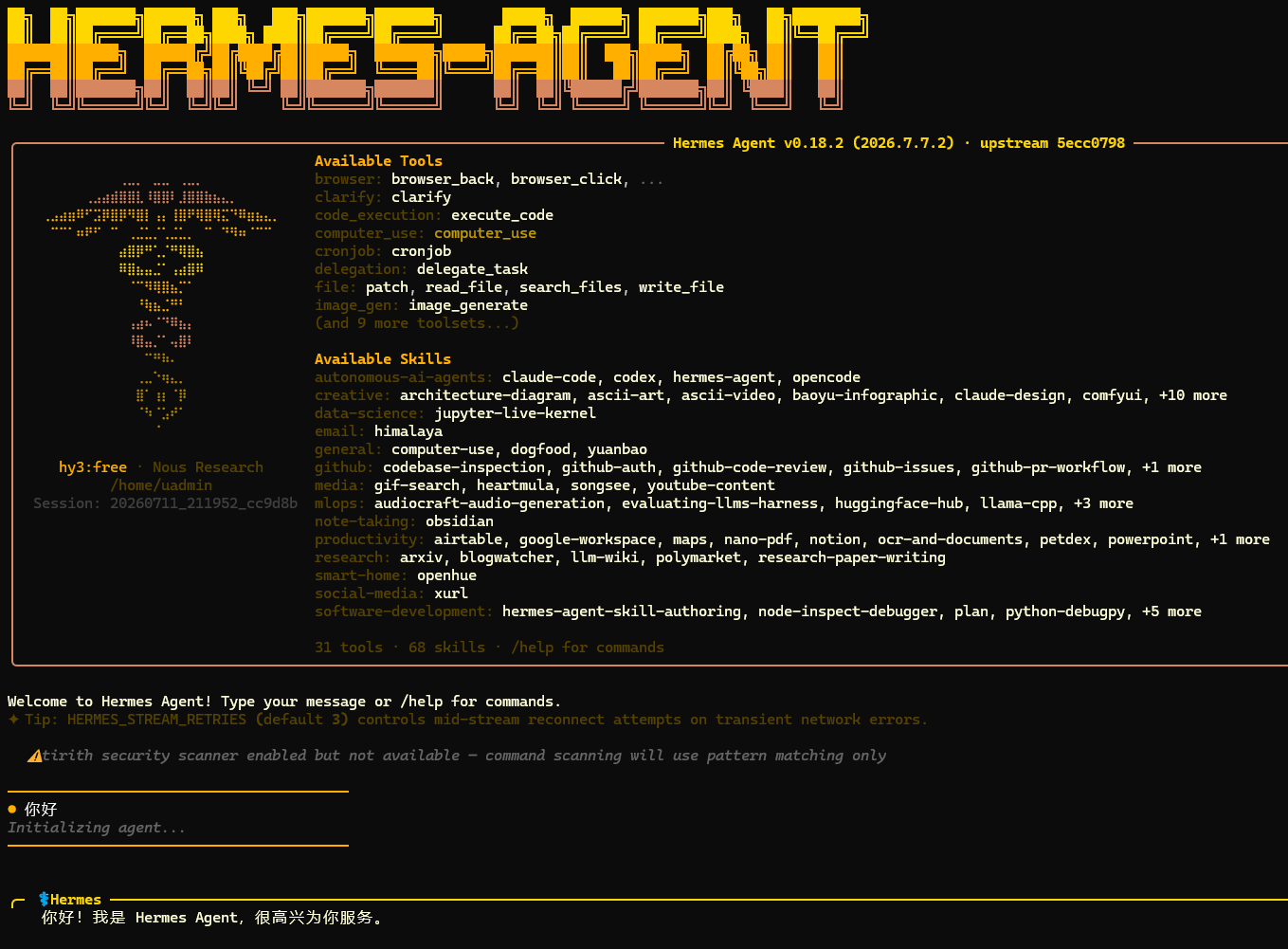
Welcome to Hermes Agent! Type your message or /help for commands.
✦ Tip: HERMES_STREAM_RETRIES (default 3) controls mid-stream reconnect attempts on transient network errors.

  ⚠ tirith security scanner enabled but not available — command scanning will use pattern matching only

────────────────────────────────────────
● 你好
Initializing agent...
────────────────────────────────────────


╭─ ⚕ Hermes ────────────────────────────────────────────────────────────────────────────────────────────────────────────────────────────────────────────────────────────────────────────────────────────────────╮
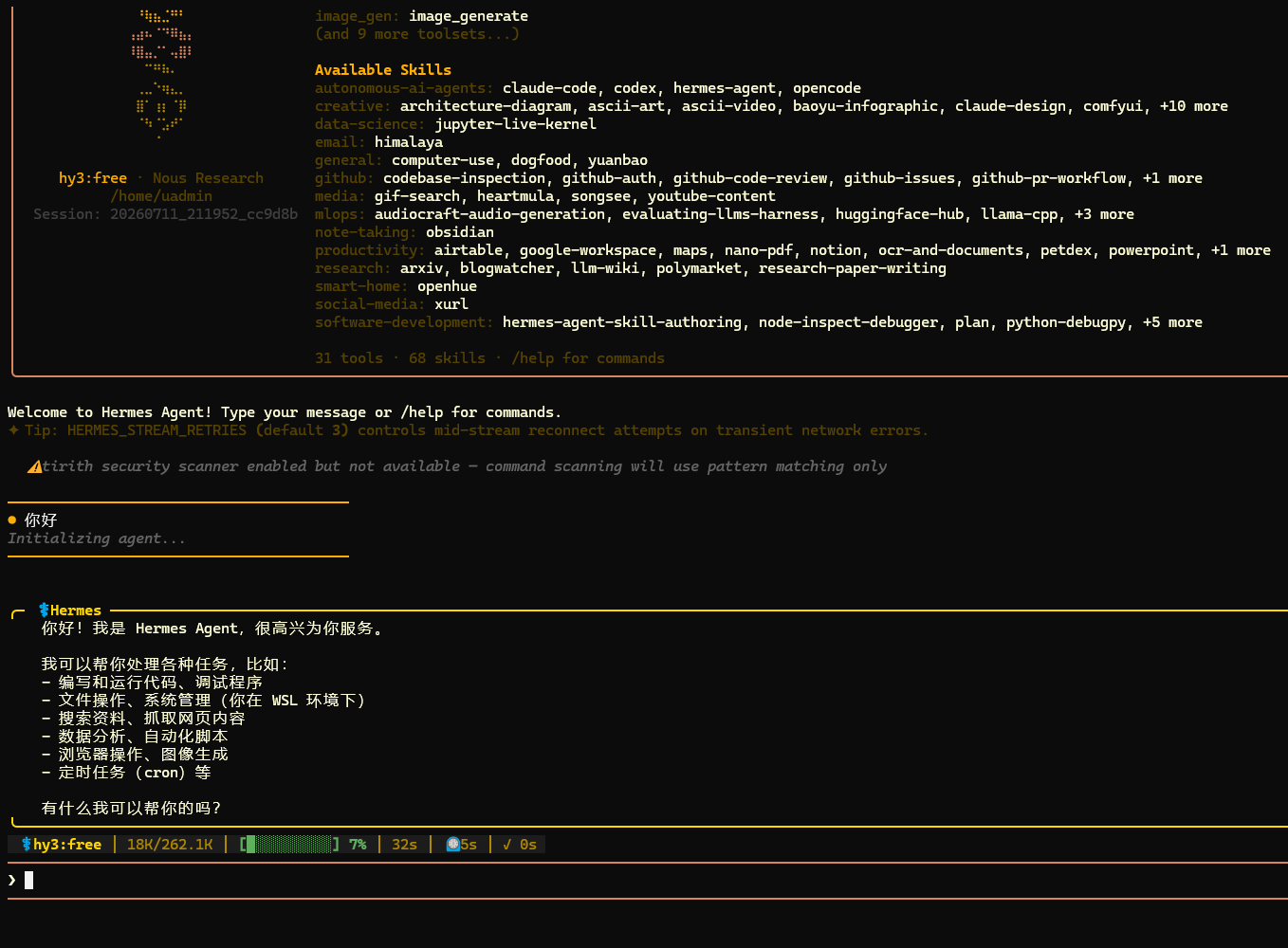
    你好!我是 Hermes Agent,很高兴为你服务。

    我可以帮你处理各种任务,比如:
    - 编写和运行代码、调试程序
    - 文件操作、系统管理(你在 WSL 环境下)
    - 搜索资料、抓取网页内容
    - 数据分析、自动化脚本
    - 浏览器操作、图像生成
    - 定时任务(cron)等

    有什么我可以帮你的吗?
╰───────────────────────────────────────────────────────────────────────────────────────────────────────────────────────────────────────────────────────────────────────────────────────────────────────────────╯
 ⚕ hy3:free │ 18K/262.1K │ [█░░░░░░░░░] 7% │ 32s │ ⏲ 5s │ ✓ 0s
─────────────────────────────────────────────────────────────────────────────────────────────────────────────────────────────────────────────────────────────────────────────────────────────────────────────────
❯
─────────────────────────────────────────────────────────────────────────────────────────────────────────────────────────────────────────────────────────────────────────────────────────────────────────────────
4.1.2 聊天截图1
4.1.3 聊天截图2
4.1.4 聊天失败
没开网络代理的可能会失败
⚠️  API call failed (attempt 1/3): APIConnectionError
   🔌 Provider: nous  Model: tencent/hy3:free
   🌐 Endpoint: https://inference-api.nousresearch.com/v1
   📝 Error: Connection error.
   ⏱️  Elapsed: 4.98s  Context: 2 msgs, ~4,372 tokens
⏳ Retrying in 2.5s (attempt 1/3)...
⚠️  API call failed (attempt 2/3): APIConnectionError
   🔌 Provider: nous  Model: tencent/hy3:free
   🌐 Endpoint: https://inference-api.nousresearch.com/v1
   📝 Error: Connection error.
   ⏱️  Elapsed: 12.36s  Context: 2 msgs, ~4,372 tokens
⏳ Retrying in 4.6s (attempt 2/3)...
⚠️  API call failed (attempt 3/3): APIConnectionError
   🔌 Provider: nous  Model: tencent/hy3:free
   🌐 Endpoint: https://inference-api.nousresearch.com/v1
   📝 Error: Connection error.
   ⏱️  Elapsed: 23.27s  Context: 2 msgs, ~4,372 tokens
❌ API failed after 3 retries — Connection error.
   💀 Final error: Connection error.
 ─  ⚕ Hermes
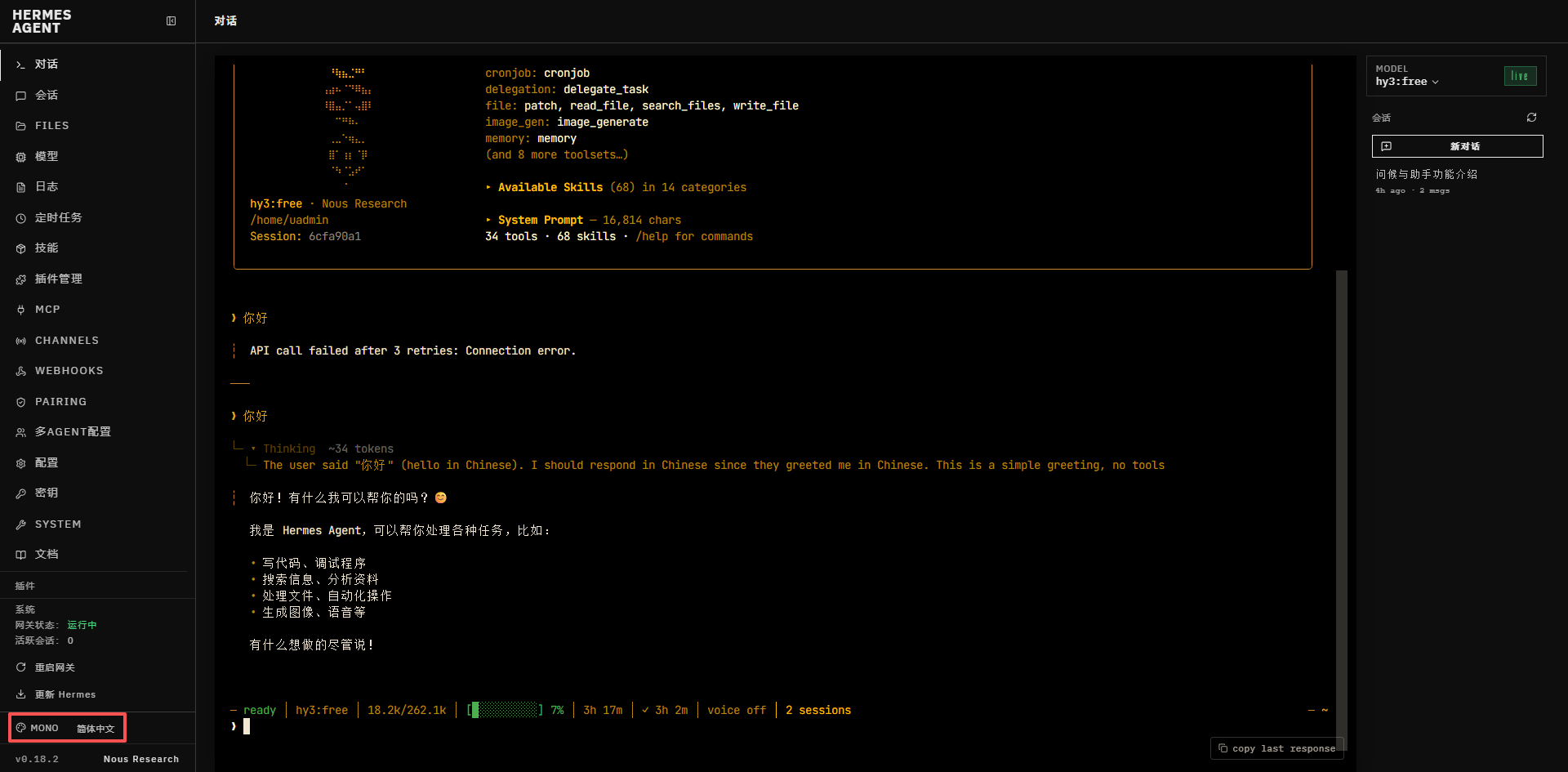
4.1.5 切换主题和语言
4.2 查看帮助/help
聊天输入:/help
4.3 退出/quit
聊天输入:/quit
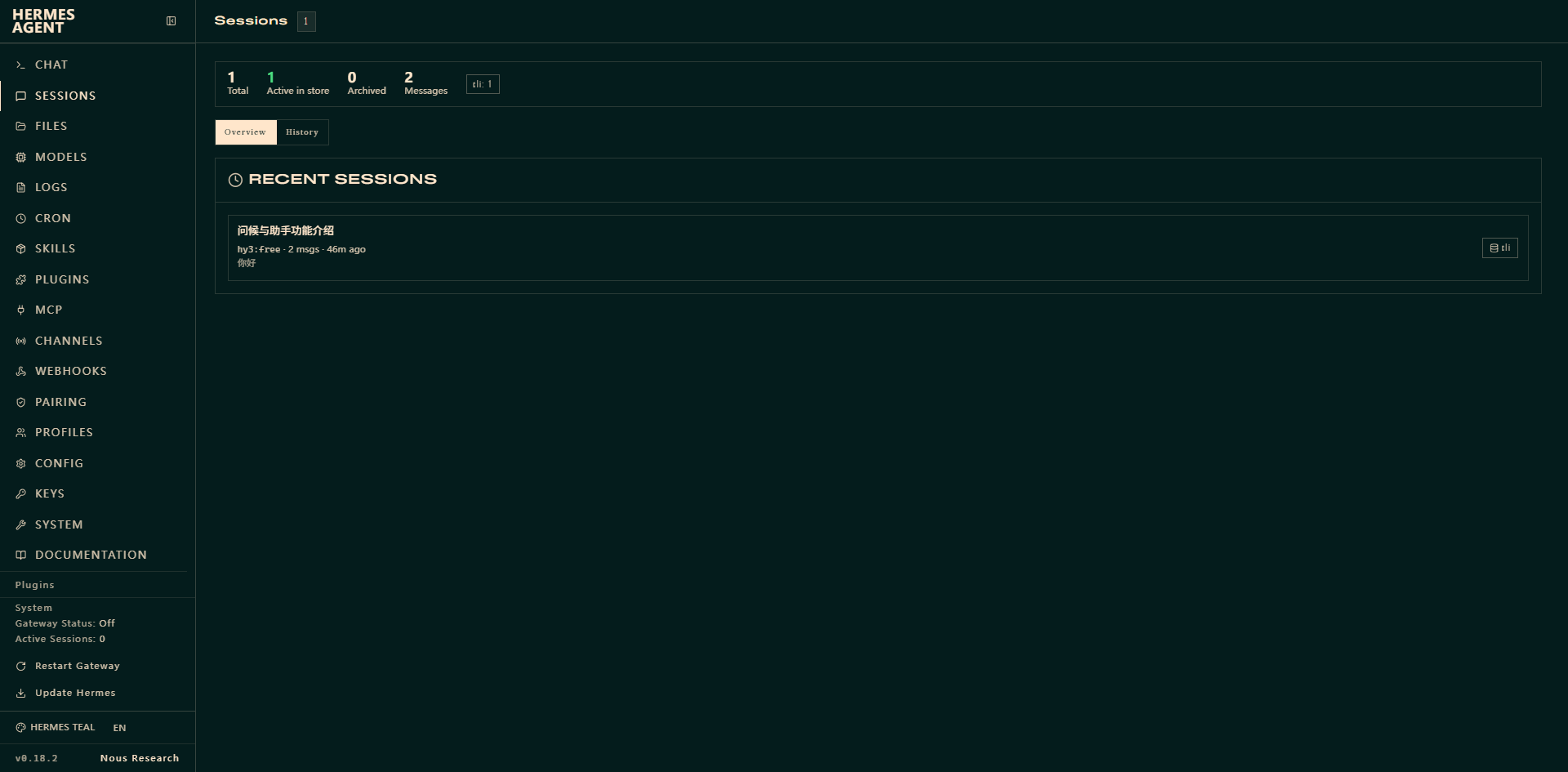
4.4 控制台 hermes dashboard
执行命令:hermes dashboard
浏览器访问:Hermes Web UI → http://127.0.0.1:9119
默认界面SESSIONS
聊天CHAT
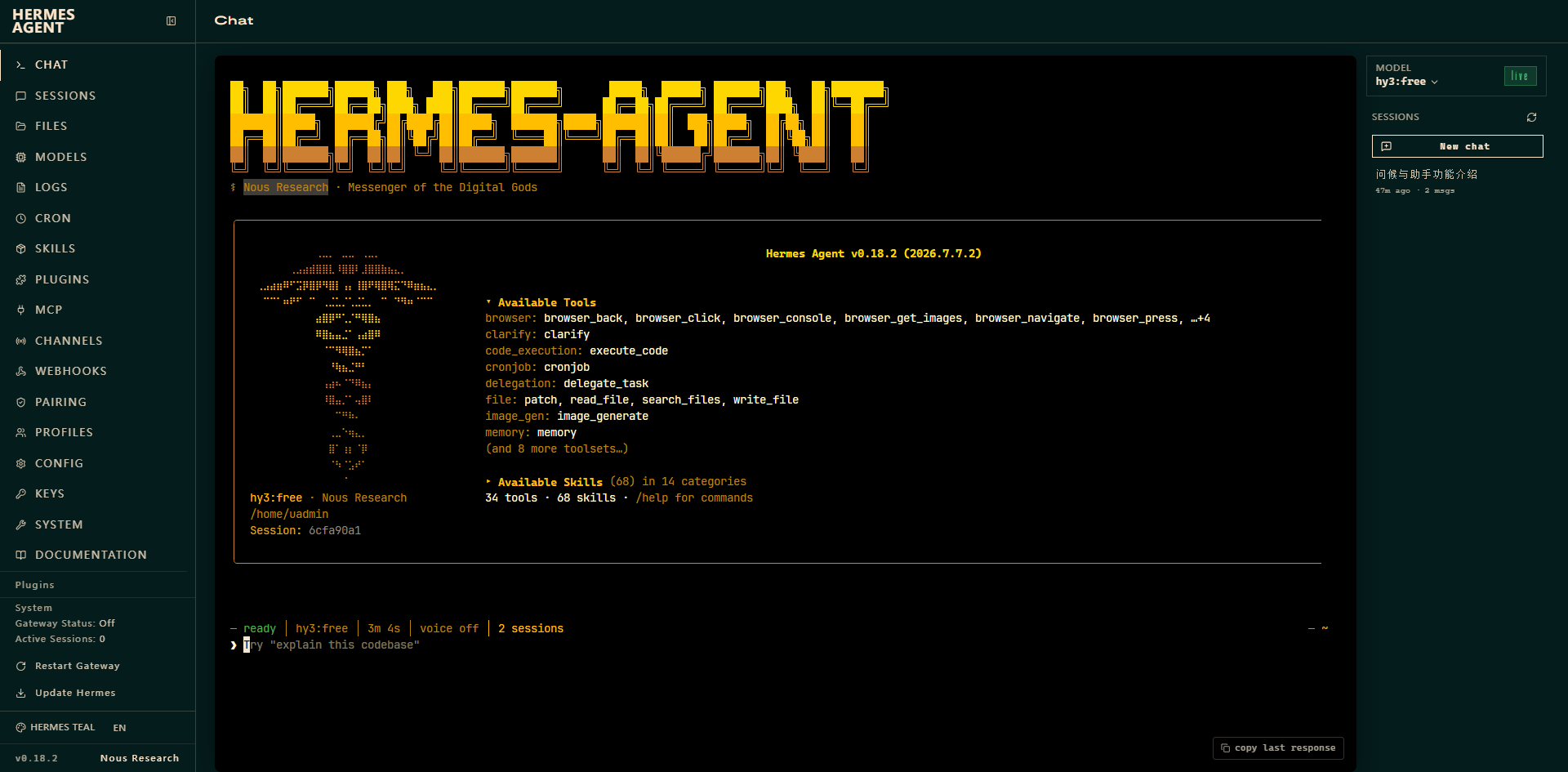
聊天失败的看命令行,看日志,(没开网络代理)
聊天成功
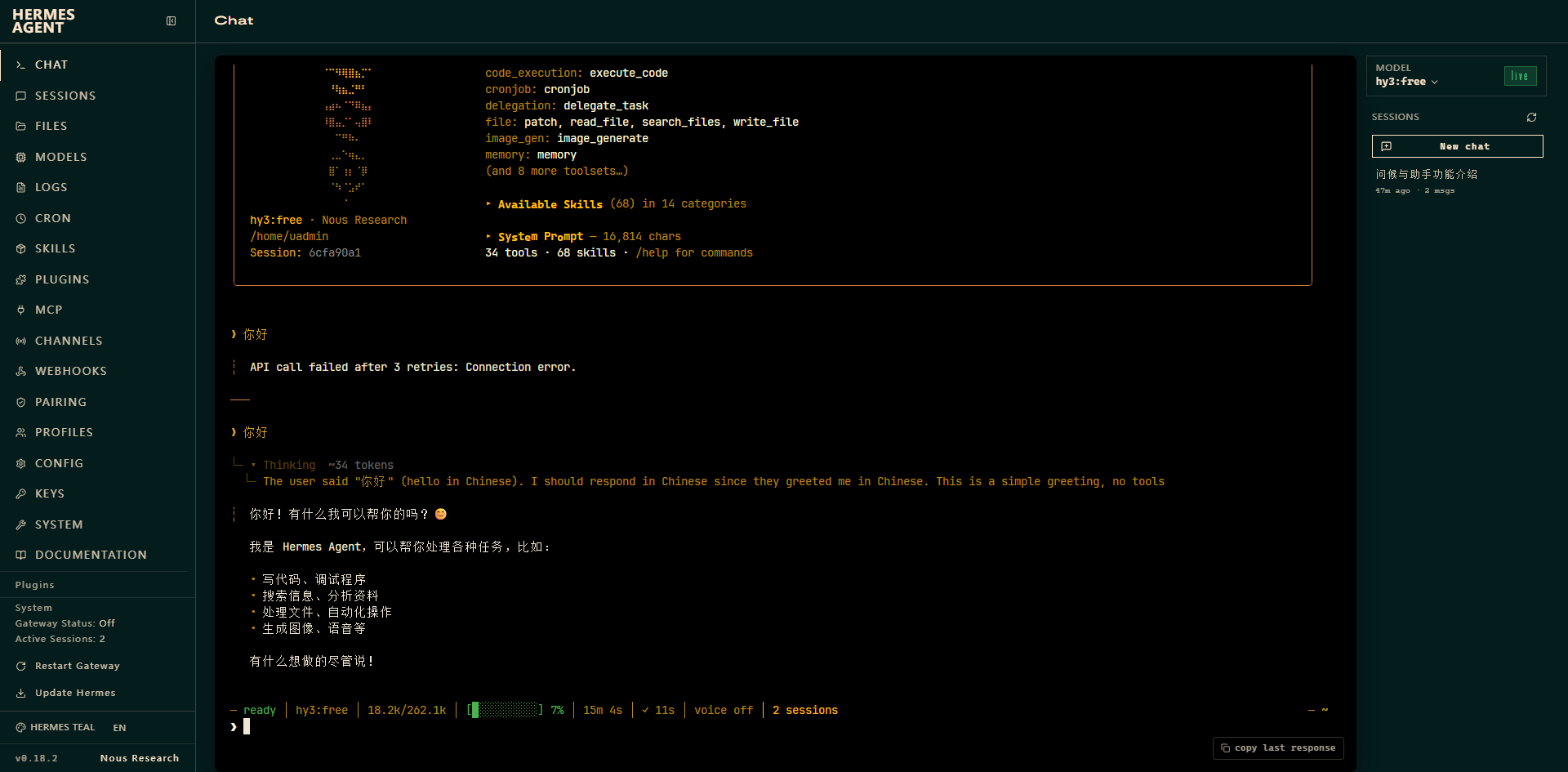
4.5 第三方增强控制台
包含内置 Web 终端、日志查看、定时任务管理、技能浏览等进阶功能:
1.安装命令(需提前安装 Node.js 环境):
npm install -g hermes-web-ui
2.启动控制台服务:
hermes-web-ui start
命令行启动会显示登录TOKEN
默认访问地址:http://localhost:8648
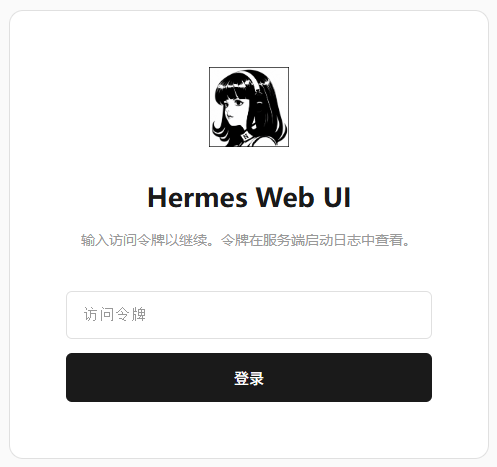
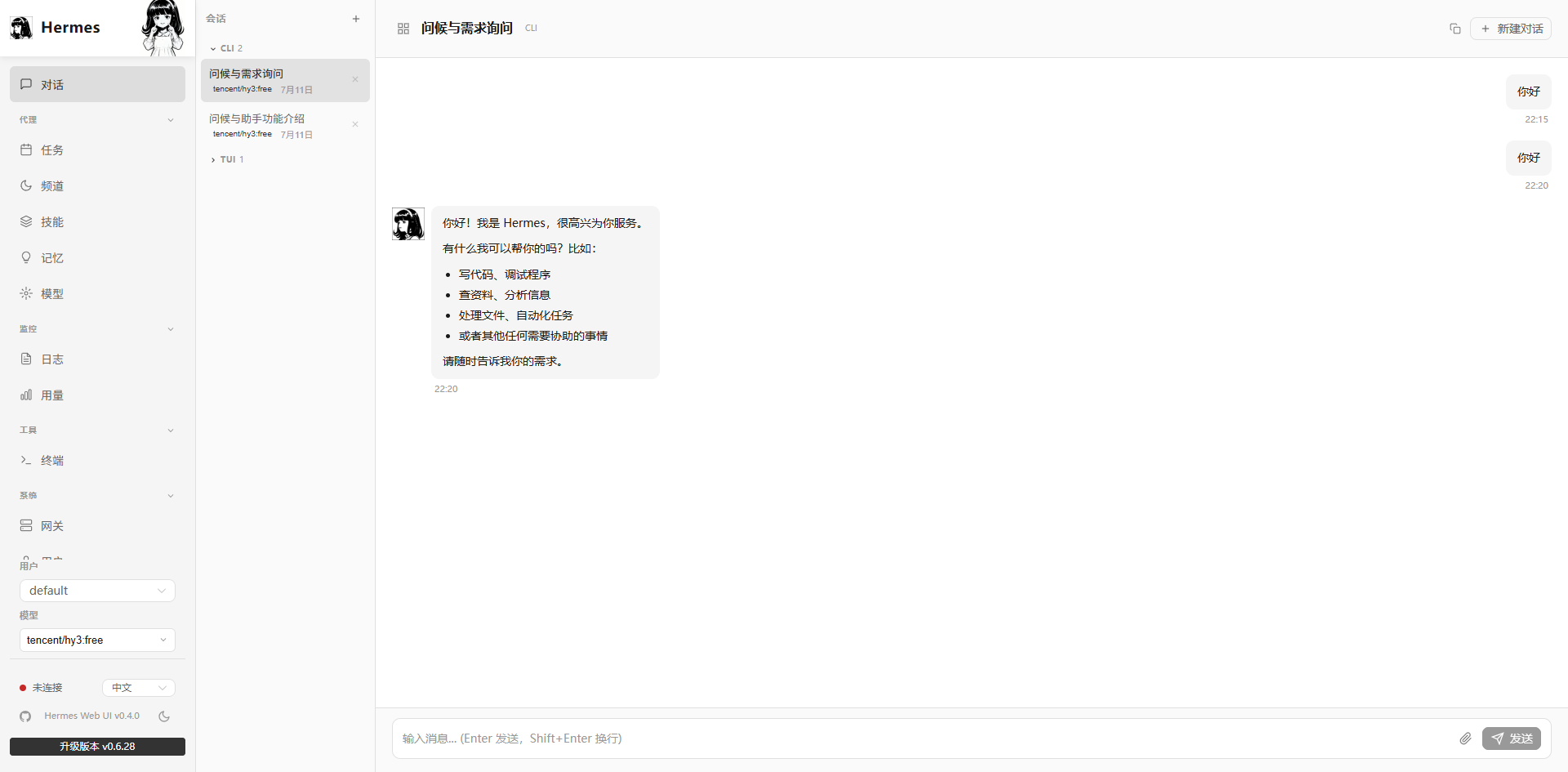
这个默认是中文的,看起来好一些。
五、查看日志
5.1. 快速查看命令(推荐)
直接在终端执行 CLI 命令,无需手动找文件:
# 实时跟踪日志(发消息时会实时打印请求错误详情)
hermes logs -f

# 查看最近50行主日志
hermes logs

# 实时只看错误日志
hermes logs errors -f

# 查看最近100行错误日志
hermes logs errors -n 100
tail -f ~/.hermes/logs/gateway.log
journalctl --user -u hermes-gateway -f(这个看得不全,不打印请求者的用户ID)
5.2. 日志文件路径
所有日志统一存放在 Hermes 配置目录的 logs 文件夹下:
- macOS / Linux / WSL2:
~/.hermes/logs/ - Windows:
%USERPROFILE%\.hermes\logs\(即C:\Users\你的用户名\.hermes\logs)
核心日志文件:
agent.log:主日志,记录所有模型调用、工具执行、会话流转,API 失败的详细堆栈在这里errors.log:仅记录错误和异常,快速排错优先看这个
5.3. 一键自动诊断
优先执行官方诊断命令,会自动检测配置、网络、依赖问题并给出修复提示:
hermes doctor

这里是“一人公司”的成长家园。我们提供从产品曝光、技术变现到法律财税的全栈内容,并连接云服务、办公空间等稀缺资源,助你专注创造,无忧运营。
更多推荐


 6
6 0
0- 0


 已为社区贡献3条内容

所有评论(0)