Playwright Test Agent
playwright 在最新版本的 1.56.0 版本引入了 playwright test Agent,我们可以看到,不管是playwright-mcp,还是现在 playwright test Agent,playwright都在积极的拥抱AI。
✅ Playwright Test Agents 是什么?
Playwright Test Agents 是 Playwright Test 框架在 v1.55+(2025 年起)引入的一套 AI 增强型测试自动化工作流工具,旨在通过 三个专用智能体(Agents) 实现 “从需求到可维护测试用例”的端到端自动化。
🎭 三大核心 Agent
|
Agent |
作用 |
输入 |
输出 |
|---|---|---|---|
|
🎭 Planner |
探索应用,生成人类可读的测试计划(Markdown) |
- 自然语言指令(如 “生成游客结账流程测试计划”)- 可选:seed.spec.ts(用于初始化环境)- 可选:PRD 文档 |
specs/xxx.md(结构化测试场景,含步骤与预期结果) |
|
🎭 Generator |
将 Markdown 测试计划转化为可执行的 Playwright 测试代码 |
- specs/xxx.md - 可访问被测应用(用于实时验证 selector) |
tests/xxx.spec.ts(含 locators、assertions 的真实测试文件) |
|
🎭 Healer |
自动修复失败的测试 |
- 失败的测试名称 |
- 当前应用 UI 状态 - 修复后的测试文件 - 或标记为跳过(若功能已废弃) |
🔁 工作流(Agentic Loop)
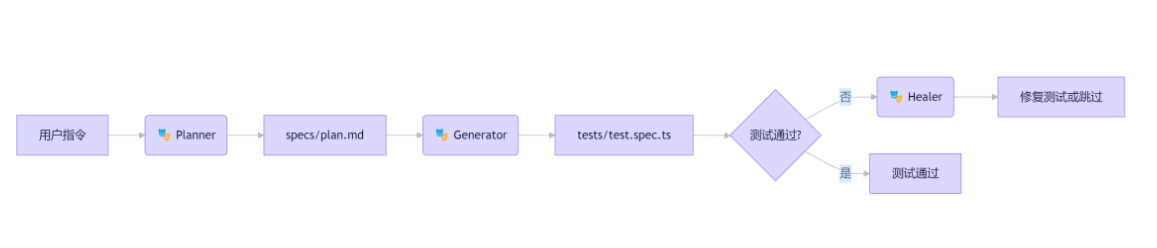
这个循环可手动触发,也可在 CI 中自动运行,实现测试的自生成 + 自修复。
🛠️ 使用方式
-
1. 初始化 Agent 定义(生成 MCP 工具描述):
npx playwright init-agents --loop=vscode # 用于 VS Code

npx playwright init-agents --loop=claude # 用于 Claude

npx playwright init-agents --loop=opencode # 用于 OpenCode
我这里使用 VS code IDE, 生成的具体命令如下:
npx playwright init-agents --loop=vscode

Writing file: .github/chatmodes/🎭 generator.chatmode.md

Writing file: .github/chatmodes/🎭 healer.chatmode.md

Writing file: .github/chatmodes/ 🎭 planner.chatmode.md

Writing file: .vscode/mcp.json

Writing file: tests\seed.spec.ts
这些命令会在 .github / 或项目根目录生成 Agent 的工具定义和提示模板(非测试代码)。
-
2. 在支持的 AI IDE 中调用(此处使用 VS Code v1.105.1):
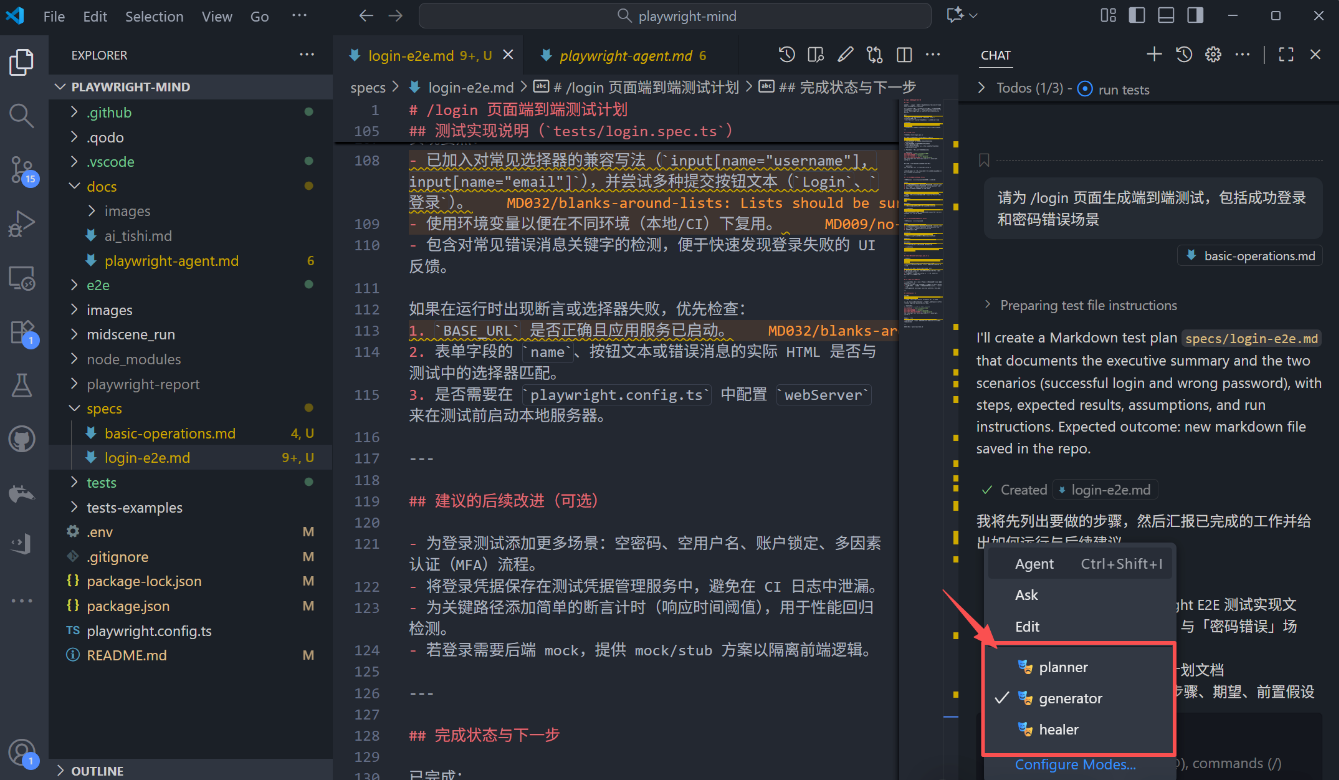
打开 Github Copilot 在对话框中输入需求:请为 /login 页面生成端到端测试,包括成功登录和密码错误场景.
🧠 发生了什么?
当你输入后,VS Code 会检测到这是一个 Playwright 项目,且存在 .github/chatmodes/,自动加载 Planner、Generator、Healer 三个 MCP 工具,调用 Planner Agent 生成 specs/login.md,自动调用 Generator Agent 将其转为 tests/login.spec.ts,(如果测试失败)后续可手动触发 Healer 修复。
💡 你不需要手动调用每个 Agent,VS Code 会自动编排整个流程。
-
3. 项目结构约定:
playwright-mind/

├── .github/ # Agent 定义(MCP tools + prompts)

├── specs/ # 人类可读的测试计划(Markdown)

├── tests/

│ ├── seed.spec.ts # 环境初始化测试(供 Planner 使用)

│ └── *.spec.ts # 生成的 Playwright 测试

└── playwright.config.ts-
4. 🔍 验证是否成功
查看项目根目录是否生成: tests/login.spec.ts, 打开文件,你会看到类似代码:
import { test, expect } from '@playwright/test';


/**

 * End-to-end tests for /login page.

 *

 * NOTE:

 * - Update BASE_URL, VALID_USER, and selectors below to match your app.

 * - You can set BASE_URL via environment variable BASE_URL or PLAYWRIGHT_BASE_URL.

 */


const BASE_URL = process.env.BASE_URL || process.env.PLAYWRIGHT_BASE_URL || 'http://localhost:3000';


// Replace these with real test credentials or inject via environment variables in CI

const VALID_USER = {

  username: process.env.TEST_USERNAME || 'testuser',

  password: process.env.TEST_PASSWORD || 'correct-password',

};


const INVALID_PASSWORD = process.env.TEST_INVALID_PASSWORD || 'wrong-password';


test.describe('/login page', () => {

  test('successful login should redirect to dashboard (or show authenticated page)', async ({ page }) => {

    await page.goto(`${BASE_URL}/login`);


    // Fill username/email — adjust selectors to match your form

    await page.fill('input[name="username"], input[name="email"]', VALID_USER.username);

    await page.fill('input[name="password"]', VALID_USER.password);


    // Click submit — try a couple of common alternatives

    await Promise.race([

      page.click('button[type="submit"]'),

      page.click('button:has-text("Login")'),

      page.click('button:has-text("登录")'),

    ]).catch(() => {

      // If none of the above matched, try pressing Enter in password field

      // (keeps test resilient; remove if your app requires explicit click)

      return page.press('input[name="password"]', 'Enter');

    });


    // Wait for a redirect or visible authenticated UI.

    // Adjust the expected URL or assertion to match your app (e.g., /dashboard, /home)

    await page.waitForTimeout(500); // small pause to allow navigation to start

    await expect(page).toHaveURL(/.*(dashboard|home|profile|\/)$/i, { timeout: 10000 });


    // Also assert a common authenticated indicator (Logout, Profile, Dashboard)

    const authIndicator = page.locator('text=Logout, text=Sign out, text=Dashboard, text=Profile');

    await expect(authIndicator.first()).toBeVisible({ timeout: 10000 });

  });
💡 适用场景
快速为新功能生成 E2E 测试骨架;在 UI 变更后自动修复大量失效测试;让产品经理/测试人员通过写 Markdown 参与测试设计。
✅ 总结
Playwright Test Agents = AI 辅助的测试工程流水线
它通过 Planner → Generator → Healer 三步,实现 “需求 → 测试计划 → 可执行测试 → 自动修复” 的闭环,显著提升测试开发效率与可维护性。
我们总能从新技术里面看到过往技术的影子,如果你使用过 BDD行为驱动开发的化,就会发现有点BDD的味道,先通过markdown描述需求,然后,在基于行为描述文件编写代码,只不过,整个过程AI协助完成。
参考项目:https://github.com/AutoTestClass/playwright-mind
最后: 下方这份完整的软件测试 视频教程已经整理上传完成,需要的朋友们可以自行领取【保证100%免费】
软件测试面试文档
我们学习必然是为了找到高薪的工作,下面这些面试题是来自阿里、腾讯、字节等一线互联网大厂最新的面试资料,并且有字节大佬给出了权威的解答,刷完这一套面试资料相信大家都能找到满意的工作。



这里是“一人公司”的成长家园。我们提供从产品曝光、技术变现到法律财税的全栈内容,并连接云服务、办公空间等稀缺资源,助你专注创造,无忧运营。
更多推荐


 3
3 0
0- 0


 已为社区贡献3条内容

所有评论(0)