python构建的3D分子轨道可视化
·
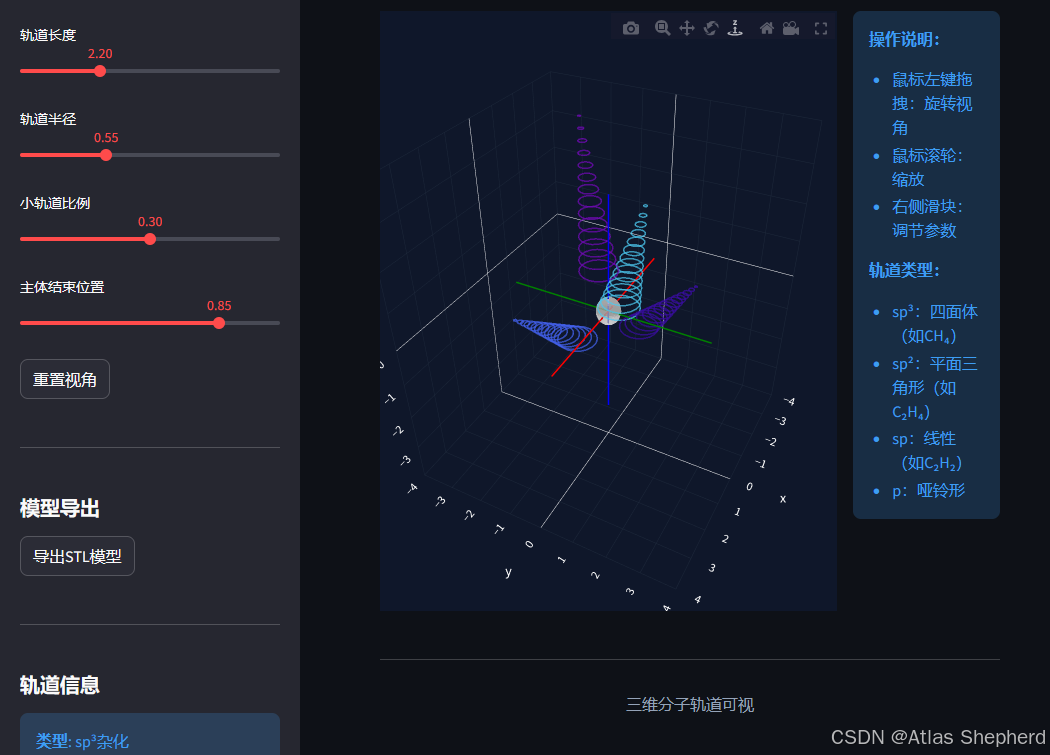
基于python与Streamlit构建的交互式的Web应用,可以在浏览器里查看和操作不同形状的分子轨道模型。可以在网页上显示3D的轨道图形,有sp3、sp2、sp和p几种类型,每种都有特定的空间结构。可以通过侧边栏的滑块调整参数,比如原子大小、轨道长短,还能旋转缩放模型,从不同角度观察。还支持导出STL文件,
一、应用概述
基于Web的交互式科学可视化工具,专门用于展示和探索量子化学中的杂化轨道三维几何结构。应用通过Streamlit构建,结合Plotly实现交互式3D可视化,并支持STL模型导出功能。
二、技术架构
核心库依赖
- Streamlit: 创建Web应用界面
- NumPy: 数学计算和数组操作
- Plotly: 交互式3D可视化
- numpy-stl: STL模型生成和导出
- math: 基础数学运算
三、核心功能模块解析
1. 用户界面系统
页面配置:宽屏布局,侧边栏默认展开
st.set_page_config(
    page_title="3D分子轨道可视化工具",
    layout="wide",
    initial_sidebar_state="expanded"
)
- 提供沉浸式的3D可视化体验
- 控制面板与主视图分离的设计
状态管理:
if 'params' not in st.session_state:
    st.session_state.params = {...}
- 使用Streamlit的session_state持久化参数
- 确保参数在用户交互过程中保持状态
2. 轨道几何计算引擎
方向向量计算 (get_orbital_directions):
-
sp³杂化:4个轨道指向正四面体的四个顶点
- 方向:
[1,1,1]/√3,[1,-1,-1]/√3,[-1,1,-1]/√3,[-1,-1,1]/√3 - 键角:109.5°(标准的四面体角)
- 方向:
-
sp²杂化:3个轨道在平面内互成120°
- 方向:
[1,0,0],[-0.5, √3/2, 0],[-0.5, -√3/2, 0] - 平面三角形结构
- 方向:
-
sp杂化:2个轨道沿z轴反向
- 方向:
[0,0,1],[0,0,-1] - 线性结构,键角180°
- 方向:
-
p轨道:标准的哑铃形轨道
- 方向:
[1,0,0],[-1,0,0]
- 方向:
网格生成算法:
球体网格生成 (create_sphere_mesh):
- 采用经纬度划分法生成球面网格
- 参数化方程:
x = r·sin(φ)·cos(θ) y = r·sin(φ)·sin(θ) z = r·cos(φ) - 生成三角面片用于3D渲染
轨道网格生成 (create_orbital_mesh):
这是应用的核心算法,模拟杂化轨道的"大头"形状:
-
主体部分构建:
- 使用正弦曲线控制半径变化:
radius = max_radius * sin(πt/2) - 实现从原点向外逐渐扩张的平滑过渡
- 在85%位置(默认)结束主体部分
- 使用正弦曲线控制半径变化:
-
半球封口:
- 在主体末端添加半球形封口
- 使轨道末端呈现圆滑的"大头"形状
-
几何变换:
- 构建局部坐标系(方向向量+两个正交基)
- 将2D圆环变换到3D空间中的正确方向
3. STL模型生成
def generate_stl_model(...):
    # 1. 生成正向的大轨道
    # 2. 生成反向的小轨道(模拟电子云的另一端)
    # 3. 添加中心原子球体
    # 4. 合并所有网格并导出为STL格式
- 大轨道:主电子云区域
- 小轨道:反向的较小电子云,模拟轨道的完整分布
- 原子核:中心球体表示原子
- 支持3D打印和教育模型制作
4. 交互控制
参数调节滑块:
- 原子半径 (0.1-1.0):控制中心原子的大小
- 轨道长度 (1.0-5.0):控制轨道延伸距离
- 轨道半径 (0.1-1.5):控制轨道"大头"的粗细
- 小轨道比例 (0.1-0.5):控制反向轨道的大小比例
- 主体结束位置 (0.5-0.95):控制"大头"开始的位置
轨道类型选择:
- 四种杂化类型对应不同的空间构型
- 实时更新对称性信息和轨道数量
5. 3D可视
坐标系统:
- 显示XYZ坐标轴(红绿蓝)
- 提供空间参考框架
轨道可视化:
- 使用锥形面片表示轨道形状
- 不同轨道用不同颜色区分
- 透明度设置显示内部结构
交互功能:
- 鼠标拖拽旋转视角
- 滚轮缩放
- 预设视角重置
四、完整代码
import streamlit as st
import numpy as np
import plotly.graph_objects as go
import math
from stl import mesh
import io

# 设置页面配置
st.set_page_config(
    page_title="3D分子轨道可视化工具",
    layout="wide",
    initial_sidebar_state="expanded"
)

# 标题
st.title("3D分子轨道可视化工具")
st.write("交互式探索杂化轨道与量子化学可视化")

# 初始化session_state
if 'params' not in st.session_state:
    st.session_state.params = {
        'orbital_type': 'sp3',
        'atom_radius': 0.35,
        'orbital_length': 2.2,
        'orbital_radius': 0.55,
        'resolution': 20,
        'small_orbital_scale': 0.3,
        'body_end_ratio': 0.85
    }

def get_orbital_directions(orbital_type):
    """获取轨道方向"""
    if orbital_type == 'sp3':
        return [
            np.array([1, 1, 1]) / np.sqrt(3),
            np.array([1, -1, -1]) / np.sqrt(3),
            np.array([-1, 1, -1]) / np.sqrt(3),
            np.array([-1, -1, 1]) / np.sqrt(3)
        ]
    elif orbital_type == 'sp2':
        return [
            np.array([1, 0, 0]),
            np.array([-0.5, np.sqrt(3)/2, 0]),
            np.array([-0.5, -np.sqrt(3)/2, 0])
        ]
    elif orbital_type == 'sp':
        return [
            np.array([0, 0, 1]),
            np.array([0, 0, -1])
        ]
    elif orbital_type == 'p':
        return [
            np.array([1, 0, 0]),
            np.array([-1, 0, 0])
        ]
    return [np.array([1, 0, 0])]

def create_sphere_mesh(center, radius, n_lat=16, n_lon=32):
    """创建球体网格"""
    vertices = []
    faces = []

    for i in range(n_lat + 1):
        phi = math.pi * i / n_lat
        for j in range(n_lon):
            theta = 2 * math.pi * j / n_lon
            x = center[0] + radius * math.sin(phi) * math.cos(theta)
            y = center[1] + radius * math.sin(phi) * math.sin(theta)
            z = center[2] + radius * math.cos(phi)
            vertices.append([x, y, z])

    # 生成三角面
    for i in range(n_lat):
        for j in range(n_lon):
            next_j = (j + 1) % n_lon
            v0 = i * n_lon + j
            v1 = i * n_lon + next_j
            v2 = (i + 1) * n_lon + j
            v3 = (i + 1) * n_lon + next_j
            faces.append([v0, v1, v2])
            faces.append([v1, v3, v2])

    return np.array(vertices), np.array(faces)

def create_orbital_mesh(start_point, direction, length=2.2, max_radius=0.55, n_lat=20, n_lon=32):
    """生成单个轨道网格(精确的sp³轨道几何模型)"""
    vertices = []
    faces = []
    direction = np.array(direction) / np.linalg.norm(direction)

    # 构建正交基
    if abs(direction[2]) < 0.9:
        v1 = np.cross(direction, (0, 0, 1))
    else:
        v1 = np.cross(direction, (1, 0, 0))
    v1 = v1 / np.linalg.norm(v1)
    v2 = np.cross(direction, v1)
    v2 = v2 / np.linalg.norm(v2)

    body_end_t = 0.85  # 主体结束位置

    # 主体部分
    for i in range(int(n_lat * body_end_t) + 1):
        t = i / n_lat
        # 使用正弦曲线实现平滑的半径增长
        radius = max_radius * math.sin(t / body_end_t * math.pi / 2)
        pos = start_point + direction * (t * length)

        for j in range(n_lon):
            theta = 2 * math.pi * j / n_lon
            offset = v1 * (radius * math.cos(theta)) + v2 * (radius * math.sin(theta))
            vertex = pos + offset
            vertices.append(vertex.tolist())

    # 半球封口
    sphere_center = start_point + direction * (body_end_t * length)
    n_hemi = 12

    for i in range(n_hemi + 1):
        phi = math.pi * i / (2 * n_hemi)
        sphere_r = max_radius * math.sin(phi)
        z_offset = max_radius * math.cos(phi)
        pos = sphere_center + direction * z_offset

        for j in range(n_lon):
            theta = 2 * math.pi * j / n_lon
            offset = v1 * (sphere_r * math.cos(theta)) + v2 * (sphere_r * math.sin(theta))
            vertices.append((pos + offset).tolist())

    # 生成三角面(主体侧面)
    for i in range(int(n_lat * body_end_t)):
        for j in range(n_lon):
            next_j = (j + 1) % n_lon
            v0 = i * n_lon + j
            v1 = i * n_lon + next_j
            v2 = (i + 1) * n_lon + next_j
            v3 = (i + 1) * n_lon + j
            faces.append([v0, v1, v2])
            faces.append([v0, v2, v3])

    # 半球封口面
    start_idx = len(vertices) - (n_hemi + 1) * n_lon
    for i in range(n_hemi):
        for j in range(n_lon):
            next_j = (j + 1) % n_lon
            v0 = start_idx + i * n_lon + j
            v1 = start_idx + i * n_lon + next_j
            v2 = start_idx + (i + 1) * n_lon + j
            v3 = start_idx + (i + 1) * n_lon + next_j
            faces.append([v0, v1, v2])
            faces.append([v1, v3, v2])

    return np.array(vertices), np.array(faces)

def generate_stl_model(orbital_type, atom_radius, orbital_length, orbital_radius, small_scale=0.3):
    """生成完整的STL模型"""
    all_vertices = []
    all_faces = []
    vertex_offset = 0

    directions = get_orbital_directions(orbital_type)

    # 生成大轨道
    for direction in directions:
        v, f = create_orbital_mesh(
            (0, 0, 0), direction,
            length=orbital_length,
            max_radius=orbital_radius
        )
        all_vertices.extend(v)
        all_faces.extend(f + vertex_offset)
        vertex_offset += len(v)

    # 生成小轨道(反方向)
    for direction in directions:
        opposite_dir = -np.array(direction)
        v, f = create_orbital_mesh(
            (0, 0, 0), opposite_dir,
            length=orbital_length * small_scale,
            max_radius=orbital_radius * small_scale
        )
        all_vertices.extend(v)
        all_faces.extend(f + vertex_offset)
        vertex_offset += len(v)

    # 添加中心原子
    v, f = create_sphere_mesh((0, 0, 0), atom_radius)
    all_vertices.extend(v)
    all_faces.extend(f + vertex_offset)

    # 创建STL网格
    vertices = np.array(all_vertices)
    faces = np.array(all_faces)

    stl_mesh = mesh.Mesh(np.zeros(faces.shape[0], dtype=mesh.Mesh.dtype))
    for i, f in enumerate(faces):
        for j in range(3):
            stl_mesh.vectors[i][j] = vertices[f[j]]

    return stl_mesh

# 侧边栏控制
with st.sidebar:
    st.header("轨道参数控制")

    orbital_type = st.selectbox(
        "轨道类型",
        options=['sp3', 'sp2', 'sp', 'p'],
        format_func=lambda x: {
            'sp3': 'sp³杂化 (四面体)',
            'sp2': 'sp²杂化 (平面三角形)',
            'sp': 'sp杂化 (线性)',
            'p': 'p轨道 (哑铃形)'
        }[x],
        key='orbital_type_select'
    )

    st.session_state.params['orbital_type'] = orbital_type

    st.session_state.params['atom_radius'] = st.slider(
        "原子半径",
        min_value=0.1,
        max_value=1.0,
        value=st.session_state.params['atom_radius'],
        step=0.05,
        key='atom_radius_slider'
    )

    st.session_state.params['orbital_length'] = st.slider(
        "轨道长度",
        min_value=1.0,
        max_value=5.0,
        value=st.session_state.params['orbital_length'],
        step=0.1,
        key='orbital_length_slider'
    )

    st.session_state.params['orbital_radius'] = st.slider(
        "轨道半径",
        min_value=0.1,
        max_value=1.5,
        value=st.session_state.params['orbital_radius'],
        step=0.05,
        key='orbital_radius_slider'
    )

    st.session_state.params['small_orbital_scale'] = st.slider(
        "小轨道比例",
        min_value=0.1,
        max_value=0.5,
        value=st.session_state.params['small_orbital_scale'],
        step=0.05,
        key='small_orbital_scale_slider'
    )

    st.session_state.params['body_end_ratio'] = st.slider(
        "主体结束位置",
        min_value=0.5,
        max_value=0.95,
        value=st.session_state.params['body_end_ratio'],
        step=0.05,
        key='body_end_ratio_slider'
    )

    if st.button("重置视角"):
        st.session_state.view_state = {'camera': {'eye': {'x': 2, 'y': 2, 'z': 2}}}

    # STL导出功能
    st.markdown("---")
    st.header("模型导出")

    if st.button("导出STL模型"):
        try:
            stl_mesh = generate_stl_model(
                orbital_type=st.session_state.params['orbital_type'],
                atom_radius=st.session_state.params['atom_radius'],
                orbital_length=st.session_state.params['orbital_length'],
                orbital_radius=st.session_state.params['orbital_radius'],
                small_scale=st.session_state.params['small_orbital_scale']
            )

            # 保存STL文件到临时文件,然后读取为字节流
            import tempfile
            with tempfile.NamedTemporaryFile(suffix='.stl', delete=False) as tmp_file:
                stl_mesh.save(tmp_file.name)
                tmp_file.flush()
                with open(tmp_file.name, 'rb') as f:
                    stl_buffer = io.BytesIO(f.read())
            stl_buffer.seek(0)

            st.download_button(
                label="下载STL文件",
                data=stl_buffer,
                file_name=f"{orbital_type}_orbital.stl",
                mime="application/octet-stream"
            )
            st.success("STL模型生成成功!")
        except Exception as e:
            st.error(f"生成STL模型时出错: {str(e)}")

# 轨道信息
st.sidebar.markdown("---")
st.sidebar.header("轨道信息")

orbital_names = {
    'sp3': 'sp³杂化',
    'sp2': 'sp²杂化',
    'sp': 'sp杂化',
    'p': 'p轨道'
}

symmetry_names = {
    'sp3': '四面体 (Td)',
    'sp2': '平面三角形 (D₃h)',
    'sp': '线性 (D∞h)',
    'p': '哑铃形 (D∞h)'
}

orbital_counts = {
    'sp3': 4,
    'sp2': 3,
    'sp': 2,
    'p': 2
}

st.sidebar.info(f"""
**类型**: {orbital_names[orbital_type]}

**对称性**: {symmetry_names[orbital_type]}

**轨道数**: {orbital_counts[orbital_type]}

**原子半径**: {st.session_state.params['atom_radius']:.2f}

**轨道长度**: {st.session_state.params['orbital_length']:.2f}

**轨道半径**: {st.session_state.params['orbital_radius']:.2f}

**小轨道比例**: {st.session_state.params['small_orbital_scale']:.2f}

**主体结束位置**: {st.session_state.params['body_end_ratio']:.2f}
""")

# 创建3D可视化
col1, col2 = st.columns([3, 1])

with col1:
    st.subheader("3D可视化")

    # 创建3D图形
    fig = go.Figure()

    # 添加坐标轴
    fig.add_trace(go.Scatter3d(
        x=[-3, 3], y=[0, 0], z=[0, 0],
        mode='lines',
        line=dict(color='red', width=3),
        name='X轴',
        showlegend=False
    ))

    fig.add_trace(go.Scatter3d(
        x=[0, 0], y=[-3, 3], z=[0, 0],
        mode='lines',
        line=dict(color='green', width=3),
        name='Y轴',
        showlegend=False
    ))

    fig.add_trace(go.Scatter3d(
        x=[0, 0], y=[0, 0], z=[-3, 3],
        mode='lines',
        line=dict(color='blue', width=3),
        name='Z轴',
        showlegend=False
    ))

    # 添加中心原子
    atom_radius = st.session_state.params['atom_radius']
    u = np.linspace(0, 2*np.pi, 20)
    v = np.linspace(0, np.pi, 20)
    x = atom_radius * np.outer(np.cos(u), np.sin(v))
    y = atom_radius * np.outer(np.sin(u), np.sin(v))
    z = atom_radius * np.outer(np.ones(np.size(u)), np.cos(v))

    fig.add_trace(go.Surface(
        x=x, y=y, z=z,
        colorscale=[[0, '#cccccc'], [1, '#cccccc']],
        showscale=False,
        name='原子',
        opacity=0.8
    ))

    # 添加轨道
    directions = get_orbital_directions(orbital_type)
    colors = ['#4cc9f0', '#4361ee', '#3a0ca3', '#7209b7']

    for i, direction in enumerate(directions):
        color = colors[i % len(colors)]
        length = st.session_state.params['orbital_length']
        radius = st.session_state.params['orbital_radius']

        # 创建锥形轨道
        t = np.linspace(0, length, 15)
        theta = np.linspace(0, 2*np.pi, 20)

        for ti in t:
            r = radius * (1 - ti/length)
            circle_x = r * np.cos(theta)
            circle_y = r * np.sin(theta)
            circle_z = np.full_like(theta, ti)

            # 变换到世界坐标
            world_x = circle_x + direction[0] * ti + direction[0] * length / 2
            world_y = circle_y + direction[1] * ti + direction[1] * length / 2
            world_z = circle_z + direction[2] * ti + direction[2] * length / 2

            fig.add_trace(go.Scatter3d(
                x=world_x, y=world_y, z=world_z,
                mode='lines',
                line=dict(color=color, width=3),
                showlegend=False,
                opacity=0.7
            ))

    # 设置布局
    fig.update_layout(
        scene=dict(
            xaxis=dict(range=[-4, 4], backgroundcolor='#0f172a', gridcolor='#1e293b', color='white'),
            yaxis=dict(range=[-4, 4], backgroundcolor='#0f172a', gridcolor='#1e293b', color='white'),
            zaxis=dict(range=[-4, 4], backgroundcolor='#0f172a', gridcolor='#1e293b', color='white'),
            bgcolor='#0f172a',
            camera=dict(
                eye=dict(x=2, y=2, z=2)
            )
        ),
        width=800,
        height=600,
        margin=dict(l=0, r=0, t=0, b=0),
        paper_bgcolor='#1a1a2e'
    )

    # 显示3D图形
    st.plotly_chart(fig, use_container_width=True, config={'displayModeBar': True})

with col2:
    st.subheader("使用说明")

    st.info("""
    **操作说明:**

    - 鼠标左键拖拽:旋转视角
    - 鼠标滚轮:缩放
    - 右侧滑块:调节参数

    **轨道类型:**
    - sp³:四面体(如CH₄)
    - sp²:平面三角形(如C₂H₄)
    - sp:线性(如C₂H₂)
    - p:哑铃形
    """)

# 底部说明
st.markdown("---")
st.markdown("""
<div style="text-align: center; color: #94a3b8;">
    <p>三维分子轨道可视</p>
</div>
""", unsafe_allow_html=True)

这里是“一人公司”的成长家园。我们提供从产品曝光、技术变现到法律财税的全栈内容,并连接云服务、办公空间等稀缺资源,助你专注创造,无忧运营。
更多推荐
 5
5 0
0- 0


 已为社区贡献5条内容

所有评论(0)