远程服务器连接Codex:Token exchange failed: token endpoint returned status 403 Forbidde
·
两步设置
一: 找到你远程服务起的/root/.vscode-server/data/Machine/settings.json,打开后加入下面这几行
{
	"http.proxy": "http://127.0.0.1:7890",
 	"http.proxySupport": "override",
  	"http.proxyStrictSSL": false
}
这里面的7890根据你的代理自己调整,一般都是7890或者7892
二:打开vscode本地.ssh/config文件
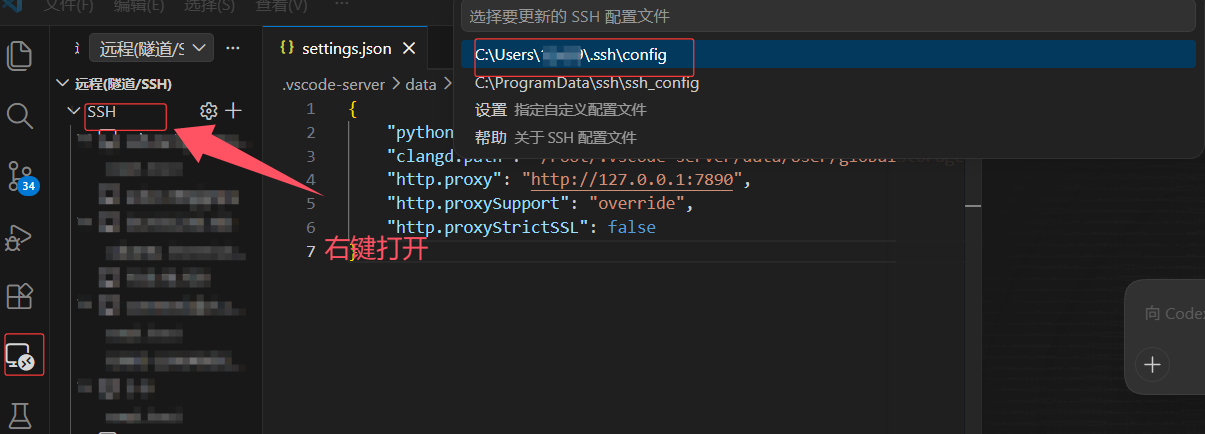
找到当前服务器那一项配置文件,在最后加上RemoteForward,端口号填自己的
Host 服务器
    HostName ...
    User ...
    Port ...
    RemoteForward 7860 127.0.0.1:7890
重启再去连就行了

这里是“一人公司”的成长家园。我们提供从产品曝光、技术变现到法律财税的全栈内容,并连接云服务、办公空间等稀缺资源,助你专注创造,无忧运营。
更多推荐



 0
0 0
0- 0


 已为社区贡献1条内容

所有评论(0)