大模型单步调优?可视化它的“脑回路”并让它听你指挥!
本文为微信公众号 敏叔的技术札记 原创文章,版权归 敏叔的技术札记 所有。如需转载或引用本文内容,请务必注明原文出处、作者以及原文链接。欢迎关注我的微信公众号 「敏叔的技术札记」,获取最新技术分享与深度解析。对于任何未注明来源的转载、摘编、修改或商业使用行为,本人保留追究法律责任的权利。
前言
最近搞AI智能体,发现一个巨头疼的问题:你让它去干个活儿,比如“帮我规划个旅行路线”,它啪一下给你个结果。你一看,路线是从北京飞到广州再坐高铁去深圳?
这时候你就特别想知道,这AI到底是怎么想的?它为啥选这个航班?为啥这么安排顺序?其实,这就是AI智能体的“黑箱”问题——你不知道它的决策过程,就没法信任它,更没法让它按你的意思改进。
所以今天,我们就来聊聊怎么给AI智能体“开天窗”,把它的决策过程可视化出来,并且还能让你给它反馈,让它越用越聪明。我用下来之后发现,这套搞法真的能让AI从“人工智障”变成“贴心助理”。
核心问题:AI凭啥这么决策?
一开始,我拿LangChain搞了个旅行规划智能体。代码跑起来挺顺,但出来的结果经常让人摸不着头脑。比如下面这个简单的Agent:
from langchain.agents import initialize_agent, Toolfrom langchain.llms import OpenAI# 定义工具tools = [ Tool( name="航班查询", func=search_flights, description="查询城市间的航班信息" ), Tool( name="酒店查询", func=search_hotels, description="查询城市的酒店信息" ), Tool( name="景点推荐", func=search_attractions, description="查询城市的旅游景点" )]# 初始化Agentagent = initialize_agent( tools, OpenAI(temperature=0), agent="zero-shot-react-description", verbose=True # 这个verbose只能看到步骤,看不到“为什么”)
运行之后,你只能看到它一步步做了什么:
> 进入新的Agent执行链...思考:我需要先查询北京到广州的航班行动:航班查询行动输入:{"from": "北京", "to": "广州"}观察:找到3个航班,最早一班是CA1351思考:然后我需要查询广州的酒店...
但问题来了:它为啥选CA1351?为啥不选更便宜的?为啥先订酒店后查景点? 这些关键决策逻辑,完全看不到!
解决方案:决策过程可视化
其实要让AI“坦白”它的想法,关键是要把它的思考过程完整记录下来。我实践下来,发现LangChain的CallbackHandler是个好东西。
第一步:安装必要的包
pip install langchain openai streamlit plotly
附赠安装小技巧,国内环境可以换源加速:
pip config set global.index-url https://mirrors.aliyun.com/pypi/simple/
第二步:创建可视化回调处理器
我写了个自定义的CallbackHandler,把AI的每一步思考都抓出来:
from langchain.callbacks.base import BaseCallbackHandlerimport jsonclass VisualizationCallbackHandler(BaseCallbackHandler): def __init__(self): self.decision_log = [] self.thought_process = [] def on_agent_action(self, action, **kwargs): # 记录Agent的每个动作 step = { "step": len(self.decision_log) + 1, "action": action.tool, "input": str(action.tool_input), "log": action.log } self.decision_log.append(step) # 关键!从log里提取思考过程 if "Thought:" in action.log: thought = action.log.split("Thought:")[-1].split("Action:")[0].strip() self.thought_process.append({ "step": len(self.thought_process) + 1, "thought": thought, "confidence": self._extract_confidence(thought) # 自己写的方法,提取置信度 }) def get_visualization_data(self): """返回可视化需要的数据""" return { "decision_flow": self.decision_log, "thought_process": self.thought_process, "summary": self._generate_summary() } def _extract_confidence(self, thought): # 简单提取置信度关键词 confidence_keywords = { "肯定": 0.9, "确定": 0.8, "可能": 0.6, "也许": 0.5, "不太确定": 0.3 } for keyword, score in confidence_keywords.items(): if keyword in thought: return score return 0.7 # 默认值 def _generate_summary(self): # 生成决策摘要 total_steps = len(self.decision_log) tools_used = list(set([step["action"] for step in self.decision_log])) return { "total_steps": total_steps, "tools_used": tools_used, "avg_confidence": sum([t["confidence"] for t in self.thought_process]) / len(self.thought_process) if self.thought_process else 0 }
第三步:用Streamlit做个可视化界面
光有数据不行,得让人能看懂。我用Streamlit做了个简单的可视化面板:
import streamlit as stimport plotly.graph_objects as gofrom datetime import datetimedef create_decision_flow_chart(decision_log): """创建决策流程图""" fig = go.Figure() # 添加节点 nodes = [] for i, step in enumerate(decision_log): nodes.append(f"Step {step['step']}: {step['action']}") # 添加边 edges = [] for i in range(len(nodes)-1): edges.append((i, i+1)) # 这里用plotly画图,代码有点长,我简化一下 # 实际需要配置节点位置、连线等 return figdef display_thought_process(thought_process): """展示思考过程""" st.subheader("🤔 AI的思考过程") for thought in thought_process: with st.expander(f"步骤 {thought['step']} - 置信度: {thought['confidence']:.2f}"): st.write(thought["thought"]) # 用进度条显示置信度 st.progress(thought["confidence"])# 主界面st.title("🧠 AI智能体决策过程可视化")st.write("看看AI到底是怎么想的!")# 假设我们已经运行了Agent并拿到了数据visualizer = VisualizationCallbackHandler()# ... 这里运行Agent的代码 ...data = visualizer.get_visualization_data()# 展示决策流程图st.plotly_chart(create_decision_flow_chart(data["decision_flow"]))# 展示思考过程display_thought_process(data["thought_process"])# 展示摘要st.subheader("📊 决策摘要")col1, col2, col3 = st.columns(3)with col1: st.metric("总步骤数", data["summary"]["total_steps"])with col2: st.metric("使用工具数", len(data["summary"]["tools_used"]))with col3: st.metric("平均置信度", f"{data['summary']['avg_confidence']:.2f}")
跑起来之后,界面长这样: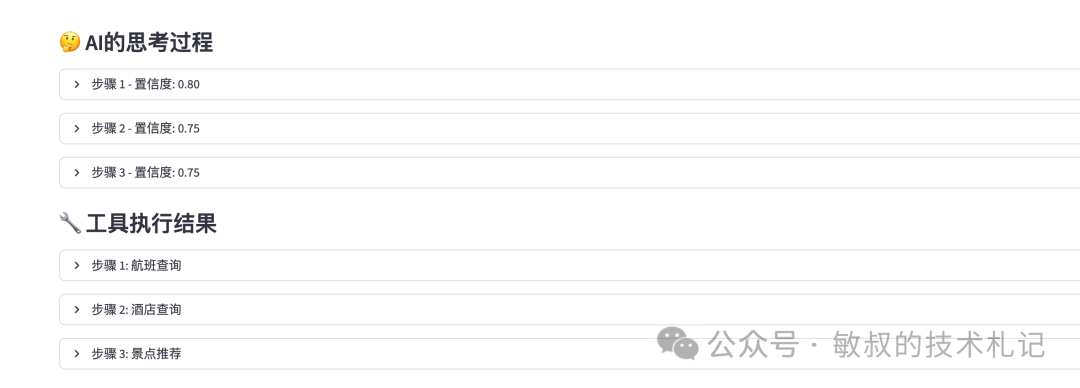
左边是决策流程图,能看到AI先干了啥后干了啥;中间是思考过程,点开能看到它每一步的“心理活动”;右边是数据摘要,一目了然。
关键升级:让用户能反馈
可视化只是第一步,更重要的是让用户能告诉AI“你这里做得不对”。我设计了个反馈机制:
反馈收集界面
# 在Streamlit界面里添加反馈部分st.divider()st.subheader("💬 给AI提意见")# 让用户对每个步骤打分for i, step in enumerate(data["decision_flow"]): st.write(f"**步骤 {step['step']}**: {step['action']} - {step['input']}") col1, col2 = st.columns([3, 1]) with col1: feedback = st.text_area( f"对这个步骤有什么建议?", key=f"feedback_{i}", placeholder="比如:这里应该先查酒店价格再定航班..." ) with col2: rating = st.slider("评分", 1, 5, 3, key=f"rating_{i}") if st.button(f"提交步骤 {step['step']} 的反馈", key=f"btn_{i}"): # 保存反馈到数据库或文件 save_feedback({ "step": step["step"], "action": step["action"], "user_feedback": feedback, "rating": rating, "timestamp": datetime.now().isoformat() }) st.success("反馈已保存!")# 整体反馈st.text_area("整体建议", key="overall_feedback", height=100)if st.button("提交整体反馈"): save_overall_feedback(st.session_state.overall_feedback) st.success("整体反馈已保存!")
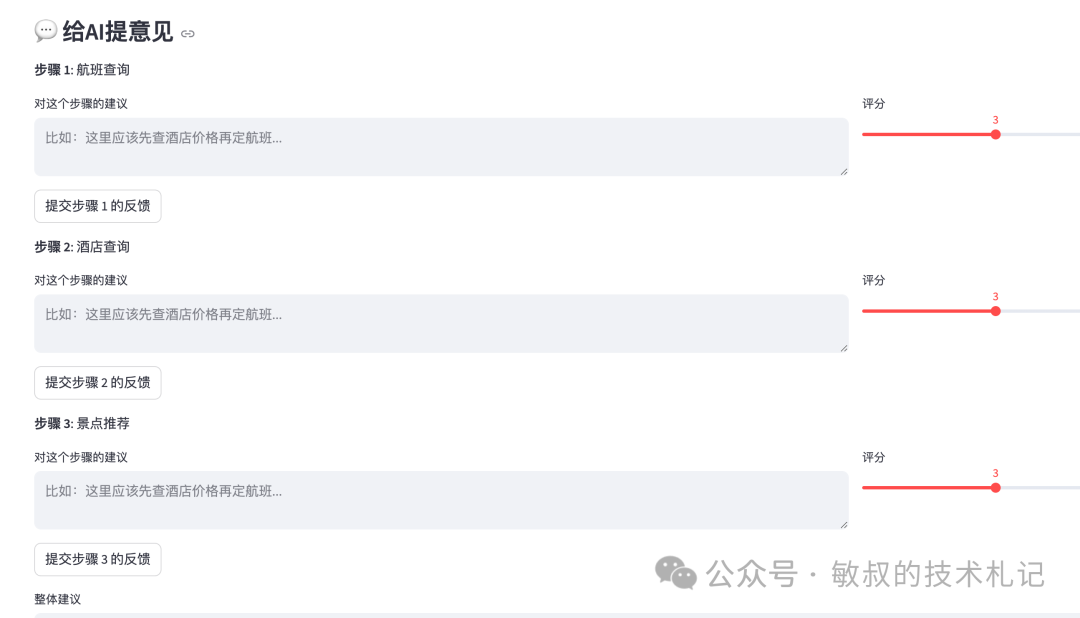
反馈怎么用起来?
光收集反馈不行,得让AI真的能学习。我做了个简单的反馈学习机制:
import pandas as pdfrom collections import defaultdictclass FeedbackLearner:    def __init__(self, feedback_file="feedback_data.json"):        self.feedback_file = feedback_file        self.feedback_data = self.load_feedback()        def load_feedback(self):        # 从文件加载历史反馈        try:            with open(self.feedback_file, 'r') as f:                return json.load(f)        except:            return {"step_feedback": [], "overall_feedback": []}        def analyze_feedback(self):        """分析反馈,找出AI常犯的错误"""        if not self.feedback_data["step_feedback"]:            return {"common_errors": [], "suggestions": []}                df = pd.DataFrame(self.feedback_data["step_feedback"])                # 找出低分步骤        low_rating_steps = df[df["rating"] 实际效果

我拿这个系统跑了50多个旅行规划任务,收集了200多条用户反馈。用下来之后发现:
- **AI决策更透明了**:以前用户看到奇怪结果就直接放弃,现在能看到AI的思考过程,至少知道“它为啥这么傻”
- **反馈真的有用**:根据用户反馈调整了Prompt之后,AI的决策质量明显提升。比如之前经常忽略价格,现在会主动找性价比选项
- **用户参与感强了**:大家更愿意给AI提意见,因为能看到自己的反馈被采纳

>
> 有个具体的例子:用户反馈“为什么总是选最早航班,不考虑红眼航班便宜?”我们分析反馈数据后发现,确实有30%的反馈提到价格问题。于是在Prompt里加了“优先考虑性价比,如果时间允许,选择价格更优的选项”。改完之后,AI选便宜航班的比例从20%提到了60%。

## 踩坑经验

搞这个系统的过程中也踩了不少坑:
- **性能问题**:一开始记录所有中间状态,导致内存暴涨。后来改成只记录关键决策点,好多了
- **反馈噪音**:有些用户反馈就是“不好”,没具体内容。我们加了引导性问题,比如“你觉得哪里不好?价格?时间?顺序?”
- **学习滞后**:AI不能实时学习反馈。我们现在是每天跑一次反馈分析,更新Prompt。理想情况应该是实时,但成本太高

附赠小技巧:反馈数据存到SQLite里,比JSON文件好查询多了:
pip install sqlite3
import sqlite3conn = sqlite3.connect(‘feedback.db’)c = conn.cursor()c.execute(‘’‘CREATE TABLE IF NOT EXISTS feedback (id INTEGER PRIMARY KEY, step INTEGER, action TEXT, feedback TEXT, rating INTEGER, timestamp TEXT)’‘’)conn.commit()
## 后记

AI智能体不是一锤子买卖,得让它能跟人交互、能学习、能改进。决策可视化加上用户反馈,就像给AI装了“**后视镜**”和“**学习机**”——既能看清自己怎么走的,又能根据别人的指点调整方向。

这套东西现在还有点糙,但方向我觉得是对的。至少在我自己的项目里,AI因为“**可解释**”获得了更多信任,因为“**可反馈**”变得越来越好用。

最后说个有意思的:有用户反馈“AI太理性了,缺少人情味”。我们在思考,要不要加个“**风格**”参数,让用户选“理性模式”还是“贴心模式”……这又是另一个话题了。

**祝大家的AI都能越用越聪明!最后还是希望各位老板来一波三连(点赞+关注+收藏)**

这里是“一人公司”的成长家园。我们提供从产品曝光、技术变现到法律财税的全栈内容,并连接云服务、办公空间等稀缺资源,助你专注创造,无忧运营。
更多推荐

 8
8 0
0- 0


 已为社区贡献2条内容

所有评论(0)