SpringBoot项目实战(33)--使用Beetl模板实现Mybatis-plus代码生成器(二)--从数据库读取表和表字段信息
本文介绍低代码生成的第二步,从数据库中获取表字段的元数据信息,可获取表字段的字段名、中文注释、字段类型等,获取到表字段元数据信息后,后续可根据元数据信息完成低代码开发。另外本文还介绍了SpringBoot中如何使用TestCase测试类实现代码测试。
一、使用ClasspathResourceLoader替代FileResourceLoader
在上一篇文章中介绍了使用Beetl模板生成Java源码,读取文件模板使用的FileResourceLoader,因为将JAVA源码模板放在非IDEA工程的路径下不便于版本管理,所以我们需要改为使用ClasspathResourceLoader,这个可以指定resources/templates/作为模板文件路径,所以可以将DevDemoApi的示例方法做一下修改:
        ClasspathResourceLoader cpLoader = new ClasspathResourceLoader("templates","utf-8");
        GroupTemplate gt = null;
        boolean bool = true;//使用文件路径,改为false则使用resource/templates路径
        if(bool){
            log.info("代码生成器使用Beetl文件路径.................");
            gt = new GroupTemplate(resourceLoader, cfg);
        }
        else{
            log.info("代码生成器使用Beetl classpath路径.................");

            gt = new GroupTemplate(cpLoader,cfg);

        }
上面的代码将模板文件的路径转到了resources/templates目录下面,所以需要把示例的ApiTemplate.java文件复制到IDEA 的openjweb-sys模块的resources/templates中。另外注意,因为我们做JAVA开发一般指定项目代码的字符集为UTF-8,所以ClasspathResourceLoader使用UTF-8作为字符集的参数,如果项目字符集为GBK,则使用GBK字符集创建cpLoader。
二、从数据库读取表和表字段信息
做代码生成的之前,我们需要读取数据库表和数据库表字段的信息,通过数据库的结构来生成实体类和相关的其他类的程序代码,所以首先我们需要实现从数据库读取表结构信息的功能。另外一种方式是在设计阶段先定义数据库表和表字段的信息,然后生成数据库表,我们可以从openjweb的comm_table_def表定义信息表和comm_column_def表字段信息表中读取信息。
现在我们实现从数据库中获取表和字段的元数据,然后再实现代码生成。虽然IDEA里有基于mybatis-plus插件生成JAVA代码,但生成的代码规范不一定完全符合我们的需要。
首先我们在openjweb-dev模块中的org.openjweb.dev.entity下建一个实体类,用于存储表字段相关信息:
package org.openjweb.dev.entity;

import lombok.Data;

@Data
public class TableColumnInfo {
    private String columnName ;
    private String columnDesc;
    private String columnType;
    private int dataSize ;
    private  int digits;
    private int isNull;


}
然后开发一个工具类,实现获取表注释和表字段信息的功能:
package org.openjweb.dev.util;
import lombok.extern.slf4j.Slf4j;
import org.openjweb.dev.entity.TableColumnInfo;
import org.springframework.util.StringUtils;
import java.sql.*;
import java.util.ArrayList;
import java.util.HashMap;
import java.util.List;
import java.util.Map;

@Slf4j
public class DbUtil {
    public static String getTableComment(String driverName,String url,String schemaName,String username,String password,String tableName) throws SQLException {
        // 建立数据库连接
        try (Connection connection = DriverManager.getConnection(url, username, password)) {
            // 获取数据库元数据
            DatabaseMetaData databaseMetaData = connection.getMetaData();
            ResultSet rs = databaseMetaData.getTables(null, null, tableName, new String[] {"TABLE"});
            if (rs.next()) {
                String tableComment = rs.getString("REMARKS");
                //System.out.println("表注释:::");
                //System.out.println(tableComment);
                // 处理表注释
                if (StringUtils.isEmpty(tableComment)){
                    String query = "SELECT TABLE_COMMENT FROM INFORMATION_SCHEMA.TABLES WHERE TABLE_SCHEMA = ? AND TABLE_NAME = ?";
                    PreparedStatement pstmt = connection.prepareStatement(query);
                    pstmt.setString(1, schemaName);
                    pstmt.setString(2, tableName);
                    ResultSet rs1 = pstmt.executeQuery();
                    if (rs1.next()) {
                        String tableComment1 = rs1.getString("TABLE_COMMENT");
                        return tableComment1;
                        // 处理你的表注释
                    }
                }
                else{
                    return tableComment;
                }
            }
        }
        return "";
    }

    public static List<TableColumnInfo> getTableColumnInfo(String driverName,String url,String schemaName,String username,String password,String tableName) throws SQLException {
        Connection connection = DriverManager.getConnection(url, username, password);
        // 获取数据库元数据
        DatabaseMetaData databaseMetaData = connection.getMetaData();
        databaseMetaData.getTables(null, schemaName,tableName.toUpperCase(),new String[]{"TABLE"});
        ResultSet rs = databaseMetaData.getColumns(null,schemaName, tableName, "%");
        //获得列数
        int columns = rs.getMetaData().getColumnCount();    // 获得列数
        List<TableColumnInfo> columnInfoList = new ArrayList<>();
        while(rs.next()){
            String columnName="";
            String columnType="";
            String comment ="";//字段注释
            columnName = rs.getString("COLUMN_NAME").toLowerCase();
            columnType = rs.getString("TYPE_NAME").toLowerCase();
            int datasize = rs.getInt("COLUMN_SIZE");
            int digits = rs.getInt("DECIMAL_DIGITS");
            int nullable = rs.getInt("NULLABLE");
            comment = rs.getString("REMARKS")==null?"":rs.getString("REMARKS");//注释
            TableColumnInfo colEnt = new TableColumnInfo();
            colEnt.setColumnName(columnName);
            colEnt.setColumnType(columnType);
            colEnt.setColumnDesc(comment);
            colEnt.setDigits(digits);
            colEnt.setDataSize(datasize);
            colEnt.setIsNull(nullable);
            columnInfoList.add(colEnt);
        }
        return columnInfoList;
    }


}
在上面的代码中,getTableComment使用两种方式获取表注释,如rs.getString("REMARKS")取不到表注释就用SELECT TABLE_COMMENT...的SQL语句。getTableColumnInfo获取表字段信息列表,封装到TableColumnInfo 列表中。
三、在openjweb-sys中创建测试类
在以前的示例都采用的是api接口进行测试,本文介绍使用Test测试类进行测试。首先我们在openjweb-sys的src/test/java/org/openjweb/sys/testcase目录下创建一个TestCreateTable测试类:
package org.openjweb.sys.testcase;

import lombok.extern.slf4j.Slf4j;
import org.openjweb.dev.entity.TableColumnInfo;
import org.openjweb.sys.OpenjwebSysApplication;
import org.springframework.boot.test.context.SpringBootTest;
import org.testng.annotations.Test;
import org.junit.runner.RunWith;
import org.openjweb.dev.util.DbUtil;
import org.springframework.test.context.junit4.SpringRunner;
import java.sql.SQLException;
import java.util.List;

@Slf4j
@RunWith(SpringRunner.class)
@SpringBootTest(classes = OpenjwebSysApplication.class)
//@TestPropertySource(locations = "classpath:application-dev.yml")
public class TestCreateTable {
    //@Value("${spring.datasource.ds1.url:}") String dbUrl;

    @Test
    public void getTableComment() throws SQLException {
        String url = "jdbc:mysql://localhost:3306/erp?useUnicode=true&characterEncoding=UTF-8&serverTimezone=Asia/Shanghai";
        String username = "root";
        String password = "root";
        String schemaName = "erp";
        String tableComment = DbUtil.getTableComment("com.mysql.jdbc.Driver",url,schemaName,username,password,"comm_system_parms");
        log.info("查询到的表注释为:");
        log.info(tableComment);
        log.info("读取表字段信息:::::");
        List<TableColumnInfo> colList =
                DbUtil.getTableColumnInfo("com.mysql.jdbc.Driver",url,schemaName,username,password,"comm_system_parms");
        if(colList!=null&& colList.size()>0){
            for(int i=0;i<colList.size();i++){
                TableColumnInfo ent = colList.get(i);
                log.info(ent.toString());
            }
        }

    }
}
注意因为目前openjweb-sys没有引入测试类相关的依赖,所以代码中有标红的地方就增加相关依赖库。然后我们打开openjweb-sys的pom.xml,
        <dependency>
            <groupId>org.testng</groupId>
            <artifactId>testng</artifactId>
            <version>6.14.3</version><!--RELEASE-->
            <scope>test</scope>
        </dependency>
默认增加的testng版本为RELEASE,可能会导致运行测试类时出错,可以降低版本,改为6.14.3。然后我们实现一个测试类:
package org.openjweb.sys.testcase;

import lombok.extern.slf4j.Slf4j;
import org.openjweb.dev.entity.TableColumnInfo;
import org.openjweb.sys.OpenjwebSysApplication;
import org.springframework.boot.test.context.SpringBootTest;
import org.testng.annotations.Test;
import org.junit.runner.RunWith;
import org.openjweb.dev.util.DbUtil;
import org.springframework.test.context.junit4.SpringRunner;
import java.sql.SQLException;
import java.util.List;

@Slf4j
@RunWith(SpringRunner.class)
@SpringBootTest(classes = OpenjwebSysApplication.class)
//@TestPropertySource(locations = "classpath:application-dev.yml")
public class TestCreateTable {
    //@Value("${spring.datasource.ds1.url:}") String dbUrl;

    @Test
    public void getTableComment() throws SQLException {
        String url = "jdbc:mysql://localhost:3306/erp?useUnicode=true&characterEncoding=UTF-8&serverTimezone=Asia/Shanghai";
        String username = "root";
        String password = "root";
        String schemaName = "erp";
        String tableComment = DbUtil.getTableComment("com.mysql.jdbc.Driver",url,schemaName,username,password,"comm_system_parms");
        log.info("查询到的表注释为:");
        log.info(tableComment);
        log.info("读取表字段信息:::::");
        List<TableColumnInfo> colList =
                DbUtil.getTableColumnInfo("com.mysql.jdbc.Driver",url,schemaName,username,password,"comm_system_parms");
        if(colList!=null&& colList.size()>0){
            for(int i=0;i<colList.size();i++){
                TableColumnInfo ent = colList.get(i);
                log.info(ent.toString());
            }
        }

    }
}
在上面的代码中,DbUtil.getTableComment获取表的注释信息,DbUtil.getTableColumnInfo获取表字段信息,可通过表字段的英文名、中文注释、字段类型等信息来开发代码生成器,下面是测试类运行输出的表字段信息:
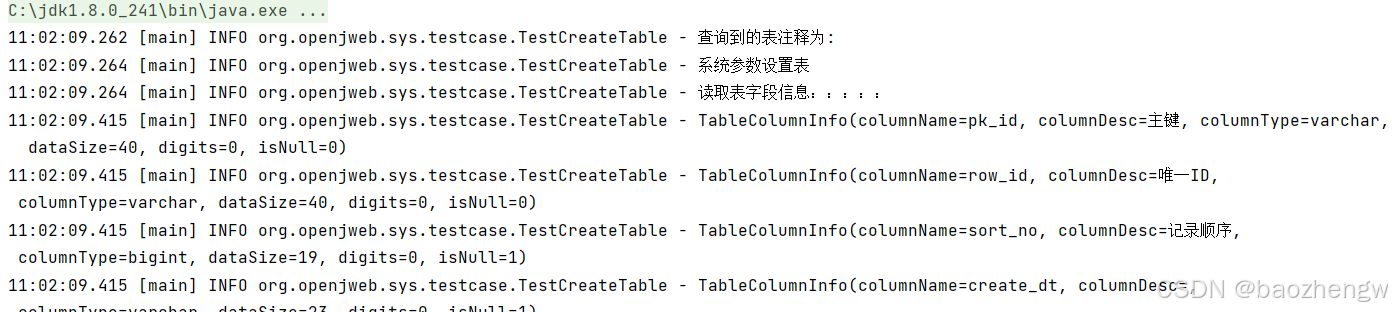
因为篇幅的原因,本文只介绍从数据库获取表信息和表字段信息的实现过程。后续会接着介绍代码生成的开发。
完整示例代码可从github下载:
https://github.com/openjweb/cloud/tree/master https://github.com/openjweb/cloud/tree/master

这里是“一人公司”的成长家园。我们提供从产品曝光、技术变现到法律财税的全栈内容,并连接云服务、办公空间等稀缺资源,助你专注创造,无忧运营。
更多推荐
 18
18 0
0- 0


 已为社区贡献5条内容

所有评论(0)