深入浅出Python 字符串
场景推荐方法简单拼接或 f-string大量拼接join()去除空白strip()rstrip()lstrip()复杂模式匹配正则表达式 (re模块)动态内容生成f-string 或format()处理多语言文本明确指定编码(如utf-8掌握字符串的底层原理与高效用法,能显著提升代码性能和可维护性。无论是数据处理、Web开发还是自动化脚本,字符串操作都是Python程序员的核心技能之一。
字符串(str)是Python中最基础、最常用的数据类型之一,用于表示文本信息。本文将从基本特性、常用操作、高级技巧到底层原理,全方位解析Python字符串。
一、字符串的本质
-
不可变对象
字符串一旦创建,内容不可修改。所有看似“修改”的操作(如替换、拼接)都会生成新字符串。所以字符串的改变操作,往往时间复杂度为O(n)。s = "Hello" s += " World" # 实际上创建新对象,原字符串未变 print(s) # "Hello World" -
序列类型
字符串是字符的有序集合,支持索引、切片和迭代;字符串索引从0开始。s = "Python" print(s[0], s[-1]) # P n print(s[2:4]) # th -
编码与存储
Python 3默认使用 Unicode(UTF-8) 编码,支持多语言字符。s = "你好,世界!" print(len(s)) # 6(每个中文字符占1个长度)
二、字符串的创建
-
基本方式
- 单引号、双引号:
"hello"或'world' - 三引号:支持多行字符串
s = """这是
多行
字符串"""

s1 = 'hello'
s2 = "hello"
s3 = """hello"""
s1 == s2 == s3
## 结果 True
- 单引号、双引号:
-
转义字符
使用\转义特殊符号(如换行\n、制表符\t)或表示Unicode字符:path = "C:\\Users\\file.txt" # 输出 C:\Users\file.txt s = "\u4f60\u597d" # 输出 "你好"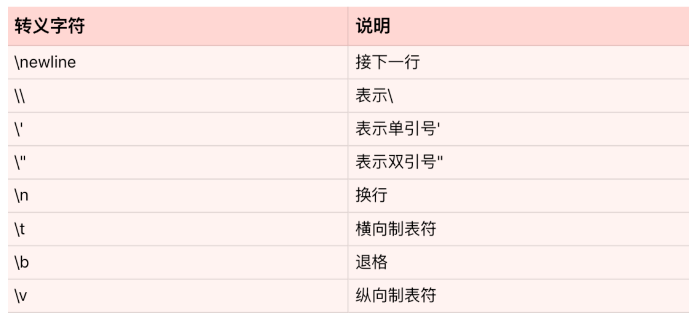
-
原始字符串(Raw String)
使用r"..."禁用转义,常用于正则表达式或文件路径:path = r"C:\Users\file.txt" # 输出原始字符
三、字符串的常用操作
-
基础操作
操作类型
方法/符号
示例
拼接
+或join()"A" + "B"→"AB"重复
*"Hi" * 3→"HiHiHi"长度
len()len("Python")→6包含检测
in/not in"th" in "Python"→True -
常用方法
方法
功能
示例
split()按分隔符拆分字符串
"a,b,c".split(",")→['a','b','c']strip()去除首尾空白或指定字符
" text ".strip()→"text"lstrip(str)只去掉开头的指定字符串 "HtextH".strip("H")→"textH"rstrip(str)只去掉尾部的指定字符串 " text ".strip()→" text"replace(old, new)替换子字符串
"Hello".replace("H", "J")→"Jello"upper() / lower()大小写转换
"AbC".lower()→"abc"startswith() / endswith()检测开头或结尾
"file.txt".endswith(".txt")→True -
查找与统计
方法
功能
find(sub,start,end)从start 到end 查找字符串中子字符串sub的位置 count() 统计字符串出现的次数 s = "apple banana apple" print(s.find("banana")) # 6(返回首个匹配的索引) print(s.count("apple")) # 2(统计出现次数)
四、字符串格式化
Python提供多种灵活的方式组合字符串:
-
f-string(推荐)
Python 3.6+引入,简洁高效,支持表达式:name = "Alice" age = 25 print(f"{name} is {age} years old.") # Alice is 25 years old. print(f"Next year: {age + 1}") # Next year: 26 -
format()方法
支持位置参数、关键字参数和格式化规范:print("{} + {} = {}".format(2, 3, 5)) ## 结果 2 + 3 = 5 print("{name} loves {food}".format(name="Bob", food="pizza")) ## 结果 Bob loves pizza -
经典占位符(%)
兼容旧版本,但功能有限:print("Value: %.2f" % 3.14159) # Value: 3.14其中 %s 表示字符串型,%d 表示整型等等。
五、字符串与编码
-
编码与解码
字符串(Unicode)与字节流(bytes)相互转换:s = "你好" b = s.encode("utf-8") # 编码为字节:b'\xe4\xbd\xa0\xe5\xa5\xbd' s2 = b.decode("utf-8") # 解码回字符串 -
常见编码问题
UnicodeEncodeError:字符串包含无法用目标编码表示的字符。UnicodeDecodeError:字节流无法按指定编码解码。
解决方法:明确指定编码方式(如open(file, encoding="utf-8"))。
六、高效处理字符串
-
避免频繁拼接
使用join()替代+拼接大量字符串,减少内存开销:# 低效 result = "" for s in list_of_strings: result += s # 高效 result = "".join(list_of_strings) -
字符串驻留(Interning)
Python会缓存部分字符串(如短字符串、变量名),优化内存和比较速度:a = "hello" b = "hello" print(a is b) # True(同一对象) -
正则表达式
复杂模式匹配使用re模块:import re text = "Email: user@example.com" match = re.search(r"\b[A-Za-z0-9._%+-]+@[A-Za-z0-9.-]+\.[A-Z|a-z]{2,}\b", text) print(match.group()) # user@example.com
七、实际应用场景
-
数据清洗
使用strip()、replace()、正则表达式等处理原始数据:dirty_data = " Price: $123.45 " clean = dirty_data.strip().replace("$", "").replace(",", "") price = float(clean.split(": ")[1]) # 123.45 -
模板引擎
结合format()或 f-string 生成动态内容:template = """ Dear {name}, Your order #{order_id} has shipped. Tracking URL: {tracking_url} """ print(template.format(name="Alice", order_id=1001, tracking_url="http://example.com")) -
文件处理
按行读取文件并解析:with open("data.txt", "r", encoding="utf-8") as f: for line in f: if line.startswith("#"): continue key, value = line.strip().split("=")
八、总结与最佳实践
|
场景 |
推荐方法 |
|---|---|
|
简单拼接 |
|
|
大量拼接 |
|
|
去除空白 |
|
|
复杂模式匹配 |
正则表达式 ( |
|
动态内容生成 |
f-string 或 |
|
处理多语言文本 |
明确指定编码(如 |
掌握字符串的底层原理与高效用法,能显著提升代码性能和可维护性。无论是数据处理、Web开发还是自动化脚本,字符串操作都是Python程序员的核心技能之一。

这里是“一人公司”的成长家园。我们提供从产品曝光、技术变现到法律财税的全栈内容,并连接云服务、办公空间等稀缺资源,助你专注创造,无忧运营。
更多推荐


 12
12 0
0- 0


 已为社区贡献1条内容

所有评论(0)